Bidirectional edges
Two-way links: o--o, <-->, x--x.
flowchart LR
  A o--o B
  B <--> C
C x--x D在 第 35 課 - 圖塊式渲染 中,我們使用了以 WebGPU Compute Shader 為基礎的渲染器 vello。這一課會嘗試另一種同樣以計算著色器為基礎的全域照明做法,並把它接進既有的渲染管線。
Paste while the canvas is focused to use the same styling as the demo above (dark theme, Gaegu font, etc.).
Two-way links: o--o, <-->, x--x.
flowchart LR
A o--o B
B <--> C
C x--x DMindmap
mindmap
  root((mindmap))
    Origins
      Long history
      ::icon(fa fa-book)
      Popularisation
        British popular psychology<br/> author Tony Buzan
    Research
      On effectiveness<br/>and features
      On Automatic creation
        Uses
            Creative techniques
            Strategic planning
            Argument mapping
    Tools
      Pen and paper
MermaidNested composite states with inner states.
stateDiagram-v2
    [*] --> Idle
    Idle --> Active: Start
Active --> [*]Actors and messages; paste to render on the canvas.
sequenceDiagram
  Alice->>John: Hello John, how are you?
  John-->>Alice: Great!
Alice-)John: See you later!完整的理論說明見:Fundamentals of Radiance Cascades
我們觀察到,離場景中最近的物體越遠:
- 需要的空間解析度就越低。(例如探針之間的間距可以更大)
- 需要的角度解析度就越高。(例如每個探針需要更多條光線)
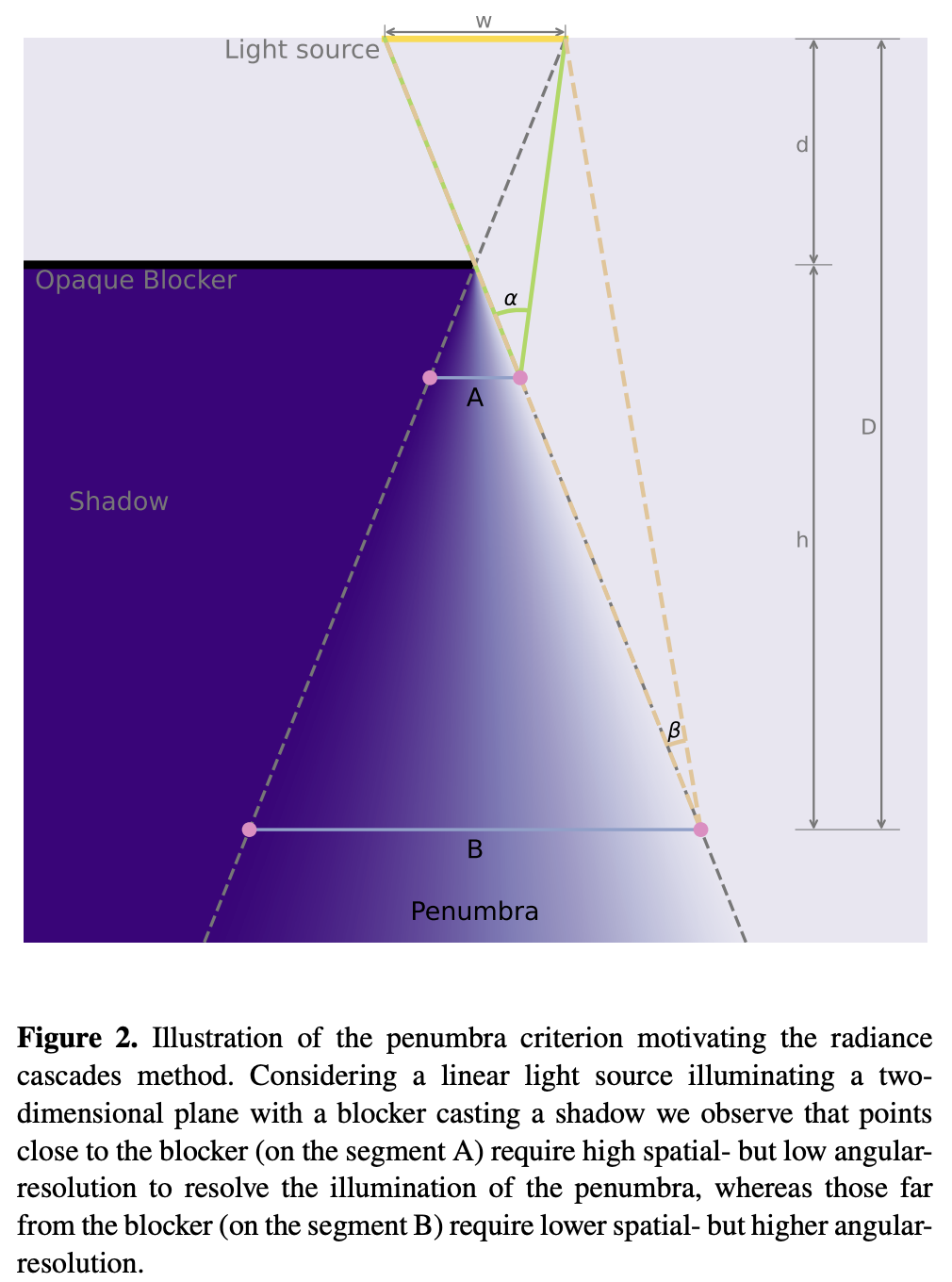
整體管線如下:
let mut rc_enc = device_handle
    .device
    .create_command_encoder(&wgpu::CommandEncoderDescriptor {
        label: Some("rc_gi"),
    });
rp.encode_distance_pass();
rp.encode_rc_cascade_passes();
rp.encode_rc_mipmap();
rp.encode_rc_apply();
device_handle.queue.submit([rc_enc.finish()]);先從解析幾何開始。在 第 2 課 - 繪製圓形 與 第 9 課 - 繪製橢圓與矩形 中,我們已經介紹過圓、橢圓與矩形的 SDF。距離在圖形邊界上與圖形內部為 0。下圖以灰階把它視覺化,並用 saturate(d * DIST_FIELD_VIZ_SCALE) 把原始距離對應到 [0,1]:
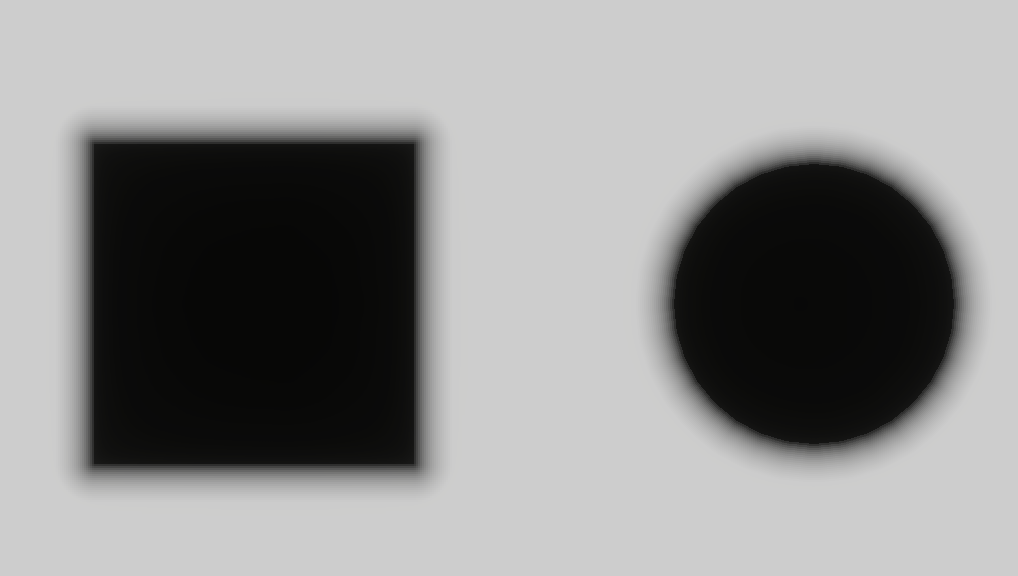
為了產生距離場紋理,頂點著色器仍然使用全螢幕三角形(類似先前的後處理通道)。prims 存放場景基本圖元的幾何,因此 sdf_prim 可以計算解析距離場。最終結果寫入 rc_dist,這是一張全畫布紋理,以 R16F 格式儲存無號距離。
@group(0) @binding(0) var<uniform> header: DistHeader;
@group(0) @binding(1) var<storage, read> prims: array<GpuRcPrim>;

@fragment
fn dist_fs(i: VsOut) -> @location(0) vec4<f32> {
  var d = 1e6;
  let n = header.count;
  for (var i = 0u; i < 64u; i = i + 1u) {
    if i >= n { break; }
    d = min(d, sdf_prim(p_canvas, prims[i]));
  }
  // d is union SDF: inside <0, outside >0, boundary ~=0. R stores max(d,0): 0 inside and on edges, positive outside as distance to boundary.
  return vec4(max(d, 0.0), 0.0, 0.0, 1.0);
}
目前只支援 Rect、Ellipse、Line 與 Polyline。其他 SDF 請參考 distfunctions2d。
bevy_radiance_cascades 的實作使用 Jump Flood Algorithm(JFA),這是一種平行產生距離場的方法。核心想法是以指數遞減的「跳躍步長」,在 log₂(N) 輪之內把資訊傳遍整個格子。
texture_2d<u32>(存放種子座標)。這樣光線步進就能邁出又大又安全的步伐,走到下一個表面,而不必使用固定的微小步長。
Fundamentals of Radiance Cascades
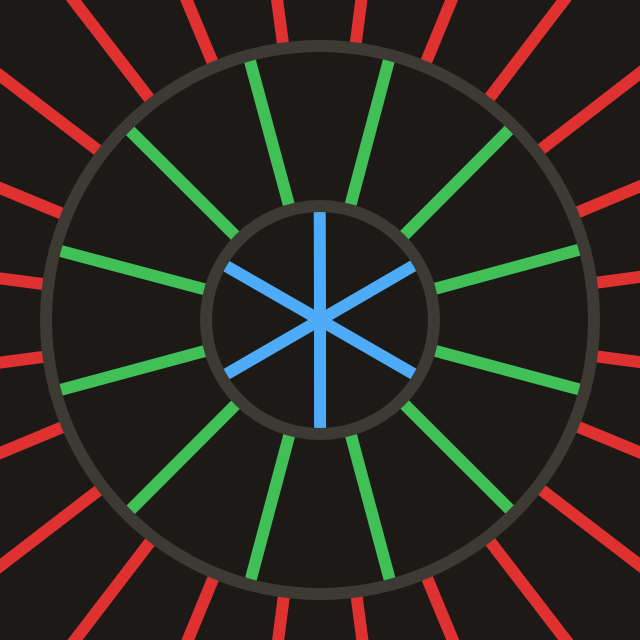
cascade 基本上是一格格的探針,其中所有探針的性質都相同。(例如區間數量、區間長度、探針間距)
每個 Probe 的結構如下。以 std140 對齊上傳到 GPU 時,必須考慮填充:
pub struct Probe {
    pub width: u32, // texel footprint per probe and ray count (angular discretization)
    pub start: f32, // where this ray segment starts from the probe center
    pub range: f32, // how far this cascade traces along the ray from start
}

pub fn probe_for_cascade(c: u32, resolution_factor: u32, interval0: f32) -> Probe {
    let width = 1u32 << (c + resolution_factor);
    let start = interval0 * (1.0 - 4.0_f32.powi(c as i32)) / -3.0;
    let range = interval0 * 4.0_f32.powi(c as i32);
    Probe {
        width,
        start,
        range,
    }
}
由畫布對角線長度計算需要的 cascade 數量:
pub fn cascade_count_for_gi_size(gi_w: u32, gi_h: u32) -> usize {
    let diag = ((gi_w * gi_w + gi_h * gi_h) as f32).sqrt();
    cascade_count_for_diagonal(diag, RC_INTERVAL0, RC_MAX_CASCADES).max(1)
}

pub const RC_INTERVAL0: f32 = 2.0;
pub const RC_MAX_CASCADES: usize = 16;
初始化畫布時配置 Probe uniform:
for c in 0..cascade_count {
    let p = probe_for_cascade(c as u32, RC_RESOLUTION_FACTOR, RC_INTERVAL0);
    let slot = ProbeUniformSlotPadded::from_probe(&p);
    queue.write_buffer(
        &self.rc_probe_dynamic_buf,
        (c * PROBE_UNIFORM_STRIDE) as u64,
        bytemuck::bytes_of(&slot),
    );
}
CPU 端的排程分成兩條管線,並且需要兩張紋理:rc_ping_a 與 rc_ping_b。
let rc_usage =
    TextureUsages::STORAGE_BINDING | TextureUsages::TEXTURE_BINDING | TextureUsages::COPY_SRC;
let (rc_a, rc_a_view) = mk_sz(
    device,
    "rc_ping_a",
    TextureFormat::Rgba16Float,
    rc_usage,
    gi_width,
    gi_height,
);
// rc_ping_b is the same
第一條管線讀取 rc_ping_a、寫入 rc_ping_b,並且先從最遠的區段開始。
let mut pass = encoder.begin_compute_pass(&ComputePassDescriptor {
    label: Some("radiance_cascades_first_pass"),
    timestamp_writes: None,
});
pass.set_pipeline(&self.rc_cascade_first_pipeline);
pass.set_bind_group(0, &radiance_cascades_10, &[first_offset]);
pass.dispatch_workgroups(gw, gh, 1);
第二條管線在 radiance_cascades_01 / 10 這兩組 bind group 之間交替,做乒乓(輪流寫入 rc_ping_a / rc_ping_b)。接著逐層往較小的 c 合併,每一步使用對應的 Probe 偏移。
let mut merge_pass = encoder.begin_compute_pass(&ComputePassDescriptor {
    label: Some("radiance_cascades_merge_passes"),
    timestamp_writes: None,
});
merge_pass.set_pipeline(&self.rc_cascade_merge_pipeline);
for pass_i in 1..cascade_count {
    let cascade_idx = cascade_count - 1 - pass_i;
    let dyn_off = (cascade_idx * PROBE_UNIFORM_STRIDE) as u32;
    let merge_idx = pass_i - 1;
    let bg = if merge_idx % 2 == 0 {
        &radiance_cascades_01
    } else {
        &radiance_cascades_10
    };
    merge_pass.set_bind_group(0, bg, &[dyn_off]);
    merge_pass.dispatch_workgroups(gw, gh, 1);
}
第一次通道與後續的乒乓計算通道,使用相同的光線派送邏輯。
@compute @workgroup_size(8, 8, 1)
fn rc_cascade_first(@builtin(global_invocation_id) gid: vec3<u32>) {
  radiance_dispatch(0u, gid);
}

@compute @workgroup_size(8, 8, 1)
fn rc_cascade_merge(@builtin(global_invocation_id) gid: vec3<u32>) {
  radiance_dispatch(1u, gid);
}每個 Compute Shader 執行緒處理 GI cascade 紋理中的一個紋素:
width² 區塊內的局部位置選一個方向。start,得到光線步進的起點。在一個探針區塊內,不同紋素代表不同方向;這個區塊打包了 width² 個方向樣本。下面的說明影片來自 Fundamentals of Radiance Cascades:
let probe_texel = vec2<u32>(base_coord.x % probe_w, base_coord.y % probe_w);

// Flatten 2D local coords into ray IDs in 0 … probe_w²-1.
let ray_index = probe_texel.x + probe_texel.y * probe_w;
let ray_count = probe_w * probe_w;

// Uniformly split [0, 2π) into ray_count directions.
// +0.5 samples the center of each angular sector.
let ray_angle = (f32(ray_index) + 0.5) / f32(ray_count) * PI2;
let ray_dir = normalize(vec2(cos(ray_angle), sin(ray_angle)));

// Probe row/column index this texel belongs to.
let probe_cell = vec2<u32>(base_coord.x / probe_w, base_coord.y / probe_w);
// Top-left coordinate of this probe in GI texture.
let probe_coord = vec2<u32>(probe_cell.x * probe_w, probe_cell.y * probe_w);
// Probe center in GI texture.
let probe_coord_center = probe_coord + vec2<u32>(probe_w / 2u, probe_w / 2u);
// Probe center in full resolution.
let center_full = vec2<f32>(probe_coord_center) * rs.gi_scale;
如果沒有命中,而且啟用了合併,就透過 merge() 加上來自上一層 cascade 的內插輻射亮度。
@group(0) @binding(5) var tex_radiance_cascades_destination: texture_storage_2d<rgba16float, write>;

fn radiance_dispatch(merge_flag: u32, gid: vec3<u32>) {
  // ...

  // Start from center + ray_dir * probe.start, not exactly at center.
  // Inner cascades already cover near field; this cascade handles farther range only.
  let origin = center_full + ray_dir * ru.probe_start;
  var color = raymarch(origin, ray_dir, ru.probe_range);
  if merge_flag != 0u && color.a != 1.0 {
    color = color + merge(probe_cell, ray_index);
  }
  textureStore(tex_radiance_cascades_destination, ...);
}對從一個像素出發、沿某個方向行進的每條光線,我們最多走 MAX_RAYMARCH 步。每一步都取樣先前產生的距離場 tex_dist_field,並向前移動 dist。如果距離 < EPSILON,就把它視為命中表面(或位於幾何內部),然後直接從 tex_main 取樣顏色。
fn raymarch(origin: vec2<f32>, ray_dir: vec2<f32>, range: f32) -> vec4<f32> {
    // ...
    var color = vec4(0.0);
    var covered_range = 0.0;
    for (var r = 0u; r < MAX_RAYMARCH; r = r + 1u) {
        if ( // termination
            covered_range >= range ||
            any(position >= dimensions)
        ) {
            break;
        }

        var dist = textureLoad(tex_dist_field, coord, 0).r;
        if (dist < EPSILON) {
            color = textureLoad(tex_main, coord, 0);
            break;
        }
        position = position + ray_dir * dist;
        covered_range = covered_range + dist;
    }
    return color;
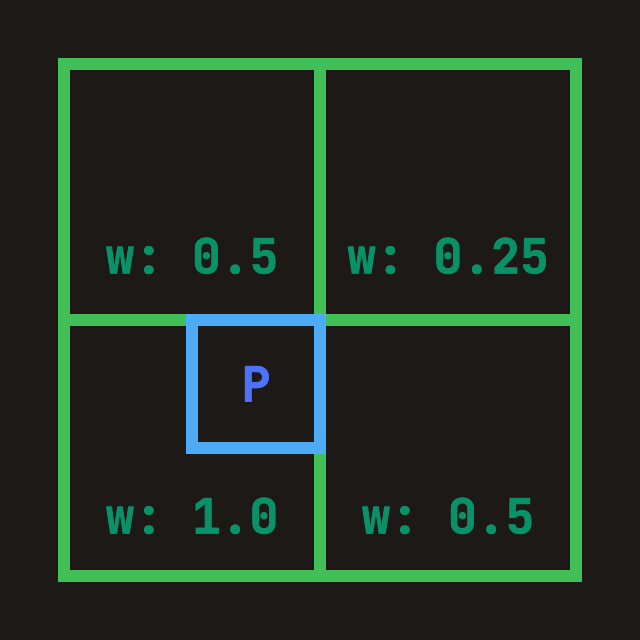
}「從內層(較細的)cascade 合併進目前這一層」:如果目前探針寬度是 W,那麼上一層 cascade(已經寫入 tex_radiance_cascades_source)的 prev_width = 2W,也就是探針邊長為 2 倍、方向樣本為 4 倍。合併時:
ray_index*4 … +3)對應到目前這個粗方向。fn merge(probe_cell: vec2<u32>, ray_index: u32) -> vec4<f32> {
let dimensions = textureDimensions(tex_radiance_cascades_source);
// Probe edge length in previous cascade texture.
// Current is W, previous is 2W, so previous has 4x rays.
let prev_width = probe.width * 2u;
let prev_ray_index_start = ray_index * 4u;
for (var p = 0u; p < 4u; p = p + 1u) {
let prev_ray_index = prev_ray_index_start + p;
let offset_coord = vec2<u32>(
prev_ray_index % prev_width,
prev_ray_index / prev_width,
);
// Sample all four spatial corners
TL = TL + fetch_cascade(
probe_cell_i,
probe_correction_offset + vec2<i32>(-1, -1),
offset_coord,
dimensions,
prev_width,
);
// TR / BL / BR omitted
}
let weight = vec2<f32>(0.75, 0.75)
- vec2<f32>(f32(probe_correction_offset.x), f32(probe_correction_offset.y)) * 0.5;
// Bilinear interpolation over accumulated corner radiance.
return mix(mix(TL, TR, weight.x), mix(BL, BR, weight.x), weight.y)
// Average the 4 fine rays into one coarse-direction result.
* 0.25;
}
用 WebGPU Inspector 可以檢查 rc_ping_b 裡最終的合併結果。可以清楚看到沒有命中的區域被補上,半影也更平滑。
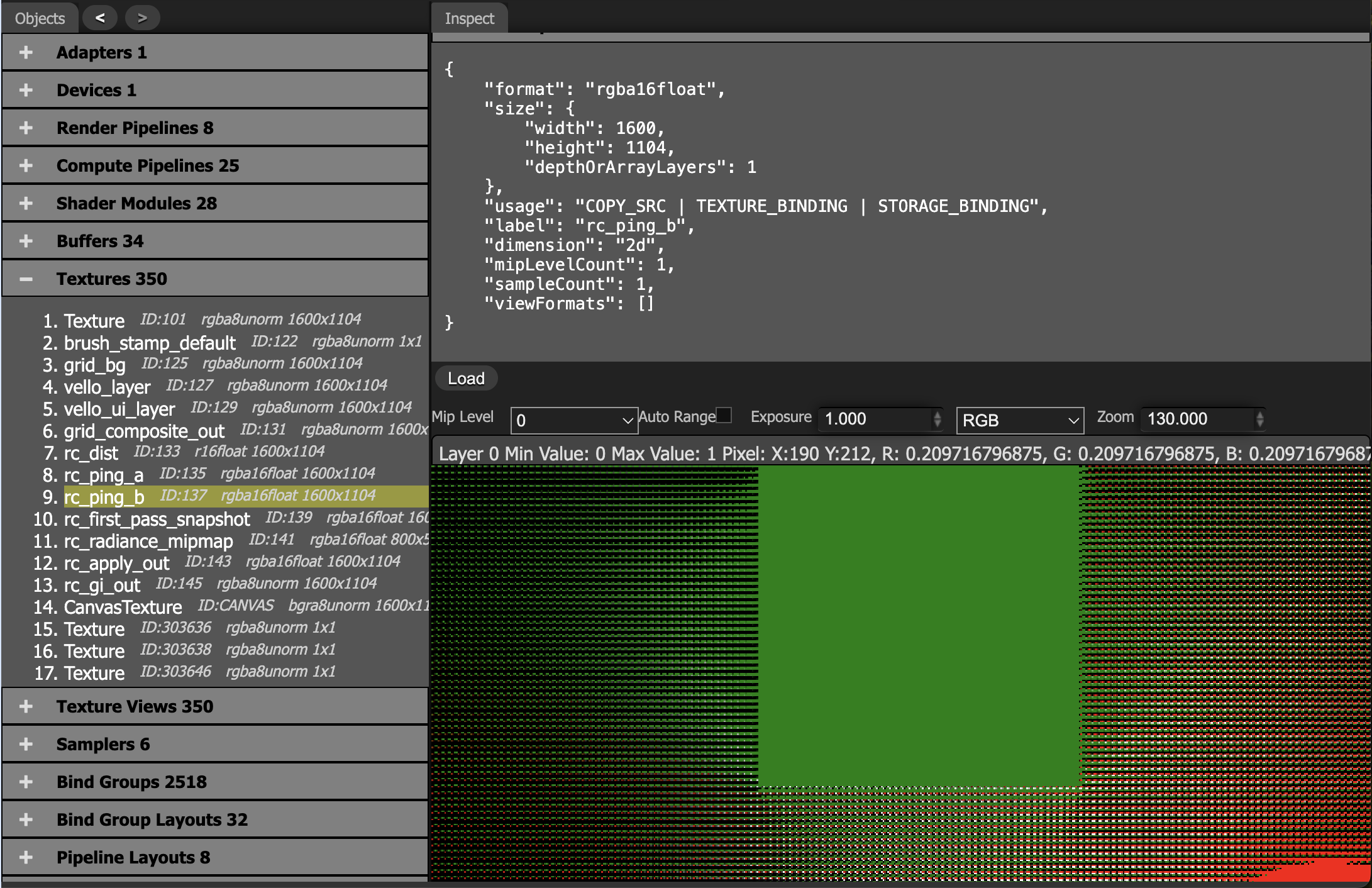
當探針間距大於陰影細節的尺度時,內插會把明暗邊界模糊掉。
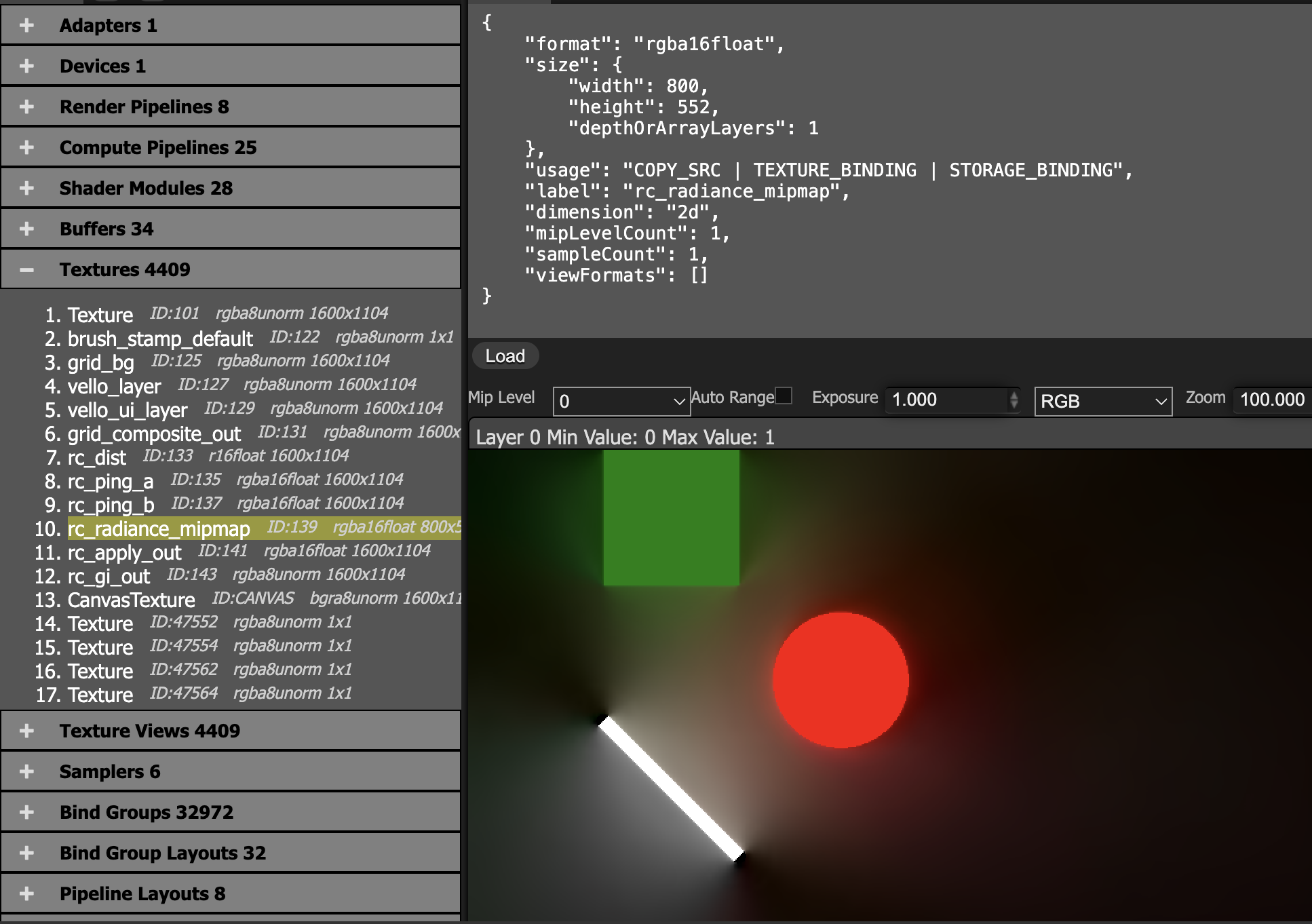
把最終 cascade 的結果在探針格子上平均,再寫入降採樣後的 radiance_mipmap。
@group(0) @binding(0) var<uniform> probe: MipmapProbe;
@group(0) @binding(1) var tex_radiance_cascades: texture_2d<f32>;
@group(0) @binding(2) var tex_radiance_mipmap: texture_storage_2d<rgba16float, write>;

@compute @workgroup_size(8, 8, 1)
fn rc_radiance_mipmap(@builtin(global_invocation_id) global_id: vec3<u32>) {
  let base_coord = global_id.xy;
  let dimensions = textureDimensions(tex_radiance_mipmap);
  if any(base_coord >= dimensions) {
    return;
  }
  let pw = probe.width;
  let ray_count = pw * 2u;
  let probe_cell = base_coord * vec2<u32>(pw, pw);
  var accumulation = vec4(0.0);
  for (var y = 0u; y < pw; y = y + 1u) {
    for (var x = 0u; x < pw; x = x + 1u) {
      let coord = vec2<i32>(i32(probe_cell.x + x), i32(probe_cell.y + y));
      accumulation = accumulation + textureLoad(tex_radiance_cascades, coord, 0);
    }
  }
  accumulation = accumulation / f32(ray_count);
  textureStore(tex_radiance_mipmap, vec2<i32>(base_coord), accumulation);
}
main + radiance_mipmap:把間接光加回主顏色。
@group(0) @binding(0) var tex_main: texture_2d<f32>;
@group(0) @binding(1) var sampler_main: sampler;
@group(0) @binding(2) var tex_radiance_mipmap: texture_2d<f32>;
@group(0) @binding(3) var sampler_radiance_mipmap: sampler;

@fragment
fn rc_apply_fs(i: VsOut) -> @location(0) vec4<f32> {
  let uv = vec2(i.ndc.x * 0.5 + 0.5, 0.5 - i.ndc.y * 0.5);
  let main = textureSample(tex_main, sampler_main, uv);
  let radiance = textureSample(tex_radiance_mipmap, sampler_radiance_mipmap, uv);
  return main + radiance;
}
mipmap 使用線性取樣器:
let sampler_rc_mipmap = device.create_sampler(&SamplerDescriptor {
    label: Some("rc_mipmap_sampler"),
    mag_filter: FilterMode::Linear,
    min_filter: FilterMode::Linear,
    mipmap_filter: MipmapFilterMode::Nearest,
    ..Default::default()
});| 經典 RC(2024 年與更早) | 全像 RC(HRC) |
|---|---|
| 離散探針:光線平均值存放在格子點上 | 全像邊界:方向性照明存放在邊界上 |
| 雙線性內插:柔化硬陰影的邊緣 | 邊界積分重建:保留不連續處 |
| 只有軟陰影:適合間接光與環境光 | 硬陰影 + 軟陰影:保留點光源清楚的陰影邊緣 |