第 20 課 - 協作
在這一課,我們會探索如何實作多人協作編輯功能。
- CRDT 的分類與實作
- 使用 Loro / Yjs 與 BroadcastChannel,在 localhost 上模擬協作
- 使用 liveblocks 實作伺服器與多個用戶端之間的協作編輯
- 端對端加密的 CRDT
- 感知與在場,包括多人游標與留言
CRDT
什麼是 CRDT?下面的介紹來自 什麼是 CRDT。Google Docs / Figma / Tiptap 的協作功能都基於它實作。這篇文章也詳細比較了 CRDT 與 OT 的特性:
CRDT(conflict-free replicated data type,無衝突複製資料型別)是一種資料結構,可以在網路中的多台電腦上複製。各個複本可以獨立、平行地更新,不需要在複本之間協調,並保證不會發生衝突。
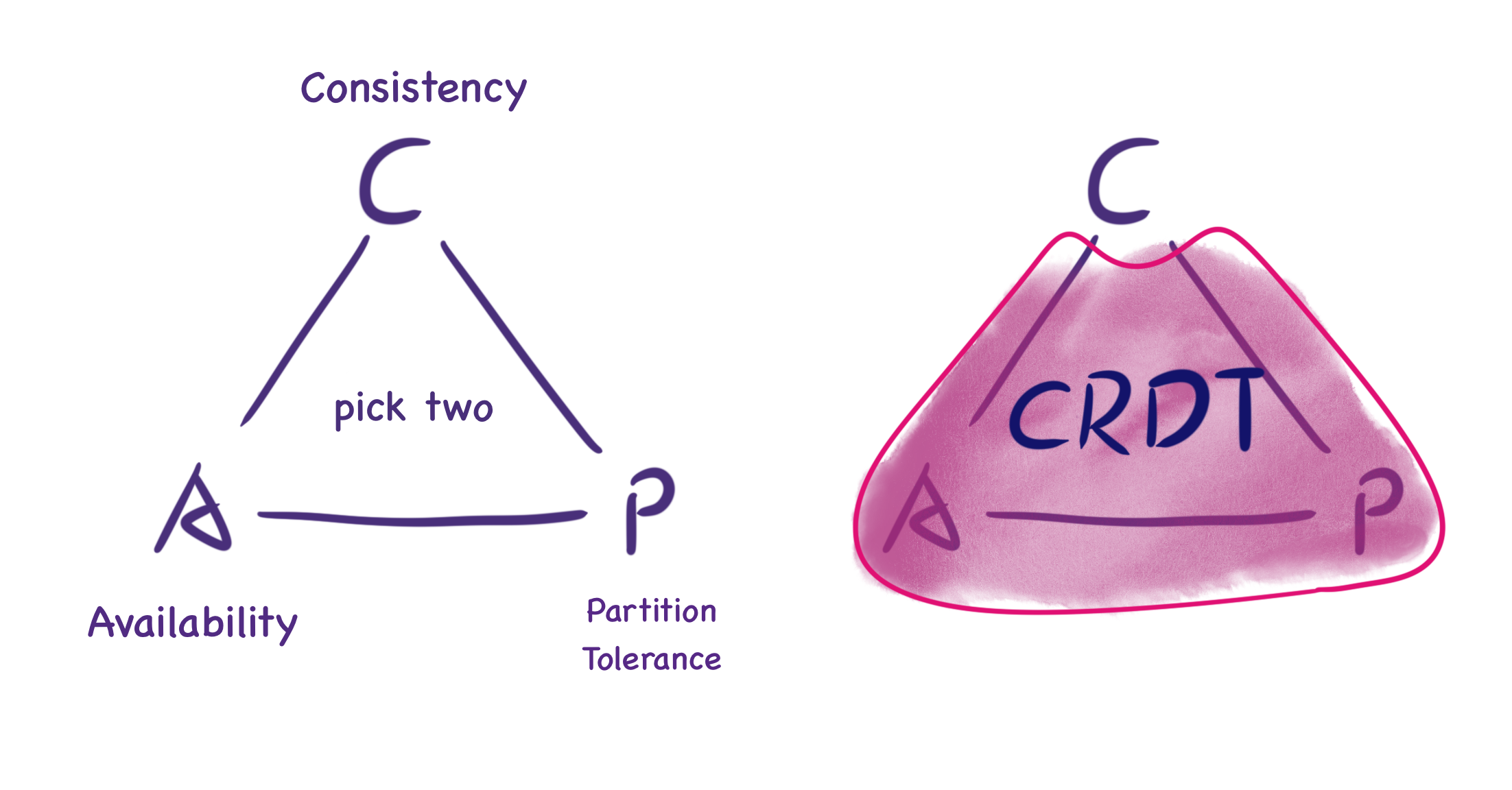
下面這張來自 什麼是 CRDT 的圖說明,在 CAP 定理下,CRDT 提供的不是「完美一致性」,而是最終一致性。雖然無法保證即時一致,但當兩個節點同步訊息時,它們會回到一致的狀態。
Figma 的多人技術如何運作 解釋了 Figma 為什麼沒有像 Google Docs 那樣選擇 OT。
同樣值得一提的是,Figma 的資料結構並不是單一的 CRDT。它受到多個各自獨立的 CRDT 啟發,並把它們組合起來,形成最終代表一份 Figma 文件的資料結構(如下所述)。
兩種 CRDT
CRDT 有兩種:操作型(Op-based)與狀態型(State-based)。前者的原理是,如果兩個使用者執行了相同順序的操作,文件的最終狀態也應該相同。為了做到這一點,每個使用者都會維護資料上執行過的全部操作,並把這些操作同步給其他使用者,以保證最終狀態。後者需要在節點之間傳送完整狀態。前者看起來只傳送操作描述,頻寬需求較低,但要保證操作冪等並處理操作順序,實作相當複雜。相比之下,後者的實作更簡單。
現在透過這個教學系列來理解狀態型 CRDT:
這個教學提供了一種通用的 CRDT 資料結構,其中包含一個必須滿足結合律、交換律與冪等性的 merge 函式。這個 merge 函式可以是最後寫入者勝出(Last-Writer Wins,LWW)Register:每次把自己的時間戳與輸入資料的時間戳比較,如果輸入資料的時間戳更大,就更新自己的資料:
interface CRDT<T, S> {
    value: T;
    state: S;
    merge(state: S): void;
}
鍵值形式的樣式表很適合使用 LWW Register。為協作應用程式設計資料結構 介紹了 Quill 編輯器使用的 {bold: true} 樣式。
對我們的情境更有幫助的是 Figma 的多人技術如何運作。Figma 的 CTO 介紹了內部使用的、類似 DOM 的樹狀結構(場景圖)。每個物件都有一個 ID 與一組屬性值,可以看成兩層對應:Map<ObjectID, Map<Property, Value>>。在處理物件屬性、物件新增/刪除、順序等問題時,採用不同的合併策略:
- 修改同一個物件的同一個屬性。例如兩個使用者分別把同一個文字物件的屬性值改成 AB 與 BC 時,Figma 不會用合併演算法得到 ABC,而是取決於伺服器何時收到訊息。
- 物件的新增/刪除。建立物件直接使用 LWW Register。和 CRDT 模型的差別在於刪除物件時的行為:Figma 的伺服器不保存被刪除物件的屬性,而是讓用戶端自行儲存,以便之後可能的復原操作。
- 場景圖結構的變更。子節點透過屬性參照父節點 ID,節點清單中的位置則用分數索引(Fractional indexing)實作。好處是改變位置只需要更新一個值,見:有序序列的即時編輯。這個方案的一個缺陷是交錯(interleaving),這裡同樣沒有考慮。
本地優先軟體
在這篇文章中,我們提出「本地優先軟體」:一組讓使用者既能協作、又能擁有資料的軟體原則。本地優先的理想包括能夠離線工作,並在多台裝置之間協作,同時改善資料的安全性、隱私、長期保存與使用者控制權。
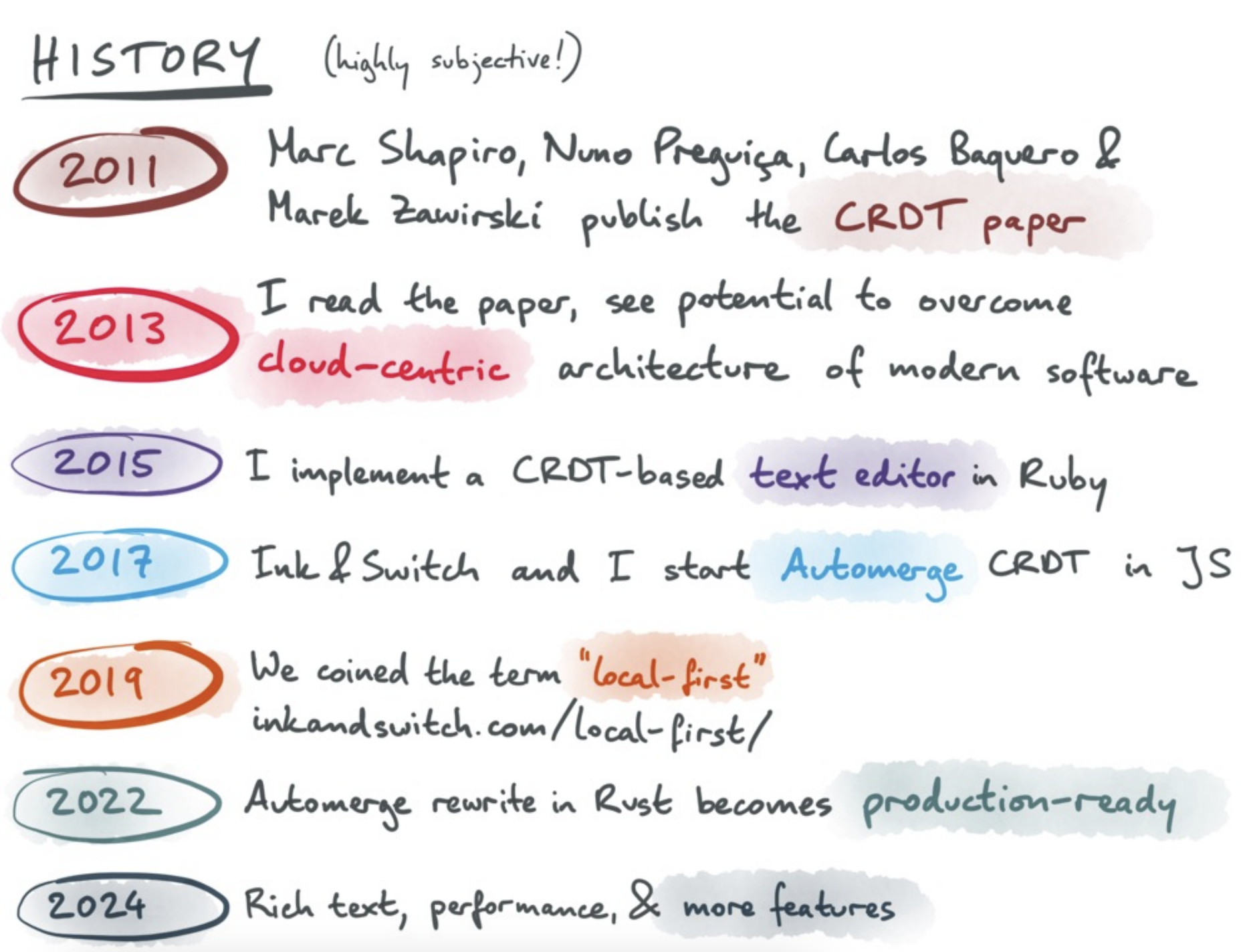
下面這張來自 本地優先的過去、現在與未來 的圖說明,本地優先這種軟體開發與資料管理理念,也可以基於 CRDT 實作。
Figma 讓你可以離線任意長的時間並繼續編輯。重新上線時,用戶端會下載一份新的文件複本,把離線期間的編輯重新套用到這份最新狀態上,然後透過新的 WebSocket 連線繼續同步更新。
富文字編輯器與程式碼編輯器也支援這一點,見 TipTap 離線支援 與 協作的完整光譜。
CRDT 的實作
Y.js 以及它移植到其他語言的版本,無疑是最著名的 CRDT 實作。下面這段文字來自 https://tiptap.dev/docs/collaboration/getting-started/overview#about-yjs
作為 CRDT,Y.js 保證變更的順序不會影響文件的最終狀態,類似 Git 處理 commit 的方式。這保證資料的所有複本在不同環境中保持一致。
由於我們不需要在協作狀態中處理文字或富文字的合併,只需要簡單的資料結構來儲存畫布狀態,例如 Y.Map。其他 CRDT 實作也提供類似的 API,例如:
- Liveblocks 提供
LiveObject/List/Map,見:Liveblocks 中的資料結構 - Automerge 提供 簡單值,支援 JSON 中所有合法型別,甚至包括
Date - Loro 也提供 Map
用 BroadcastChannel 模擬
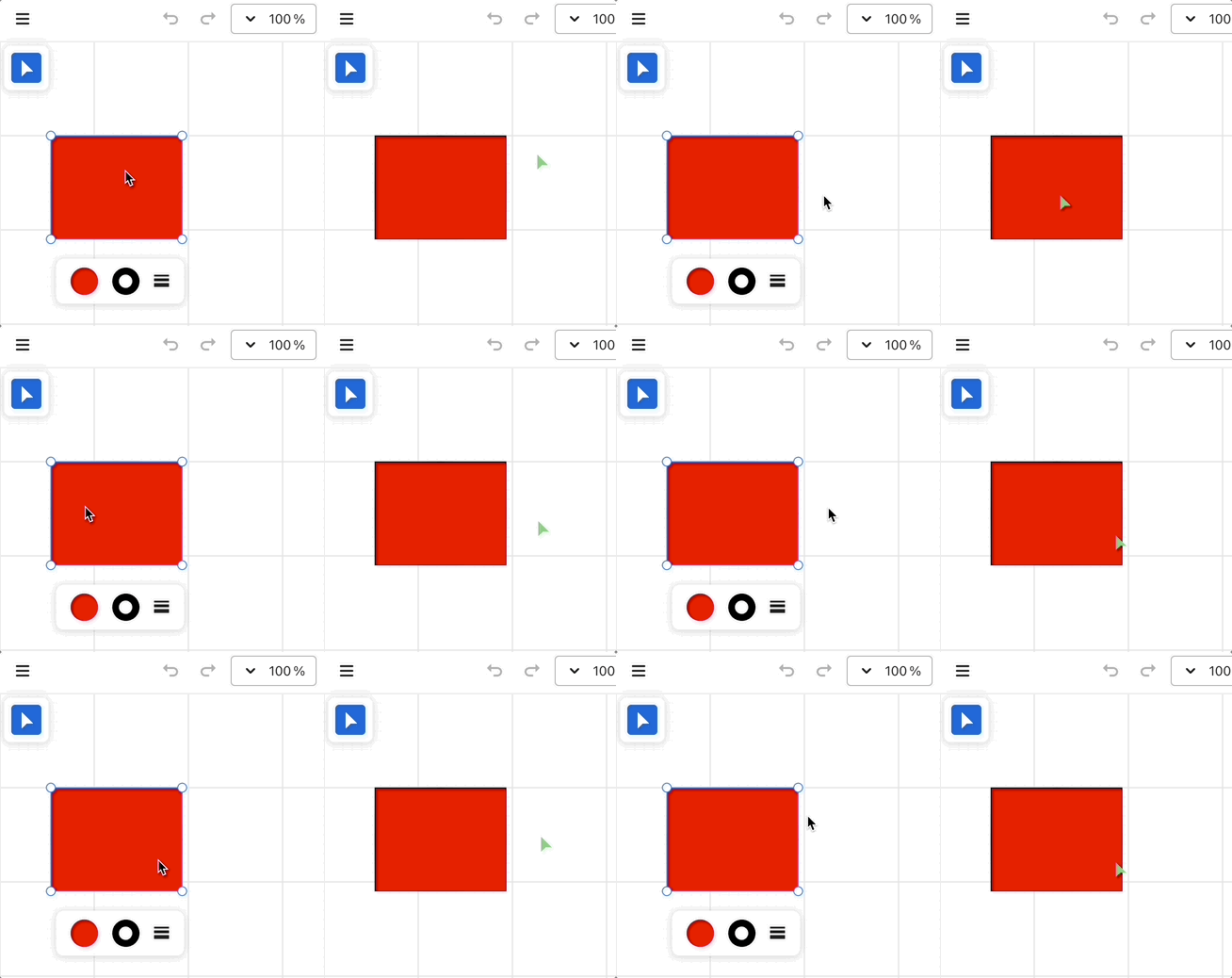
現在參考 Loro 的 Excalidraw 範例 與 dgmjs-plugin-yjs,利用 BroadcastChannel 能在同一來源下的多個分頁之間通訊的特性,模擬多個使用者協作的效果。
使用 Loro 的範例
在 Excalidraw 中,可以用 onChange 鉤子監看場景中所有圖形的變更:
<Excalidraw
    onChange={(elements) => {
        const v = getVersion(elements);
    }}
/>
當歷史紀錄改變時,我們呼叫這個鉤子:
export class API {
    onchange: (snapshot: {
        appState: AppState;
        nodes: SerializedNode[];
    }) => void;
}

api.onchange = (snapshot) => {
    const { appState, nodes } = snapshot;
};
參考 Excalidraw 的 updateScene,我們也可以提供 updateNodes 方法來更新場景圖。
api.updateNodes(nodes);下面以 Loro 為例,模擬多個使用者協作編輯的效果。我們利用 BroadcastChannel 的特性,讓同一個來源內的多個分頁能夠通訊。每當畫布內容改變,就向其他頁面送出訊息。收到另一個頁面的訊息後,即完成同步。因此,每個頁面都必須同時擔任訊息的發送者與接收者。
先看訊息接收端的程式碼實作:首先建立一個 LoroDoc 實例。使用 List 結構儲存圖形清單。收到訊息後,把資料匯入 LoroDoc。可參考 匯出與匯入。
import { LoroDoc } from 'loro-crdt';

const channel = new BroadcastChannel('loro-crdt');
const doc = new LoroDoc();
const docNodes = doc.getList('nodes');

channel.onmessage = (e) => {
    const bytes = new Uint8Array(e.data);
    doc.import(bytes);
};
接著,把 docNodes 轉成 JavaScript 物件之後,呼叫畫布 API updateNodes 完成場景更新:
doc.subscribe((e) => {
    if (e.by !== 'local') {
        api.updateNodes(docNodes.toJSON());
    }
});
再看訊息發送端的實作。透過 onchange 鉤子訂閱畫布場景圖的變更,把變更記錄到文件並提交。這會觸發其他視窗中先前的場景更新:
api.onchange = (snapshot) => {
    const { appState, nodes } = snapshot;
    if (recordLocalOps(docElements, nodes)) {
        doc.commit();
    }
};
提交本地變更時:
function recordLocalOps(
    loroList: LoroList,
    nodes: readonly { version?: number; isDeleted?: boolean }[],
): boolean {
    nodes = nodes.filter((e) => !e.isDeleted); // 首先排除掉被删除的图形
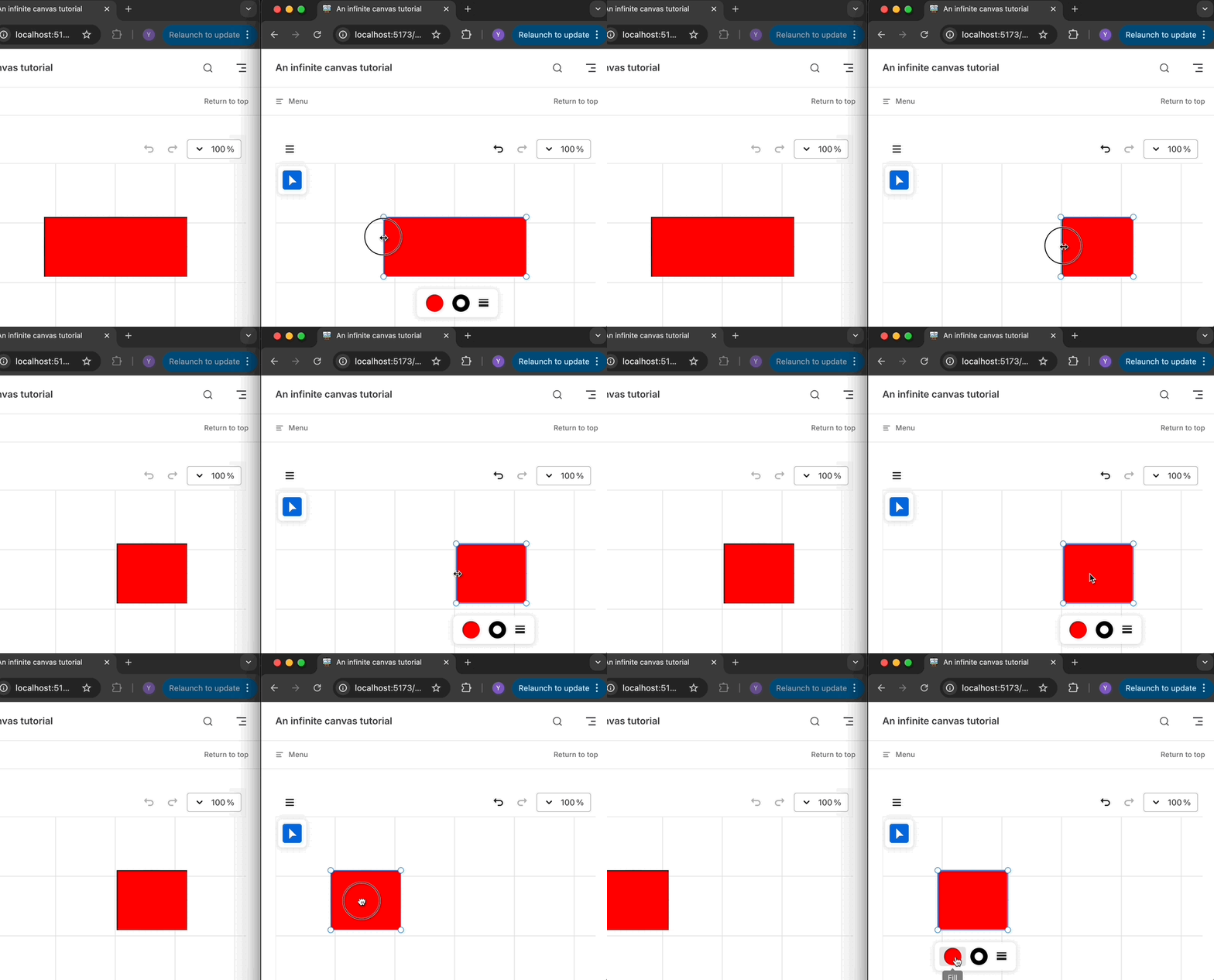
}在下面的範例中,你可以在左側或右側視窗任意拖曳、調整大小或改變矩形的顏色,另一個視窗會同步這些修改:使用 Loro 的範例
使用 Yjs 的範例
首先監看本地畫布的變更,並把圖形清單及其屬性物件同步到本地的 Y.Doc:
api.onchange = (snapshot) => {
    const { appState, nodes } = snapshot;
    doc.transact(() => {
        // 写入 Y.Doc
    }, local);
};
然後監聽 Y.Doc 的變更,透過 origin 區分本地與遠端變更。如果變更來自本地,就送出同步訊息;如果來自遠端,就更新畫布內容。
doc.on('update', (update, origin) => {
    if (origin === local) {
        channel.postMessage(update);
    }

    if (origin !== local) {
        const nodes = yArray.toArray().map((node) => node.toJSON());
        api.updateNodes(nodes);
    }
});
使用 Liveblocks 作為後端
上面基於 BroadcastChannel 的實作,終究只是一個簡單範例。接下來我們會用 liveblocks 與 Yjs 實作一個更實用的例子。
import { createClient } from '@liveblocks/client';
import { getYjsProviderForRoom } from '@liveblocks/yjs';

const client = createClient({});
const { room, leave } = client.enterRoom('my-room-id', {});

const yProvider = getYjsProviderForRoom(room, {
    // Enable V2 encoding for better performance with LiveMaps
    // https://liveblocks.io/docs/guides/yjs-best-practices-and-tips#Enable-experimental-V2-encoding-for-Y.Maps
    useV2Encoding_experimental: true,
});
const yDoc = yProvider.getYDoc();你可以在多個瀏覽器視窗中打開這個範例:使用 Liveblocks 的範例
用 IndexedDB 支援離線
建立房間時,liveblocks 也提供 offlineSupport_experimental 設定選項,方便啟用離線功能:
使用 IndexedDB 啟用離線支援。這表示第一次載入之後,文件會存在本地,並立即載入。
import { getYjsProviderForRoom } from '@liveblocks/yjs';

const yProvider = getYjsProviderForRoom(room, {
    offlineSupport_experimental: true,
});
端對端加密
現在我們可以把文件存成 CRDT,並用某種同步伺服器合併更新、轉送它們,同時保證這個檔案維持私密。
在論文 瀏覽器中的端對端加密 中,Excalidraw 介紹了一種簡單的端對端加密做法:讓各個用戶端能夠通訊,同時避免伺服器讀到內容。加密資料放在連結的 hash 部分,伺服器讀不到,只在用戶端解碼:https://excalidraw.com/#json=5645858175451136,8w-G0ZXiOfRYAn7VWpANxw
接下來,我們分析 Excalidraw 如何利用 Web Crypto API 實作這個功能。
產生金鑰
使用 generateKey API 選擇 AES-GCM 演算法並產生一把隨機金鑰。extractable 參數表示這把金鑰之後可以透過 exportKey API,以可攜的外部格式匯出。例如,這裡我們選擇 JSON Web Key 的 ‘jwk’ 格式:
// @see https://github.com/excalidraw/excalidraw/blob/7f66e1fe897873713ba04410534be2d97b9139af/packages/excalidraw/data/encryption.ts#L17
export const generateEncryptionKey = async <
    T extends 'string' | 'cryptoKey' = 'string',
>(
    returnAs?: T,
): Promise<T extends 'cryptoKey' ? CryptoKey : string> => {
    const key = await window.crypto.subtle.generateKey(
        {
            name: 'AES-GCM',
            length: ENCRYPTION_KEY_BITS,
        },
        true, // extractable
        ['encrypt', 'decrypt'],
    );
    return (
        returnAs === 'cryptoKey'
            ? key
            : (await window.crypto.subtle.exportKey('jwk', key)).k
    ) as T extends 'cryptoKey' ? CryptoKey : string;
};
加密與解密資料
首先產生密碼學上安全的隨機數:
export const createIV = () => {
    const arr = new Uint8Array(IV_LENGTH_BYTES);
    return window.crypto.getRandomValues(arr);
};
然後用這把私鑰加密序列化後的場景資料,並從用戶端上傳到 firestore 或 AWS S3 這類雲端儲存:
// @see https://github.com/excalidraw/excalidraw/blob/7f66e1fe897873713ba04410534be2d97b9139af/excalidraw-app/components/ExportToExcalidrawPlus.tsx#L42
const encryptionKey = (await generateEncryptionKey())!;
const encryptedData = await encryptData(
    // 使用 iv 加密
    encryptionKey,
    serializeAsJSON(elements, appState, files, 'database'), // 序列化数据
);
const blob = new Blob(
    [encryptedData.iv, new Uint8Array(encryptedData.encryptedBuffer)],
    {
        type: MIME_TYPES.binary,
    },
);

// Upload blob to Firebase / AWS S3
同態加密 CRDT
感知與在場
Yjs 提供 感知與在場 功能,用來分享游標位置與狀態資訊,讓使用者感知其他協作者的在場。這些資訊不會存在 Yjs 文件裡,因為它不需要跨工作階段持久保存。不過,它可以作為 JSON 物件傳播給所有使用者,使用者離線時會移除自己的狀態。
使用 Liveblocks 作為後端
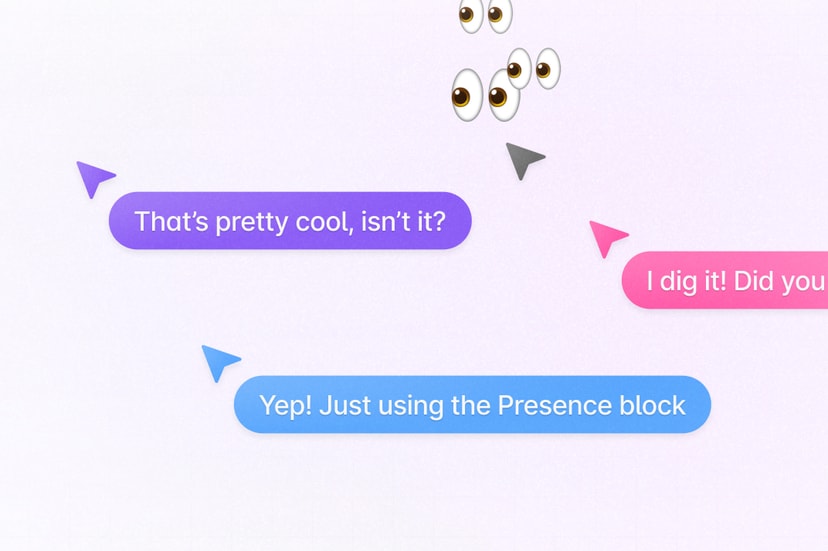
作為 Yjs 的 Provider 實作,liveblocks 也在 Room API 中提供 Presence 功能。我們可以監聽畫布上的 pointermove 事件,並用 updatePresence 廣播。必須注意,儲存之前要先轉換到世界座標系。詳見 第 6 課 - 座標::
function onPointerMove(event) {
    const { x, y } = api.viewport2Canvas({
        x: event.offsetX,
        y: event.offsetY,
    });
    room.updatePresence({
        cursor: {
            x
            y,
        },
    });
}
這樣用戶端就可以訂閱其他使用者的狀態變更,用來渲染他們的滑鼠位置。這裡需要把滑鼠位置從世界座標系轉換到視埠座標系:
room.subscribe('others', (others) => {
    others.forEach((other) => {
        // [{ cursor: {} }, { cursor: {} }, ...]
        const { x, y } = api.canvas2Viewport({
            x: other.presence.cursor.x,
            y: other.presence.cursor.y,
        });
        // Render cursor with [x, y]
    });
});
當然,我們可以透過節流降低更新頻率——畢竟沒有必要「即時」顯示其他人的滑鼠位置。但這會引出下一個問題。
const client = createClient({
    throttle: 16,
    publicApiKey:
        'pk_dev_MYcFNShiwPwRDvuvhklopMg6SAkdASzz6QrOMQIlu86NkcuXVNxP06aXrxi9qo7M',
});
平滑地渲染游標
如何為多人游標加上動畫 展示了節流降低更新頻率之後,其他使用者會感到滑鼠游標卡頓,類似把更新率從 60FPS 降到 20FPS。
解法是讓滑鼠在相鄰位置之間平滑移動,而不是一步一步跳。幸好 tldraw 提供了 perfect-cursors,把這些都處理好了。
此外,我們可以使用 framer-motion。它支援宣告式語法(相容 React/Vue),並用內建的 Spring 緩動函式達到類似效果。詳見:使用 framer-motion 的範例。
// Cursor.vue
<script lang="ts" setup>
import { motion } from 'motion-v';
</script>
<template>
    <motion.div
        class="Cursor"
        aria-hidden="true"
        :initial="{ x, y }"
        :animate="{ x, y }"
        :transition="{
            type: 'spring',
            damping: 20,
            mass: 0.4,
            stiffness: 400,
        }"
    >
        <svg path="..."></svg>
    </motion.div>
</template>
留言覆疊
在協作編輯情境中,即時聊天與留言非常重要。在 Figma 裡,留言泡泡可以放在畫布的任何位置。此外,在較低的縮放等級,留言會聚合起來,提供留言叢集的概觀。隨著縮放等級提高,會出現更細的叢集,最終顯示每一個留言泡泡的分布。詳見:Figma 留言指南。
資料結構
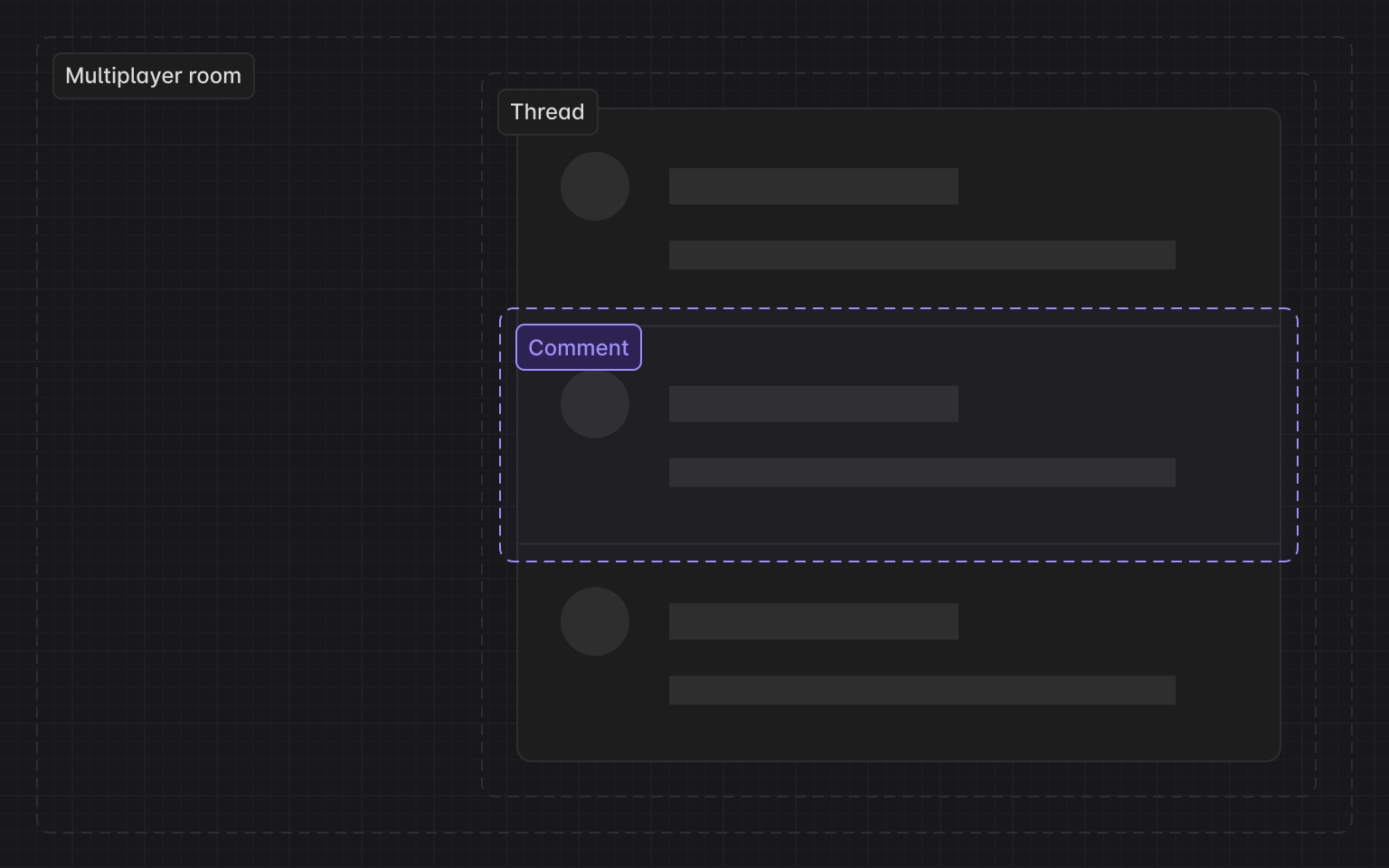
接下來,我們會基於 Liveblocks 留言 實作類似的功能。先看資料結構:Thread 與 Comment 維持一對多的關係。
interface Thread {
    id: string;
    roomId: string; // liveblocks room
    createdAt: Date;
    comments: Comment[];
    metadata: {
        x: number; // x position in canvas coordinates
        y: number;
    };
}
聚合
在上面的點聚合情境中,需要處理兩個關鍵挑戰:
- 如何聚合?給定一個點,如何找出以該點為中心、位於指定半徑內的所有點?
- 聚合之後,給定一個包圍盒(例如目前的視埠),如何找出其中包含的所有聚合特徵?
對於這兩個問題(半徑與範圍查詢),面對大量點資料時,暴力走訪每一個點本質上效率很低。要達到高效率搜尋,必須使用 kdbush 這類空間索引。雖然我們不在 GIS 情境中,仍然可以從 supercluster 的實作得到啟發。
在點聚合情境中,k-d tree 節點不僅包含原始的 Point 特徵,也包含聚合後的點集合。後者需要一個聚合中心點,其資料結構如下:
// createPointCluster
data.push(
    x,
    y, // projected point coordinates
    Infinity, // the last zoom the point was processed at
    i, // index of the source feature in the original input array
    -1, // parent cluster id
    1, // number of points in a cluster
);
在建立索引的階段,需要為每個縮放等級建構一棵 k-d tree:
// supercluster/index.js

// maxZoom
// minZoom
let clusters = [];
for (let i = 0; i < points.length; i++) {
    clusters.push(createPointCluster(points[i], i));
}
// Create root k-d tree
this.trees[maxZoom + 1] = new KDBush(
    clusters,
    getX,
    getY,
    nodeSize,
    Float32Array,
);
for (let z = maxZoom; z >= minZoom; z--) {
    clusters = this._cluster(clusters, z);
    this.trees[z] = new KDBush(clusters, getX, getY, nodeSize, Float32Array);
}
在指定範圍內聚合點,需要處理兩個問題:
- 用 k-d tree 的半徑,查詢給定半徑內的所有鄰居。kdbush 提供的
within方法就是做這件事。 - 用範圍內各點的座標,依每個子集包含的點數加權,產生聚合點的座標。
getClusters(bbox, zoom) {
// Get k-d tree on current zoom level
    const tree = this.trees[this._limitZoom(zoom)];
// Query the index array of features contained within the bounding box
    const ids = tree.range(minX, minY, maxX, maxY);
    const clusters = [];
    for (const id of ids) {
// Locate a k-d tree node via index
        const c = tree.points[id];
// If the node is a point set, create the corresponding GeoJSON feature; if it is a single point, return it directly.
        clusters.push(c.numPoints ? getClusterJSON(c) : this.points[c.index]);
    }
    return clusters;
}
顯示聚合結果
查詢視埠範圍內的聚合點:
const { cameraZoom } = this.api.getAppState();
const { minX, minY, maxX, maxY } = this.api.getViewportBounds();
this.clusters = this.cluster.getClusters([minX, minY, maxX, maxY], cameraZoom);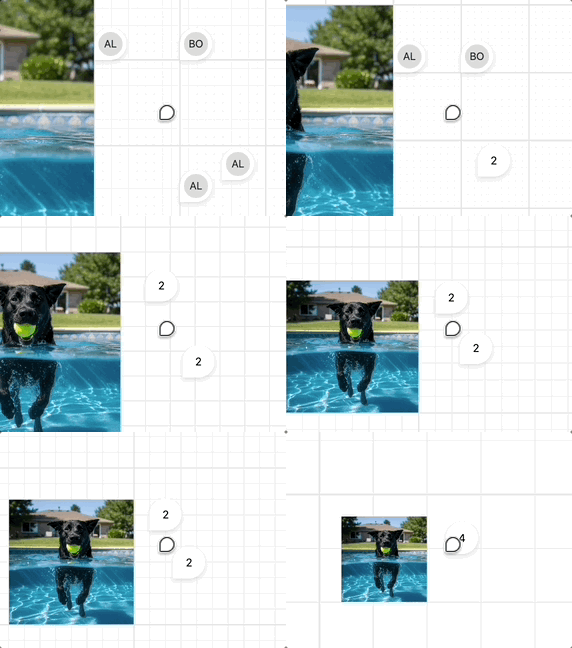
分數索引
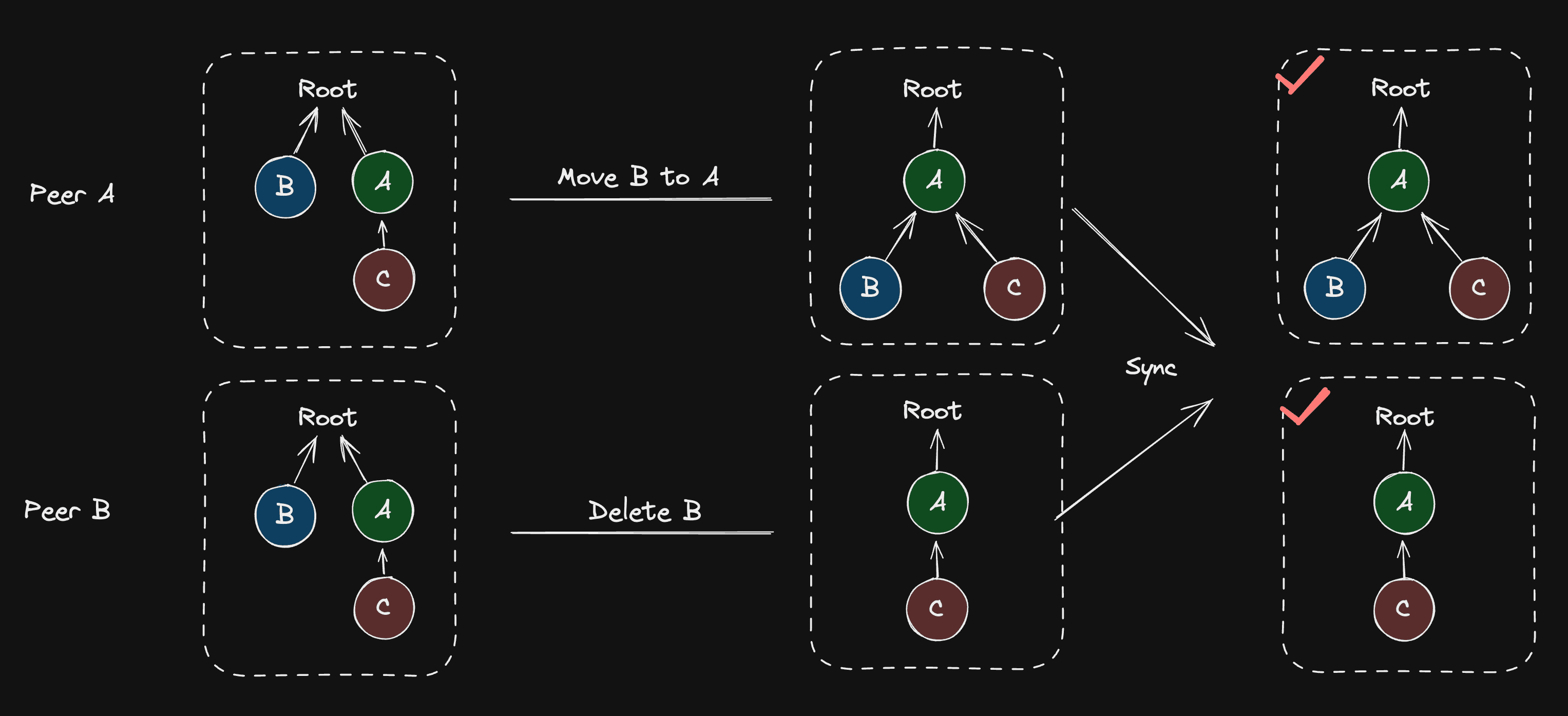
如前所述,場景圖可以看成一棵「可移動樹」,可能的衝突包括三種情境:新增、刪除與移動。可移動樹 CRDT 與 Loro 的實作 詳細說明了 Loro 對這三種情境的實作方式。例如,刪除與移動同一個節點時,兩種結果都可以接受,取決於伺服器收到訊息的順序。然而,有些操作情境在同步之後可能形成環,例如兩個使用者分別執行 B -> C 與 C -> B,破壞了樹的結構定義。
import { Loro, LoroTree, LoroTreeNode } from 'loro-crdt';

let doc = new Loro();
let tree: LoroTree = doc.getTree('tree');
let root: LoroTreeNode = tree.createNode();
有序序列的即時編輯 介紹了 Figma 如何使用 fractional-indexing 反映場景圖中元素的位置。
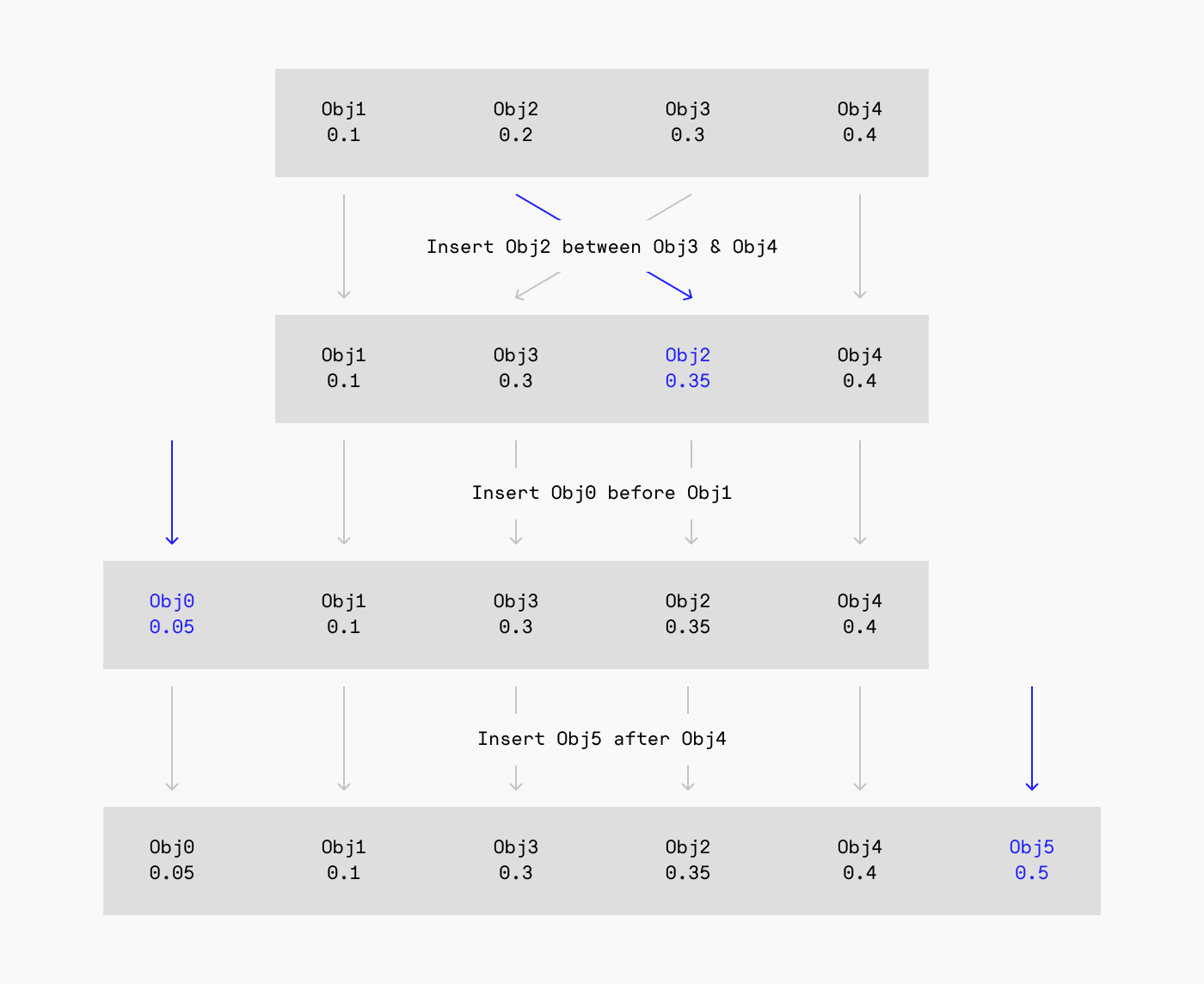
Excalidraw 也使用同樣的實作:
// @see https://github.com/excalidraw/excalidraw/blob/9ee0b8ffcbd3664a47748a93262860321a203821/packages/excalidraw/fractionalIndex.ts#L380
import { generateNKeysBetween } from 'fractional-indexing';
const fractionalIndices = generateNKeysBetween(
    elements[lowerBoundIndex]?.index,
    elements[upperBoundIndex]?.index,
    indices.length,
) as FractionalIndex[];
Loro 內建的 Tree 包含 Fractional Index 演算法,見:可移動樹 CRDT 與 Loro 的實作。
我們把 Fractional Index 演算法整合進 Loro,並與可移動樹結合,使可移動樹的子節點可以排序。
在 第 14 課 中,我們希望透過 ZIndex 控制渲染順序。在編輯器 UI 中,這個功能表現為「調整圖層順序」、「上移」與「下移」這類能力。因此,當 ZIndex 第一次被加入或被修改時,我們先走訪場景圖,依 ZIndex 為子節點排序。得到排序後的陣列之後,再根據目前節點緊鄰的兩個兄弟節點,更新目前節點的分數索引。
class ComputeZIndex extends System {
    private readonly zIndexes = this.query(
        (q) => q.addedOrChanged.with(ZIndex).trackWrites,
    );

    execute() {
        this.zIndexes.addedOrChanged.forEach((entity) => {
            // Travese scenegraph, sort children by z-index
            const descendants = getDescendants(
                getSceneRoot(entity),
                sortByZIndex,
            );
            const index = descendants.indexOf(entity);
            const prev = descendants[index - 1] || null;
            const next = descendants[index + 1] || null;
            const prevFractionalIndex =
                (prev?.has(FractionalIndex) &&
                    prev.read(FractionalIndex)?.value) ||
                null;
            const nextFractionalIndex =
                (next?.has(FractionalIndex) &&
                    next.read(FractionalIndex)?.value) ||
                null;

            // Generate fractional index with prev and next node
            const key = generateKeyBetween(
                prevFractionalIndex, // a0
                nextFractionalIndex, // a2
            );

            if (!entity.has(FractionalIndex)) {
                entity.add(FractionalIndex);
            }
            entity.write(FractionalIndex).value = key; // a1
        });
    }
}
這樣就可以在渲染前依照分數索引排序。值得注意的是,不能直接使用 localeCompare 來比較:
export function sortByFractionalIndex(a: Entity, b: Entity) {
    if (a.has(FractionalIndex) && b.has(FractionalIndex)) {
        const aFractionalIndex = a.read(FractionalIndex).value;
        const bFractionalIndex = b.read(FractionalIndex).value;

        // Can't use localeCompare here.
        // @see https://github.com/rocicorp/fractional-indexing/issues/20
        if (aFractionalIndex < bFractionalIndex) return -1;
        if (aFractionalIndex > bFractionalIndex) return 1;
        return 0;
    }

    return 0;
}