第 33 課 - 版面引擎
瀏覽器內建了 Flexbox、Grid、Block 等數種版面系統,因此像「置中」這類效果,不必再手動計算節點位置。
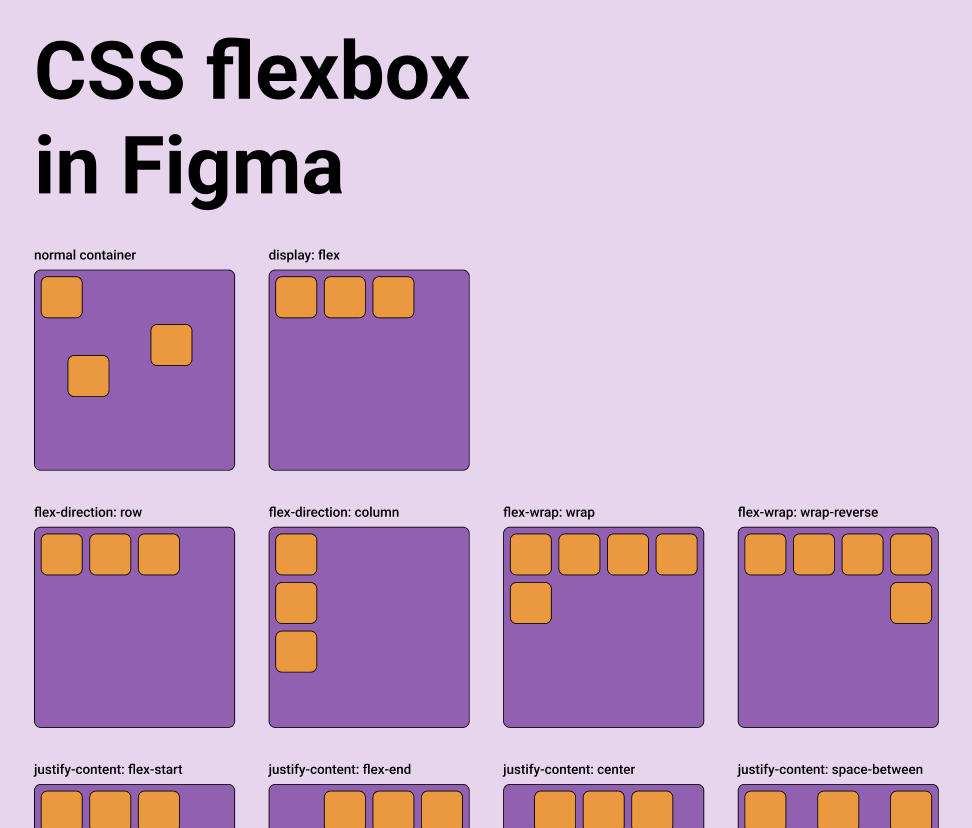
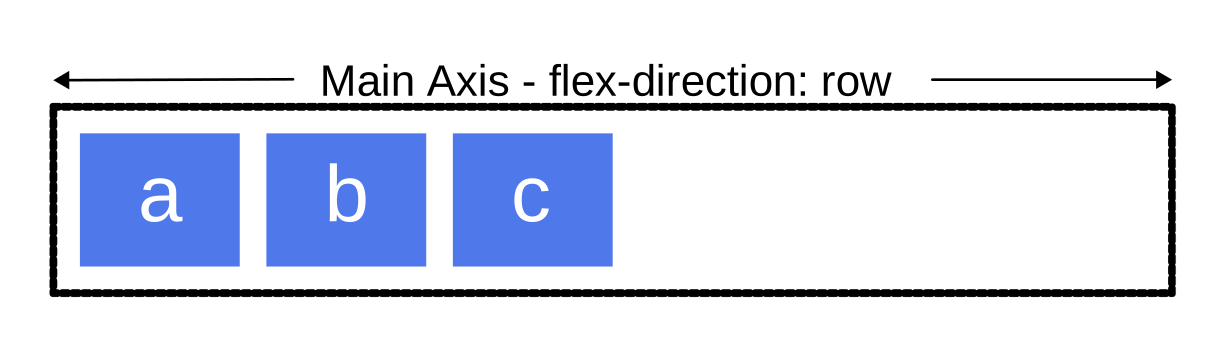
無限畫布這類在 DOM 之外運作的應用程式,必須自己實作版面引擎。Figma 實作了 Auto Layout,其中 Grid 目前仍在 beta,而 Vertical 與 Horizontal 對應 CSS 的 flex-direction 屬性。詳見:Figma - Guide to auto layout
以 design-to-code 為主的工具通常都會提供這項能力。詳見: Layout in pencil.dev
父物件可以透過 layout、justifyContent、alignItems 這類屬性,以類似 flexbox 的版面系統,接管子物件的尺寸與定位。
export interface Layout {
    /** Enable flex layout. None means all children are absolutely positioned and will not be affected by layout properties. Frames default to horizontal, groups default to none. */
    layout?: 'none' | 'vertical' | 'horizontal';
    /** The gap between children in the main axis direction. Defaults to 0. */
    gap?: NumberOrVariable;
    layoutIncludeStroke?: boolean;
    /** The Inside padding along the edge of the container */
    padding?:
        | /** The inside padding to all sides */ NumberOrVariable
        | /** The inside horizontal and vertical padding */ [
              NumberOrVariable,
              NumberOrVariable,
          ]
        | /** Top, Right, Bottom, Left padding */ [
              NumberOrVariable,
              NumberOrVariable,
              NumberOrVariable,
              NumberOrVariable,
          ];
    /** Control the justify alignment of the children along the main axis. Defaults to 'start'. */
    justifyContent?:
        | 'start'
        | 'center'
        | 'end'
        | 'space_between'
        | 'space_around';
    /** Control the alignment of children along the cross axis. Defaults to 'start'. */
    alignItems?: 'start' | 'center' | 'end';
}
這一課會實作 Flexbox 版面,並讓節點支援同名的 CSS 屬性:
const parent = {
    id: 'parent',
    type: 'rect',
    x: 100,
    y: 100,
    width: 200,
    height: 200,
    display: 'flex',
    alignItems: 'center',
    justifyContent: 'center',
};
const child = {
    id: 'child',
    parentId: 'parent',
    type: 'rect',
    width: 50,
    height: 50,
};
Yoga
在前端使用 Yoga 版面引擎,只能透過 WASM。目前有幾種可用的實作:
- yoga-layout-prebuilt 距離上次更新已經很久。
- yoga-wasm-web 早期的 satori 用它把 HTML 轉成 SVG 並計算版面。taffy 也有相關的 範例
- yoga-layout 我們建議使用它,我們的實作也以它為基礎。react-pdf/yoga 同樣使用它。
只要指定一個平面,Yoga 也能用在 3D 空間。詳見:react-three-flex
與 DOM Flexbox 的另一個重要差異是,必須在 3D 中指定容器所在的平面。元素會放在由兩條軸決定的 2D 平面上,並使用沿著這兩條軸算出的 width 與 height。

pixijs/layout
pixijs/layout 也是用 Yoga 實作的。類似的實作還有:pixi-flex-layout
const container = new Container({
    layout: {
        width: '80%',
        height: '80%',
        gap: 4,
        flexWrap: 'wrap',
        justifyContent: 'center',
        alignContent: 'center',
    },
});
troika-flex-layout
troika-flex-layout 使用 yoga-layout-prebuilt,在 WebWorker 中計算:
import { requestFlexLayout } from 'troika-flex-layout';

// Describe your layout style tree, with a unique id for each node:
const styleTree = {
    id: 'root',
    width: 100,
    height: 100,
    alignItems: 'center',
    justifyContent: 'center',
    children: [
        {
            id: 'child',
            width: '50%',
            height: '50%',
        },
    ],
};

// Initiate a layout request with a callback function:
requestFlexLayout(styleTree, (results) => {
    // The results are a mapping of node ids to layout boxes:
    // {
    //   root: { left: 0, top: 0, width: 100, height: 100 },
    //   child: { left: 25, top: 25, width: 50, height: 50 }
    // }
});
Yoga 以外的選擇
純 JS 實作:
- Motion Canvas Layouts 以瀏覽器原生的 Flexbox 實作,不必再實作複雜的版面演算法
- Simplifying WebGL: Building an Effective Layout Engine
Rust 實作:
- stretch 實作了 Flexbox,並提供
stretch-layout的 WASM 繫結,但已經長期沒有維護。 - taffy 以 Rust 撰寫的高效能 UI 版面函式庫,目前實作了 Flexbox、Grid、Block 等數種 CSS 版面演算法。不過還沒有 WASM 繫結。詳見:taffy wasm bindings
我們的實作
我們選了官方的 yoga-layout。除了熟悉的 Flexbox,它也提供 Margin、Padding 這類基本版面屬性。
import { loadYoga } from 'yoga-layout/load';

class YogaSystem extends System {
    async prepare() {
        Yoga = await loadYoga();
    }
}
需要建立一棵與場景圖平行的版面樹。
首先,我們要建立一棵與場景圖平行的版面樹。節點結構如下:
interface StyleTreeNode {
    id: string;
    top?: number | string;
    left?: number | string;
    width?: number | string;
    height?: number | string;
    children: StyleTreeNode[];
    padding?: number | number[];
    margin?: number | number[];
    gap?: number;
    rowGap?: number;
    columnGap?: number;
}
接著在適當的時機,把版面樹轉成 Yoga 樹,執行版面計算,再把結果套用到場景圖的節點:
const root = Yoga.Node.createWithConfig(yogaConfig);
populateNode(root, styleTree);

root.calculateLayout();
const results = Object.create(null);
walkStyleTree(styleTree, (styleNode) => {
    const { id, yogaNode } = styleNode;
    results[id] = {
        x: yogaNode.getComputedLeft(),
        y: yogaNode.getComputedTop(),
        width: yogaNode.getComputedWidth(),
        height: yogaNode.getComputedHeight(),
    };
});
root.freeRecursive();
何時進行版面計算
當 Flexbox 容器自身的尺寸改變時,必須重新計算版面,並套用到子節點的位置與尺寸。容器加入新的子節點時也一樣。
class YogaSystem extends System {
    private readonly bounds = this.query((q) =>
        q.addedOrChanged.and.removed
            .with(ComputedBounds)
            .trackWrites.and.with(Flex),
    );

    execute() {
        this.bounds.addedOrChanged.forEach((entity) => {
            // relayout
        });
    }
}
AlignItems 與 JustifyContent
最常見的用法,是用這兩個屬性把內容置中:
要實作文字置中的按鈕:
標籤使用內在寬度(wordWrap: false),Yoga 會把量測後的文字方塊置中放進按鈕。若固定 wordWrapWidth,並加上 maxLines: 1 與 textOverflow: 'ellipsis',即使按鈕還有足夠空間,標籤也可能被截斷。這些選項應留給確實需要截斷的標籤。
間距
下面的範例展示 padding 與 gap 的效果:
const parent = {
    id: 'yoga-gap-parent',
    type: 'rect',
    x: 100,
    y: 100,
    width: 200,
    height: 250,
    fill: 'grey',
    display: 'flex',
    padding: 10,
    flexWrap: 'wrap',
    gap: 10,
    zIndex: 0,
};
彈性基準、Grow 與 Shrink
Flex grow 接受任何大於等於 0 的浮點數,預設為 0。容器會以子節點的 flex grow 值作為權重,把剩餘空間分配給各個子節點。
最小/最大寬度與高度
匯出 SVG
CSS Flexbox 只接受 HTML 元素作為容器,不支援 SVG 元素,因此匯出成 SVG 時,仍必須使用版面計算之後的絕對位置。
const layoutNodes = api.readLayoutFromECS(nodes);

(await serializeNodesToSVGElements(layoutNodes)).forEach((element) => {
    $namespace.appendChild(element);
});