第 34 課 - Group、Frame 與裁切
目前的 Group / g 只是邏輯上的分組,沒有幾何邊界(例如 x/y/width/height),因此不會對子節點套用裁切。tldraw 則同時提供 Group 與 Frame,作為 Structural shapes。
Group
在 Figma 裡,Group 本質上扮演「容器」的角色,類似資料夾。詳見:The difference between frames and groups
- 把多個元素當成一個單位來操作(移動、縮放等)
- 點擊時預設選取整個 Group;Group 的尺寸由子元素自動決定
- 雙擊可以進入 Group,編輯個別元素
- Group/Ungroup
- 使用內容選單與鍵盤快捷鍵
- 在圖層面板中拖放
以拖放組成 Group
在實作拖放分組之前,可以先用 sortablejs 讓同一層清單裡的項目能夠拖放排序。
import Sortable from 'sortablejs';

const lists = root.querySelectorAll<HTMLElement>('.layer-siblings');
lists.forEach((el) => {
    const parentId = el.dataset.layerParentId ?? '';
    const sortable = Sortable.create(el, {
        animation: 150,
        draggable: '.layer-branch',
        filter: '.layer-branch--locked', // 锁定图层无法拖拽
        preventOnFilter: false,
        group: {
            name: `layers-${parentId || 'root'}`,
            pull: true,
            put: true,
        },
        onEnd: (evt) => {
            if (evt.oldIndex === evt.newIndex) {
                return;
            }
            const to = evt.to as HTMLElement;
            const orderedIds = Array.from(to.children)
                .filter((c): c is HTMLElement =>
                    c.classList.contains('layer-branch'),
                )
                .map((c) => c.dataset.nodeId)
                .filter((id): id is string => !!id);
            // 所有兄弟节点重新排序,依次设置 zIndex
            this.applyLayerSiblingOrder(
                to.dataset.layerParentId ?? '',
                orderedIds,
            );
        },
    });
    this.sortableInstances.push(sortable);
});
拖曳以組成 Group 或取消 Group,需要跨 Group 操作。
模板緩衝區
在 tldraw 裡,裁切是透過 CSS clip-path 完成的:覆寫父節點的 getClipPath 來定義它,內建的 Frame 就是這樣實作的。Figma 把這個屬性稱為 clip content,見 Frame properties in Figma。
在 pencil.dev 中,Frame 的定義如下:它是一個可以包含子元素、並具備裁切能力的矩形:
/** A frame is a rectangle that can have children. */
export interface Frame extends Rectangleish, CanHaveChildren, Layout {
    type: 'frame';
    /** Visually clip content that overflows the frame bounds. Default is false. */
    clip?: BooleanOrVariable;
    placeholder?: boolean;
    /** The presence of this property indicates that this frame is a "slot" - which means that it is intended be customized with children in instances of the parent component. Each element of the array is an ID of a "recommended" reusable component, one which fits semantically as a child here (e.g. inside a menu bar, the content slot would recommend IDs of various menu item components). */
    slot?: string[];
}
為了通用,我們希望任何圖形都能當成裁切父節點:超出圖形範圍的子節點會被裁掉,父節點本身仍正常渲染,並套用 fill/stroke。屬性宣告為:
{
    clipChildren: true;
}
接下來看看如何在 WebGL/WebGPU 中實作這種裁切。
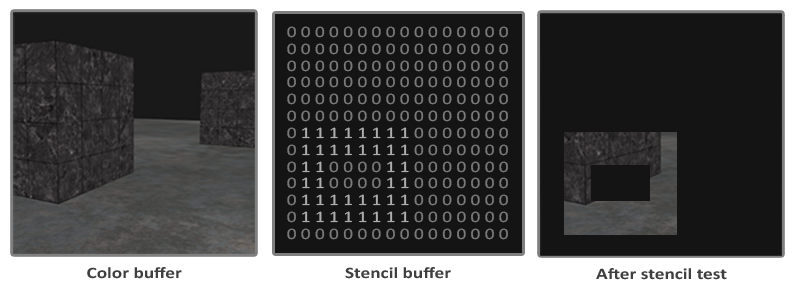
一旦某個圖形成為裁切容器,RenderPass 裡也要寫入模板緩衝區;它的預設值是 0:
{
    stencilWrite: true, // enable writing to stencil buffer
    stencilFront: {
        compare: CompareFunction.ALWAYS,
        passOp: StencilOp.REPLACE,
    },
    stencilBack: {
        compare: CompareFunction.ALWAYS,
        passOp: StencilOp.REPLACE,
    }
}
接著把一個參考值寫進模板緩衝區,之後渲染子節點時用來比較。這個值可以落在 [0-255],例如上圖中的 1:
renderPass.setStencilReference(STENCIL_CLIP_REF);渲染被裁切的子節點時,檢查緩衝區的值是否等於這個參考值;值為 0 的區域不會畫出來,從而完成裁切:
{
    stencilFront: {
        compare: CompareFunction.EQUAL,
        passOp: StencilOp.KEEP,
    }
}
橡皮擦效果
現在可以實作 第 25 課 - 非原子式橡皮擦 剩下的部分。橡皮擦效果與裁切相反:CSS clip-path 定義的是「可見」區域,SVG 的 <clipPath> 也一樣,兩者都無法定義「不可見」區域。
SVG 的 <mask> 可以,見 Clipping and masking in SVG。在 WebGL/WebGPU 中,只要把比較反過來:
{
    stencilFront: {
        compare: CompareFunction.EQUAL,
        compare: CompareFunction.NOTEQUAL,
        passOp: StencilOp.KEEP,
    }
}
因此還需要一個屬性,用來區分 clip 與 erase 模式:
{
    clipChildren: true,
    clipMode: 'erase', // 'clip' | 'erase'
}
在片段著色器裡使用模板緩衝區時,必須跳過平常依 alpha 做 discard 的邏輯,見 第 2 課 - SDF。否則在 fill='none' 時無法得到正確的渲染:
// sdf.glsl
#ifdef USE_STENCIL
  // Stencil pass: discard by geometry (SDF distance), not alpha. Include the same
  // anti-alias band as the normal pass (fwidth(distance)) so the stencil boundary
  // matches the visible shape and avoids edge holes.
  float outerBoundary = (strokeAlignment < 1.5) ? 0.0 : strokeWidth;
  if (distance > outerBoundary)
    discard;
#else
  if (outputColor.a < epsilon)
    discard;
#endif
匯出為圖片
把單一被裁切的元素匯出成圖片時,需要用它的包圍盒與父節點包圍盒的交集,作為渲染到 OffscreenCanvas 的尺寸,或是匯出 SVG 時的 viewBox 尺寸:
const { minX, minY, maxX, maxY } =
    entity.read(ComputedBounds).renderWorldBounds;
const {
    minX: parentMinX,
    minY: parentMinY,
    maxX: parentMaxX,
    maxY: parentMaxY,
} = parentEntity.read(ComputedBounds).renderWorldBounds;
const isectMinX = Math.max(minX, parentMinX);
const isectMinY = Math.max(minY, parentMinY);
const isectMaxX = Math.min(maxX, parentMaxX);
const isectMaxY = Math.min(maxY, parentMaxY);
bounds.addFrame(isectMinX, isectMinY, isectMaxX, isectMaxY);
匯出 PNG
唯一要注意的是,即使只匯出被裁切的子節點,也必須先渲染父節點。
匯出 SVG
先看 clipMode='clip' 的情況。
裁切父節點會對應一個 <g>。把它的 clip-path 設成引用圖形自身的定義;注意 <clipPath> 本身不會被渲染。
<g clip-path="url(#clip-path-frame-1)" transform="matrix(1,0,0,1,100,100)">
    <defs>
        <clipPath id="clip-path-frame-1">
            <ellipse
                id="node-frame-1"
                fill="green"
                cx="100"
                cy="100"
                rx="100"
                ry="100"
            />
        </clipPath>
    </defs>
    <ellipse
        id="node-frame-1"
        fill="green"
        cx="100"
        cy="100"
        rx="100"
        ry="100"
    />
    <rect
        id="node-rect-1"
        fill="red"
        width="100"
        height="100"
        transform="matrix(1,0,0,1,-50,-50)"
    />
</g>
clipMode='erase' 時,SVG mask 的規則是:
- 白色(亮度 1):被遮罩的內容可見
- 黑色(亮度 0):被遮罩的內容隱藏
先畫一個很大的白色矩形,再以黑色畫出用來擦除的圖形:
const $whiteRect = createSVGElement('rect');
$whiteRect.setAttribute('x', '-10000');
$whiteRect.setAttribute('y', '-10000');
$whiteRect.setAttribute('width', '20000');
$whiteRect.setAttribute('height', '20000');
$whiteRect.setAttribute('fill', 'white');
$clipPath.appendChild($whiteRect);

$parentNode.setAttribute('fill', 'black');
$parentNode.setAttribute('stroke', 'black');
得到的 SVG 結構:
<defs xmlns="http://www.w3.org/2000/svg">
    <mask id="mask-frame-1">
        <rect x="-10000" y="-10000" width="20000" height="20000" fill="white" />
        <rect fill="black" width="100" height="100" stroke="black" />
    </mask>
</defs>
裁剪圖片
裁剪最常用在圖片上。詳見 Crop an image 與 image cropping in excalidraw。
在編輯器裡,裁剪通常會保留原始圖片,因此被裁掉的區域只是在視覺上隱藏,方便重新調整裁剪範圍:
裁剪是非破壞性的操作,被裁掉的區域並不會被刪除。因此若有需要,仍可以修改裁剪區域。
裁剪區域的半透明效果
進入裁剪模式後,仍要顯示原始圖片內容,並用透明度標示被裁掉的區域。我們為 clipMode 再加入一種 'soft' 模式來達成這個效果:
實作原理如下:被裁切的圖形實際上會渲染兩次。第一次(compare: CompareFunction.EQUAL)渲染先前描述的正常裁切部分,第二次(compare: CompareFunction.NOTEQUAL)套用固定的透明度:
#ifdef USE_SOFT_CLIP_OUTSIDE
  outputColor *= 0.15;
#endif
加入互動
接著加入互動,讓裁剪區域可以編輯。進入裁剪模式後,有兩個可互動的部分:
- 固定裁剪區域,並拖曳被裁剪的圖形
- 調整裁剪區域的大小
參考 Figma 的互動設計,選取圖形後可以透過內容選單進入裁剪模式。此時會為選取的元素建立一個負責裁切的父元素:
const children = layersSelected.map((id) => this.api.getNodeById(id));
const bounds = this.api.getBounds(children);
const { minX, minY, maxX, maxY } = bounds;
// create a clip parent for all the selected nodes
const clipParent: RectSerializedNode = {
    id: uuidv4(),
    type: 'rect',
    clipMode: 'clip',
    x: minX,
    y: minY,
    width: maxX - minX,
    height: maxY - minY,
};

this.api.runAtNextTick(() => {
    this.api.updateNodes([clipParent]);
    // clipParent -> children
    children.forEach((child) => {
        this.api.reparentNode(child, clipParent);
    });
    this.api.setAppState({
        layersCropping: [clipParent.id],
        penbarSelected: Pen.SELECT,
    });
    this.api.record();
});