Bidirectional edges
Two-way links: o--o, <-->, x--x.
flowchart LR
  A o--o B
  B <--> C
C x--x D第 35 課 - タイルベースレンダリング では、WebGPU のコンピュートシェーダーに基づくレンダラー vello を使いました。この課では、同じくコンピュートシェーダーに基づくグローバルイルミネーションの手法を試し、既存のレンダリングパイプラインへ組み込みます。
Paste while the canvas is focused to use the same styling as the demo above (dark theme, Gaegu font, etc.).
Two-way links: o--o, <-->, x--x.
flowchart LR
A o--o B
B <--> C
C x--x DMindmap
mindmap
  root((mindmap))
    Origins
      Long history
      ::icon(fa fa-book)
      Popularisation
        British popular psychology<br/> author Tony Buzan
    Research
      On effectiveness<br/>and features
      On Automatic creation
        Uses
            Creative techniques
            Strategic planning
            Argument mapping
    Tools
      Pen and paper
MermaidNested composite states with inner states.
stateDiagram-v2
    [*] --> Idle
    Idle --> Active: Start
Active --> [*]Actors and messages; paste to render on the canvas.
sequenceDiagram
  Alice->>John: Hello John, how are you?
  John-->>Alice: Great!
  Alice-)John: See you later!
理論の全体的な説明は Fundamentals of Radiance Cascades を参照してください。
シーン内で最も近い物体から遠ざかるほど、次のことが観測されます。
- 必要な空間分解能は下がります。(たとえばプローブの間隔をより広くできます)
- 必要な角度分解能は上がります。(たとえばプローブあたりのレイをより多く必要とします)
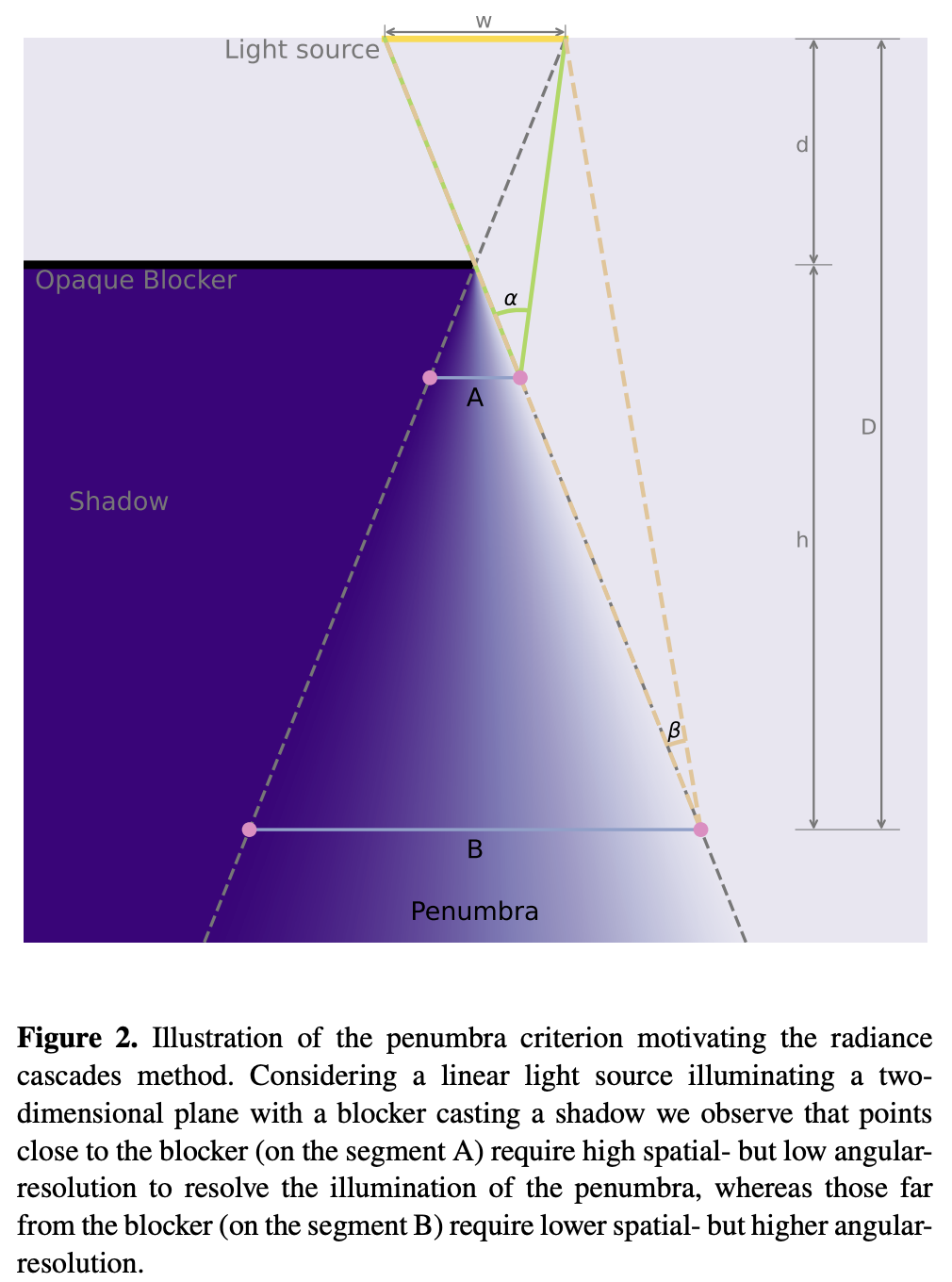
全体のパイプラインは次のとおりです。
let mut rc_enc = device_handle
    .device
    .create_command_encoder(&wgpu::CommandEncoderDescriptor {
        label: Some("rc_gi"),
    });
rp.encode_distance_pass();
rp.encode_rc_cascade_passes();
rp.encode_rc_mipmap();
rp.encode_rc_apply();
device_handle.queue.submit([rc_enc.finish()]);解析幾何から始めます。第 2 課 - 円を描く と 第 9 課 - 楕円と矩形を描く で、円、楕円、矩形の SDF はすでに紹介しました。図形の境界と図形の内部では距離は 0 です。下の図はこれをグレースケールで可視化したもので、元の距離を [0,1] に写像するときに saturate(d * DIST_FIELD_VIZ_SCALE) を使っています。
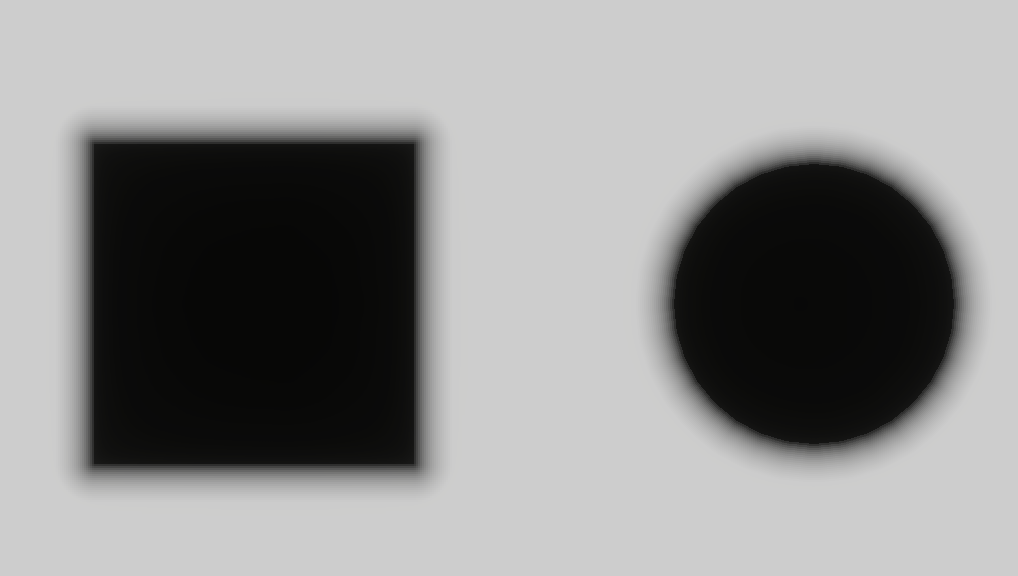
距離フィールドのテクスチャを生成するとき、頂点シェーダーは引き続きフルスクリーン三角形を使います(これまでのポストプロセスのパスに似ています)。prims はシーンの基本プリミティブの幾何を保持するので、sdf_prim が解析的な距離フィールドを評価できます。最終結果は rc_dist に書き込まれます。これはキャンバス全体のテクスチャで、R16F 形式の符号なし距離を格納します。
@group(0) @binding(0) var<uniform> header: DistHeader;
@group(0) @binding(1) var<storage, read> prims: array<GpuRcPrim>;

@fragment
fn dist_fs(i: VsOut) -> @location(0) vec4<f32> {
  var d = 1e6;
  let n = header.count;
  for (var i = 0u; i < 64u; i = i + 1u) {
    if i >= n { break; }
    d = min(d, sdf_prim(p_canvas, prims[i]));
  }
  // d is union SDF: inside <0, outside >0, boundary ~=0. R stores max(d,0): 0 inside and on edges, positive outside as distance to boundary.
  return vec4(max(d, 0.0), 0.0, 0.0, 1.0);
}
今のところ対応しているのは Rect、Ellipse、Line、Polyline だけです。ほかの SDF は distfunctions2d を参照してください。
bevy_radiance_cascades の実装は、距離フィールドを並列に生成する Jump Flood Algorithm(JFA)を使います。中心となる考え方は、指数関数的に小さくなる「ジャンプ幅」で、log₂(N) ラウンドのうちに情報を格子全体へ伝播させることです。
texture_2d<u32>(シード座標を格納します)。これによりレイマーチングは、固定のごく小さい刻みではなく、次の表面まで大きく安全な刻みで進めます。
Fundamentals of Radiance Cascades
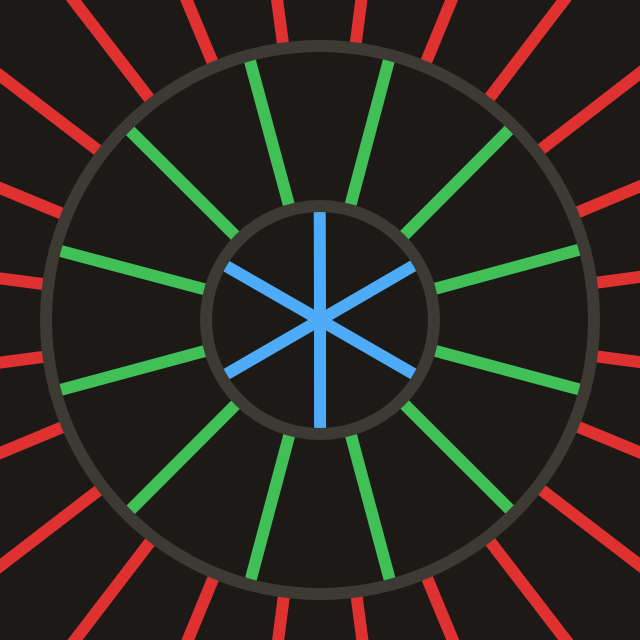
カスケードは基本的にプローブの格子で、すべてのプローブが同じ性質を持ちます。(たとえば区間の数、区間の長さ、プローブ間隔)
各 Probe の構造は次のとおりです。std140 アライメントで GPU に送るときは、パディングを考慮する必要があります。
pub struct Probe {
    pub width: u32, // texel footprint per probe and ray count (angular discretization)
    pub start: f32, // where this ray segment starts from the probe center
    pub range: f32, // how far this cascade traces along the ray from start
}

pub fn probe_for_cascade(c: u32, resolution_factor: u32, interval0: f32) -> Probe {
    let width = 1u32 << (c + resolution_factor);
    let start = interval0 * (1.0 - 4.0_f32.powi(c as i32)) / -3.0;
    let range = interval0 * 4.0_f32.powi(c as i32);
    Probe {
        width,
        start,
        range,
    }
}
キャンバスの対角線の長さから、必要なカスケード数を計算します。
pub fn cascade_count_for_gi_size(gi_w: u32, gi_h: u32) -> usize {
    let diag = ((gi_w * gi_w + gi_h * gi_h) as f32).sqrt();
    cascade_count_for_diagonal(diag, RC_INTERVAL0, RC_MAX_CASCADES).max(1)
}

pub const RC_INTERVAL0: f32 = 2.0;
pub const RC_MAX_CASCADES: usize = 16;
キャンバスを初期化するときに Probe のユニフォームを割り当てます。
for c in 0..cascade_count {
    let p = probe_for_cascade(c as u32, RC_RESOLUTION_FACTOR, RC_INTERVAL0);
    let slot = ProbeUniformSlotPadded::from_probe(&p);
    queue.write_buffer(
        &self.rc_probe_dynamic_buf,
        (c * PROBE_UNIFORM_STRIDE) as u64,
        bytemuck::bytes_of(&slot),
    );
}
CPU 側のスケジューリングは 2 つのパイプラインに分かれ、rc_ping_a と rc_ping_b の 2 枚のテクスチャが必要です。
let rc_usage =
    TextureUsages::STORAGE_BINDING | TextureUsages::TEXTURE_BINDING | TextureUsages::COPY_SRC;
let (rc_a, rc_a_view) = mk_sz(
    device,
    "rc_ping_a",
    TextureFormat::Rgba16Float,
    rc_usage,
    gi_width,
    gi_height,
);
// rc_ping_b is the same
1 つ目のパイプラインは rc_ping_a を読み、rc_ping_b に書き、最も遠い区間から始めます。
let mut pass = encoder.begin_compute_pass(&ComputePassDescriptor {
    label: Some("radiance_cascades_first_pass"),
    timestamp_writes: None,
});
pass.set_pipeline(&self.rc_cascade_first_pipeline);
pass.set_bind_group(0, &radiance_cascades_10, &[first_offset]);
pass.dispatch_workgroups(gw, gh, 1);
2 つ目のパイプラインは、ピンポンのために radiance_cascades_01 / 10 のバインドグループを交互に使います(rc_ping_a / rc_ping_b へ順番に書き込みます)。その後、各ステップで対応する Probe オフセットを使い、より小さい c に向かってレベルごとにマージします。
let mut merge_pass = encoder.begin_compute_pass(&ComputePassDescriptor {
    label: Some("radiance_cascades_merge_passes"),
    timestamp_writes: None,
});
merge_pass.set_pipeline(&self.rc_cascade_merge_pipeline);
for pass_i in 1..cascade_count {
    let cascade_idx = cascade_count - 1 - pass_i;
    let dyn_off = (cascade_idx * PROBE_UNIFORM_STRIDE) as u32;
    let merge_idx = pass_i - 1;
    let bg = if merge_idx % 2 == 0 {
        &radiance_cascades_01
    } else {
        &radiance_cascades_10
    };
    merge_pass.set_bind_group(0, bg, &[dyn_off]);
    merge_pass.dispatch_workgroups(gw, gh, 1);
}
最初のパスも、その後のピンポンのコンピュートパスも、同じレイのディスパッチ処理を使います。
@compute @workgroup_size(8, 8, 1)
fn rc_cascade_first(@builtin(global_invocation_id) gid: vec3<u32>) {
  radiance_dispatch(0u, gid);
}

@compute @workgroup_size(8, 8, 1)
fn rc_cascade_merge(@builtin(global_invocation_id) gid: vec3<u32>) {
  radiance_dispatch(1u, gid);
}各コンピュートシェーダーのスレッドは、GI カスケードテクスチャのテクセル 1 つを処理します。
width² ブロック内の局所位置から方向を選びます。start だけずらして、レイマーチの開始点を得ます。1 つのプローブブロックの中では、テクセルごとに方向が異なります。ブロックには width² 個の方向サンプルが詰まります。下の解説動画は Fundamentals of Radiance Cascades のものです。
let probe_texel = vec2<u32>(base_coord.x % probe_w, base_coord.y % probe_w);

// Flatten 2D local coords into ray IDs in 0 … probe_w²-1.
let ray_index = probe_texel.x + probe_texel.y * probe_w;
let ray_count = probe_w * probe_w;

// Uniformly split [0, 2π) into ray_count directions.
// +0.5 samples the center of each angular sector.
let ray_angle = (f32(ray_index) + 0.5) / f32(ray_count) * PI2;
let ray_dir = normalize(vec2(cos(ray_angle), sin(ray_angle)));

// Probe row/column index this texel belongs to.
let probe_cell = vec2<u32>(base_coord.x / probe_w, base_coord.y / probe_w);
// Top-left coordinate of this probe in GI texture.
let probe_coord = vec2<u32>(probe_cell.x * probe_w, probe_cell.y * probe_w);
// Probe center in GI texture.
let probe_coord_center = probe_coord + vec2<u32>(probe_w / 2u, probe_w / 2u);
// Probe center in full resolution.
let center_full = vec2<f32>(probe_coord_center) * rs.gi_scale;ヒットがなくマージが有効なら、merge() を通じて上のカスケードから補間した放射輝度を足します。
@group(0) @binding(5) var tex_radiance_cascades_destination: texture_storage_2d<rgba16float, write>;

fn radiance_dispatch(merge_flag: u32, gid: vec3<u32>) {
  // ...

  // Start from center + ray_dir * probe.start, not exactly at center.
  // Inner cascades already cover near field; this cascade handles farther range only.
  let origin = center_full + ray_dir * ru.probe_start;
  var color = raymarch(origin, ray_dir, ru.probe_range);
  if merge_flag != 0u && color.a != 1.0 {
    color = color + merge(probe_cell, ray_index);
  }
  textureStore(tex_radiance_cascades_destination, ...);
}ピクセルから出発してある方向へ進む各レイは、最大 MAX_RAYMARCH 歩まで進みます。各歩で、先に生成した距離フィールド tex_dist_field をサンプリングし、dist だけ前へ進みます。距離が < EPSILON なら表面に当たった(または幾何の内部にいる)とみなし、色は tex_main から直接サンプリングします。
fn raymarch(origin: vec2<f32>, ray_dir: vec2<f32>, range: f32) -> vec4<f32> {
    // ...
    var color = vec4(0.0);
    var covered_range = 0.0;
    for (var r = 0u; r < MAX_RAYMARCH; r = r + 1u) {
        if ( // termination
            covered_range >= range ||
            any(position >= dimensions)
        ) {
            break;
        }

        var dist = textureLoad(tex_dist_field, coord, 0).r;
        if (dist < EPSILON) {
            color = textureLoad(tex_main, coord, 0);
            break;
        }
        position = position + ray_dir * dist;
        covered_range = covered_range + dist;
    }
    return color;
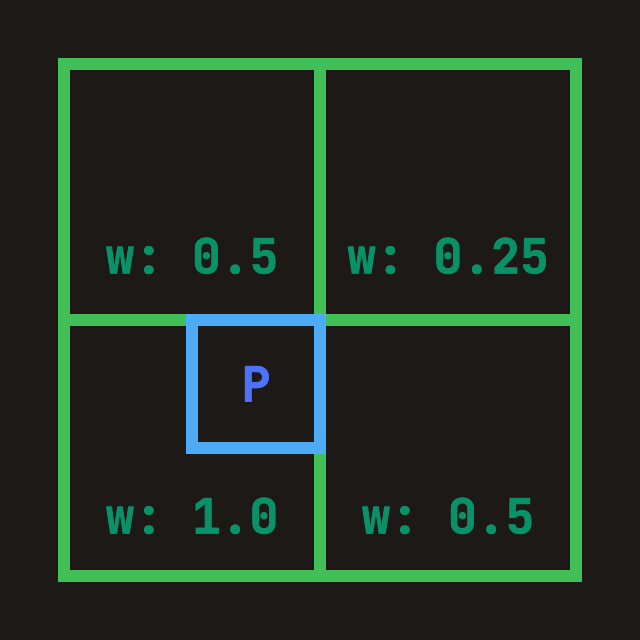
}「内側(より細かい)カスケードを現在のレイヤーへマージ」します。現在のプローブ幅が W なら、直前のカスケード(すでに tex_radiance_cascades_source に書き込み済み)は prev_width = 2W です。つまりプローブの辺の長さが 2 倍、方向サンプルは 4 倍です。マージでは次を行います。
ray_index*4 … +3)を、現在の粗い方向へ対応づけます。fn merge(probe_cell: vec2<u32>, ray_index: u32) -> vec4<f32> {
let dimensions = textureDimensions(tex_radiance_cascades_source);
// Probe edge length in previous cascade texture.
// Current is W, previous is 2W, so previous has 4x rays.
let prev_width = probe.width * 2u;
let prev_ray_index_start = ray_index * 4u;
for (var p = 0u; p < 4u; p = p + 1u) {
let prev_ray_index = prev_ray_index_start + p;
let offset_coord = vec2<u32>(
prev_ray_index % prev_width,
prev_ray_index / prev_width,
);
// Sample all four spatial corners
TL = TL + fetch_cascade(
probe_cell_i,
probe_correction_offset + vec2<i32>(-1, -1),
offset_coord,
dimensions,
prev_width,
);
// TR / BL / BR omitted
}
let weight = vec2<f32>(0.75, 0.75)
- vec2<f32>(f32(probe_correction_offset.x), f32(probe_correction_offset.y)) * 0.5;
// Bilinear interpolation over accumulated corner radiance.
return mix(mix(TL, TR, weight.x), mix(BL, BR, weight.x), weight.y)
// Average the 4 fine rays into one coarse-direction result.
* 0.25;
}
WebGPU Inspector で、rc_ping_b にある最終的なマージ結果を調べられます。ヒットしなかった領域が埋められ、より滑らかな半影になることがはっきり分かります。
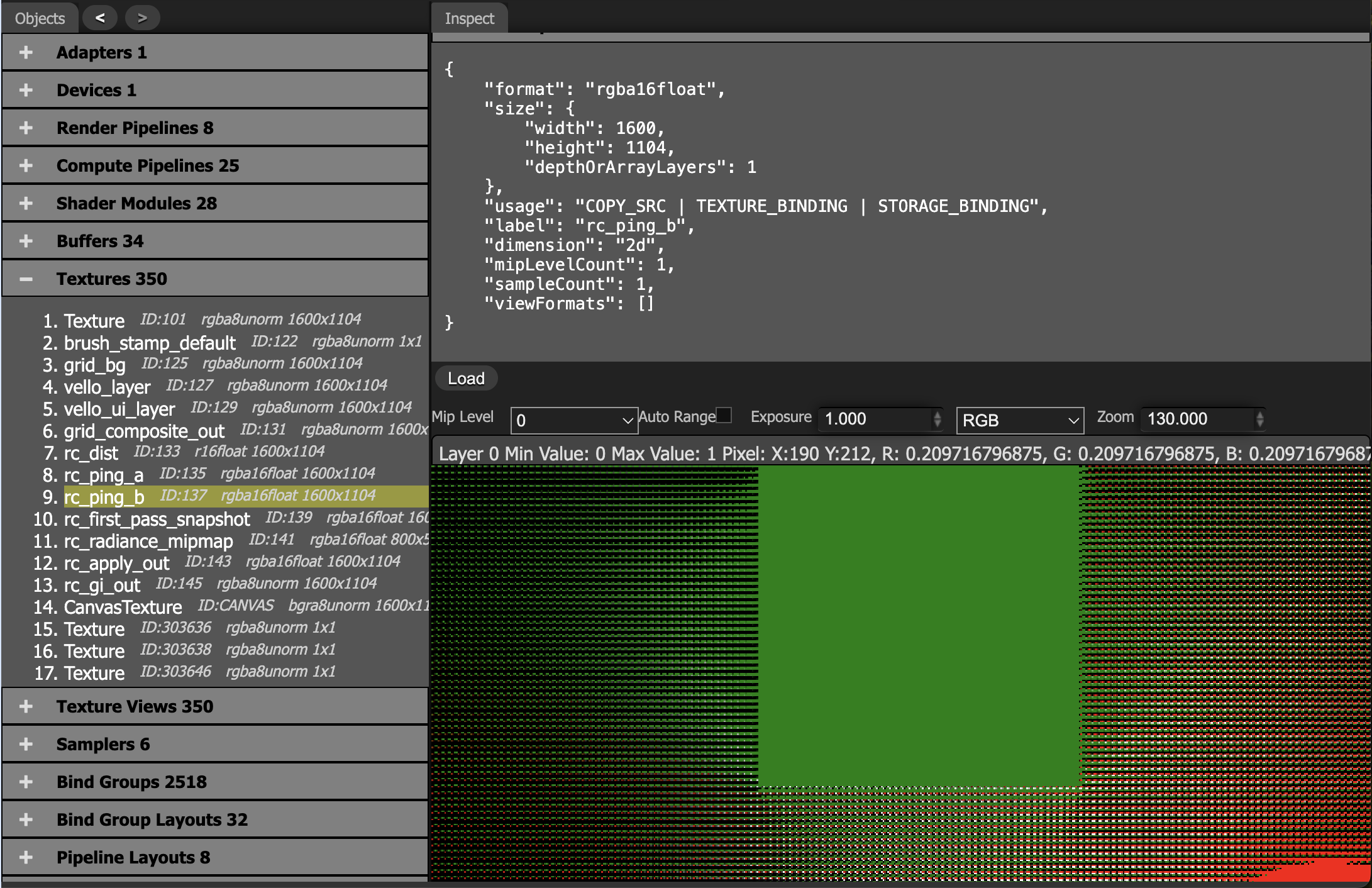
プローブ間隔が影のディテールのスケールより大きくなると、補間が明暗の境界をぼかします。
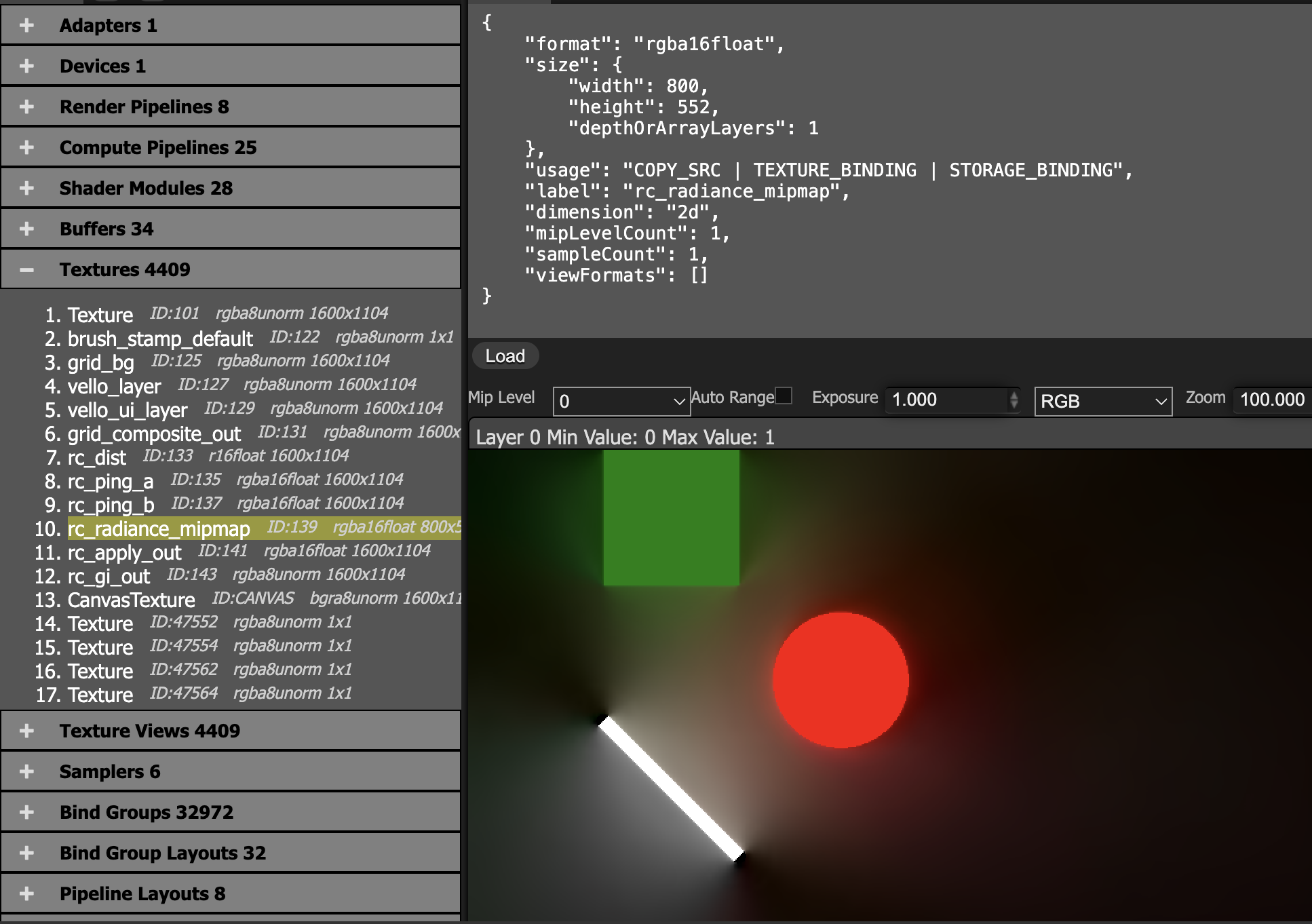
最終カスケードの結果をプローブ格子上で平均し、ダウンサンプリングした radiance_mipmap へ書き込みます。
@group(0) @binding(0) var<uniform> probe: MipmapProbe;
@group(0) @binding(1) var tex_radiance_cascades: texture_2d<f32>;
@group(0) @binding(2) var tex_radiance_mipmap: texture_storage_2d<rgba16float, write>;

@compute @workgroup_size(8, 8, 1)
fn rc_radiance_mipmap(@builtin(global_invocation_id) global_id: vec3<u32>) {
  let base_coord = global_id.xy;
  let dimensions = textureDimensions(tex_radiance_mipmap);
  if any(base_coord >= dimensions) {
    return;
  }
  let pw = probe.width;
  let ray_count = pw * 2u;
  let probe_cell = base_coord * vec2<u32>(pw, pw);
  var accumulation = vec4(0.0);
  for (var y = 0u; y < pw; y = y + 1u) {
    for (var x = 0u; x < pw; x = x + 1u) {
      let coord = vec2<i32>(i32(probe_cell.x + x), i32(probe_cell.y + y));
      accumulation = accumulation + textureLoad(tex_radiance_cascades, coord, 0);
    }
  }
  accumulation = accumulation / f32(ray_count);
  textureStore(tex_radiance_mipmap, vec2<i32>(base_coord), accumulation);
}
main + radiance_mipmap: 間接光をメインの色へ足し戻します。
@group(0) @binding(0) var tex_main: texture_2d<f32>;
@group(0) @binding(1) var sampler_main: sampler;
@group(0) @binding(2) var tex_radiance_mipmap: texture_2d<f32>;
@group(0) @binding(3) var sampler_radiance_mipmap: sampler;

@fragment
fn rc_apply_fs(i: VsOut) -> @location(0) vec4<f32> {
  let uv = vec2(i.ndc.x * 0.5 + 0.5, 0.5 - i.ndc.y * 0.5);
  let main = textureSample(tex_main, sampler_main, uv);
  let radiance = textureSample(tex_radiance_mipmap, sampler_radiance_mipmap, uv);
  return main + radiance;
}
ミップマップには線形サンプラーを使います。
let sampler_rc_mipmap = device.create_sampler(&SamplerDescriptor {
    label: Some("rc_mipmap_sampler"),
    mag_filter: FilterMode::Linear,
    min_filter: FilterMode::Linear,
    mipmap_filter: MipmapFilterMode::Nearest,
    ..Default::default()
});| 古典的 RC(2024 年以前) | ホログラフィック RC(HRC) |
|---|---|
| 離散プローブ: レイの平均を格子点に格納します | ホログラフィック境界: 方向性のある照明を境界に格納します |
| 双線形補間: 硬い影の縁をやわらげます | 境界積分再構成: 不連続を保ちます |
| ソフトシャドウのみ: 間接光や環境光に向きます | ハード+ソフトシャドウ: 点光源のくっきりした影の縁を保ちます |