第 8 課 - 最佳化效能
在本課中,你將學到以下內容:
- 什麼是繪製呼叫
- 用剔除減少繪製呼叫
- 用合併批次減少繪製呼叫
- 使用空間索引提升拾取效率
- 以 GPU 為基礎的顏色拾取
效能最佳化是一項複雜且長期的工作,我傾向在專案早期就著手處理。先前我們學過如何用 SDF 繪製圓形,現在來做一次效能測試,繪製 1000 個圓,FPS 大約是 35:
$icCanvas = call(() => {
    return document.createElement('ic-canvas-lesson7');
});call(() => {
const { Canvas, Circle } = Lesson7;
const stats = new Stats();
stats.showPanel(0);
const $stats = stats.dom;
$stats.style.position = 'absolute';
$stats.style.left = '0px';
$stats.style.top = '0px';
$icCanvas.parentElement.style.position = 'relative';
$icCanvas.parentElement.appendChild($stats);
$icCanvas.addEventListener('ic-ready', (e) => {
const canvas = e.detail;
for (let i = 0; i < 100; i++) {
const circle = new Circle({
cx: Math.random() * 400,
cy: Math.random() * 200,
r: Math.random() * 20,
fill: 'red',
});
canvas.appendChild(circle);
}
});
$icCanvas.addEventListener('ic-frame', (e) => {
stats.update();
});
});我們使用 stats.js 測量 FPS,並建立放在畫布左上角的面板。目前顯然並不流暢:
const stats = new Stats();
stats.showPanel(0); // Only show FPS panel

const animate = () => {
    // Trigger updating
    if (stats) {
        stats.update();
    }
    canvas.render();
    requestAnimationFrame(animate);
};
使用第一課介紹過的 Spector.js,可以看到大量繪製命令。我已篩選到 drawElements 命令,事實上每個圓都對應若干 WebGL 命令(包括建立緩衝區等)。
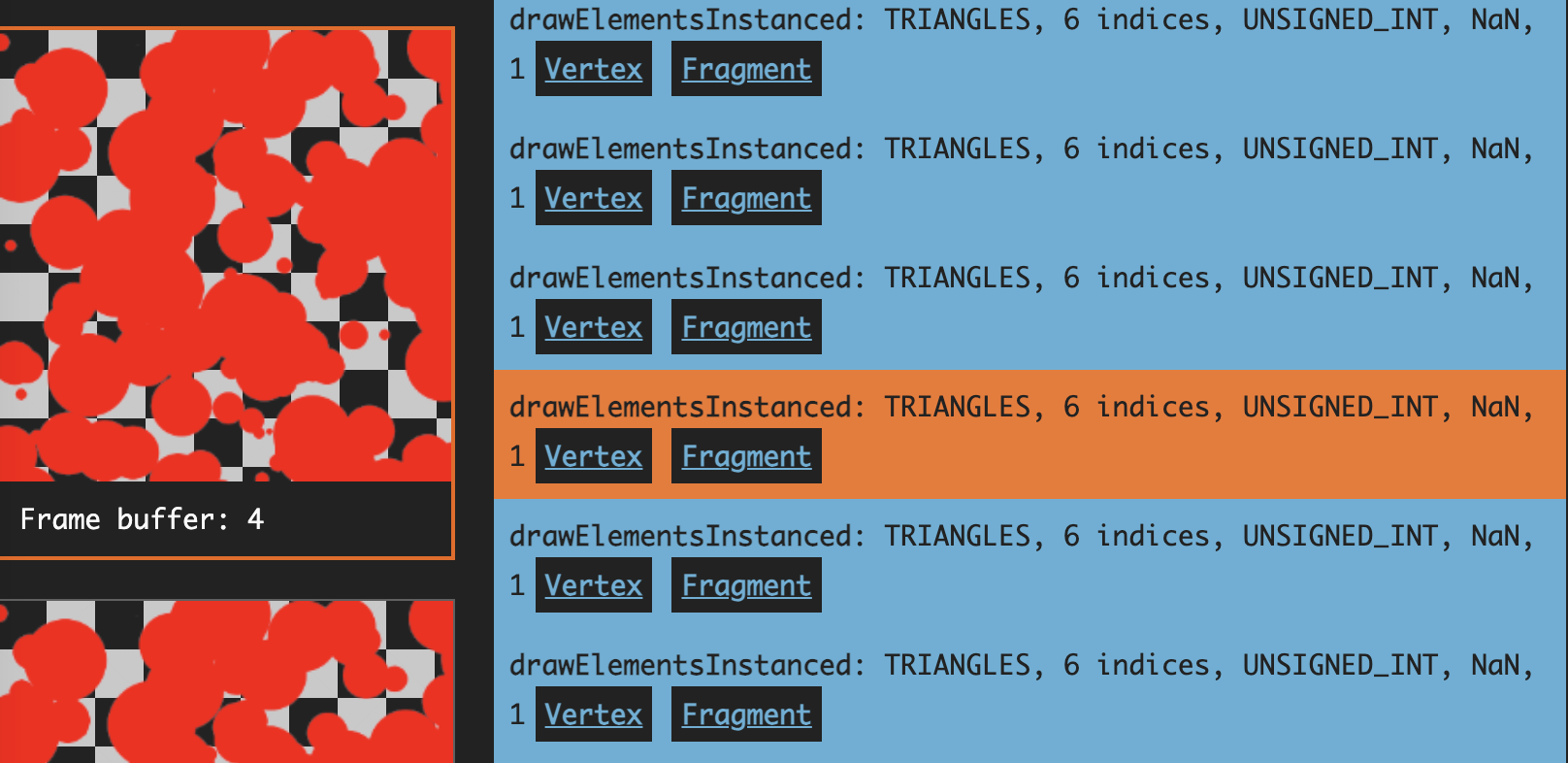
什麼是繪製呼叫
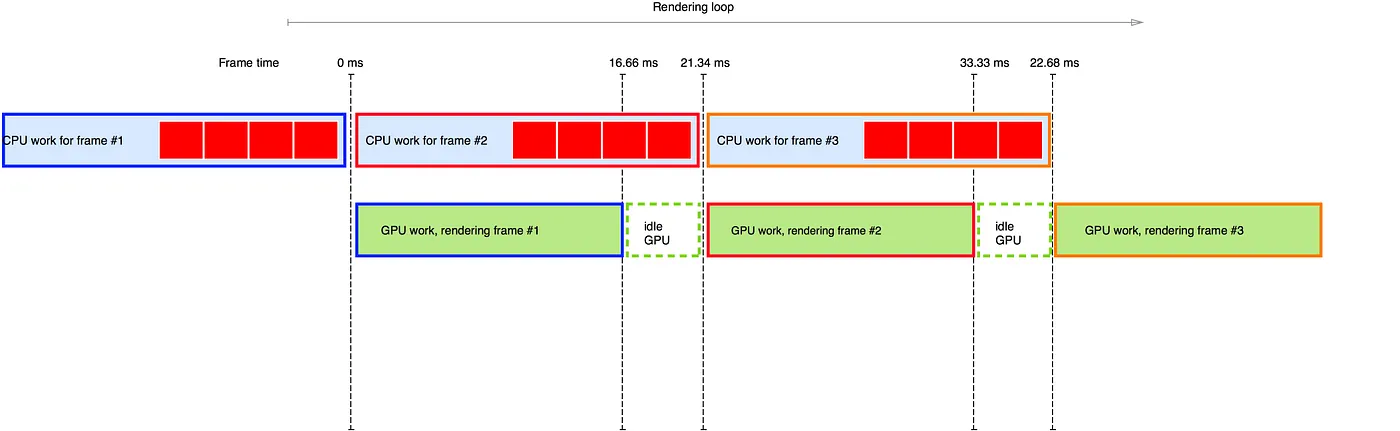
這些繪製命令稱為 Draw call(繪製呼叫)。下方這張來自 繪製呼叫簡述 的圖說明了為什麼繪製呼叫變多會影響效能。因為所有繪製呼叫都由 CPU 發起,數量增加時,CPU 需要更長的時間做準備;GPU 雖然渲染得更快,卻仍須等待,閒置時間很多,所以瓶頸在 CPU。
那麼要如何減少繪製呼叫?通常有兩種思路:
- 視埠剔除。
- 繪製呼叫批次處理。
視埠剔除
視埠外的圖形不需要渲染。下方這張來自 Unreal 剔除如何運作 的圖,以上帝視角顯示相機視錐之外被剔除的紅色物件,可以看出這能大幅減少不必要的繪製呼叫。

3D 場景中有許多基於相機視錐剔除演算法的最佳化,如 高效率的視錐剔除 所述。例如可以利用場景圖資訊:如果某個圖形已經完全在視錐內,就不需要再檢測它的子節點。
各個渲染引擎都提供了對應功能,例如:
與 3D 場景相比,我們的 2D 畫布實作起來簡單得多。那麼要如何判斷一個圖形是否在視埠內?這時就要用到包圍盒的概念。當然也不一定要用包圍盒,在 3D 場景中可以改用包圍球。
軸對齊包圍盒
軸對齊包圍盒(Axis-Aligned Bounding Box,簡稱 AABB)是 3D 圖學中常用的簡單包圍盒,與世界座標系的各軸平行。換句話說,它的邊與座標軸方向一致。軸對齊包圍盒通常是長方體,用來以簡化的盒子表示一個物件或一組物件在空間中所佔的區域。在我們的 2D 場景中它是一個矩形,只需要儲存左上角的 minX/Y 與右下角的 maxX/Y 座標:
export class AABB {
    minX: number;
    minY: number;
    maxX: number;
    maxY: number;
    matrix: Matrix;

    isEmpty() {
        return this.minX > this.maxX || this.minY > this.maxY;
    }
}
接下來為圖形加上取得包圍盒的方法。以圓為例,要把圓心、半徑與線寬都考慮進去。這裡也使用了 髒旗標,只有相關屬性改變時才重新計算:
export class Circle extends Shape {
    getRenderBounds() {
        if (this.renderBoundsDirtyFlag) {
            const halfLineWidth = this.#strokeWidth / 2;
            this.renderBoundsDirtyFlag = false;
            this.renderBounds = new AABB(
                this.#cx - this.#r - halfLineWidth,
                this.#cy - this.#r - halfLineWidth,
                this.#cx + this.#r + halfLineWidth,
                this.#cy + this.#r + halfLineWidth,
            );
        }
        return this.renderBounds;
    }
}
加入剔除外掛
加入一個剔除外掛,保存視埠對應的包圍盒,之後再與每個圖形的包圍盒做相交測試。考慮到相機變換,我們取得視埠四個頂點在世界座標系中的座標,再用一個包圍盒把它們框起來。每次相機改變時都會更新這個包圍盒。
export class Culling implements Plugin {
    #viewport: AABB = new AABB();

    private updateViewport() {
        const {
            camera,
            api: { viewport2Canvas },
        } = this.#context;
        const { width, height } = camera;

        // tl, tr, br, bl
        const tl = viewport2Canvas({
            x: 0,
            y: 0,
        });

        this.#viewport.minX = Math.min(tl.x, tr.x, br.x, bl.x);
        this.#viewport.minY = Math.min(tl.y, tr.y, br.y, bl.y);
        this.#viewport.maxX = Math.max(tl.x, tr.x, br.x, bl.x);
        this.#viewport.maxY = Math.max(tl.y, tr.y, br.y, bl.y);
    }
}
在每一幀開始時走訪場景圖,判斷圖形的包圍盒是否與視埠相交;如果不相交,就把 culled 設為 true,渲染時便可跳過:
hooks.beginFrame.tap(() => {
    const { minX, minY, maxX, maxY } = this.#viewport;

    traverse(root, (shape) => {
        if (shape.renderable && shape.cullable) {
            const bounds = shape.getBounds();
            shape.culled =
                bounds.minX >= maxX ||
                bounds.minY >= maxY ||
                bounds.maxX <= minX ||
                bounds.maxY <= minY;
        }

        return shape.culled;
    });
});
看一下效果。放大與縮小時,被剔除的圖形數量會改變,被剔除的圖形越多,FPS 就越高:
$total = call(() => {
    return document.createElement('div');
});$culled = call(() => {
return document.createElement('div');
});$icCanvas2 = call(() => {
return document.createElement('ic-canvas-lesson8');
});call(() => {
const { Canvas, Circle } = Lesson8;
const stats = new Stats();
stats.showPanel(0);
const $stats = stats.dom;
$stats.style.position = 'absolute';
$stats.style.left = '0px';
$stats.style.top = '0px';
$icCanvas2.parentElement.style.position = 'relative';
$icCanvas2.parentElement.appendChild($stats);
const circles = [];
$icCanvas2.addEventListener('ic-ready', (e) => {
const canvas = e.detail;
for (let i = 0; i < 500; i++) {
const circle = new Circle({
cx: Math.random() * 1000,
cy: Math.random() * 1000,
r: Math.random() * 20,
fill: `rgb(${Math.floor(Math.random() * 255)},${Math.floor(
Math.random() * 255,
)},${Math.floor(Math.random() * 255)})`,
batchable: false,
// cullable: false,
});
canvas.appendChild(circle);
circles.push(circle);
}
});
$icCanvas2.addEventListener('ic-frame', (e) => {
stats.update();
const total = circles.length;
const culled = circles.filter((circle) => circle.culled).length;
$total.innerHTML = `total: ${total}`;
$culled.innerHTML = `culled: ${culled}`;
});
});當視埠包含所有圖形時,沒有任何圖形可以被剔除,這時就必須用其他方法減少繪製呼叫。
批次渲染
能夠合併的繪製呼叫需要滿足某些條件,例如幾何相近、使用相同的著色器等。繪製呼叫批次處理 - Unity 提供了兩種做法:
- 靜態批次處理 適用於靜止物件,把它們變換到世界座標系,並共用頂點陣列。完成之後,就不能再對個別物件套用變換。
- 動態批次處理 適用於移動中的物件。在 CPU 端把頂點變換到世界座標系,但變換本身有額外開銷。
Pixi.js 也有內建的批次渲染系統,一直沿用到目前正在開發的 V8:深入 PixiJS:批次渲染系統。
首先把渲染邏輯從圖形中分離出來,這樣才合理;圖形不應該關心自己是如何被渲染的:
class Circle {
    render(device: Device, renderPass: RenderPass, uniformBuffer: Buffer) {}
}
先前走訪場景圖時,我們會立刻觸發圖形的渲染邏輯;現在則把圖形加入待渲染佇列,等待合併後一起輸出:
hooks.render.tap((shape) => {
    shape.render();
    if (shape.renderable) {
        this.#batchManager.add(shape);
    }
});
接著抽象出 Drawcall 類別,讓先前實作的 SDF 繼承它。它包含下列生命週期:
export abstract class Drawcall {
    abstract createGeometry(): void;
    abstract createMaterial(uniformBuffer: Buffer): void;
    abstract render(renderPass: RenderPass): void;
    abstract destroy(): void;
}

export class SDF extends Drawcall {}
實例化
對於大量相似的圖形,WebGL2 最佳化 - 實例化繪製 可以顯著減少繪製呼叫次數。Three.js 中這稱為 InstancedMesh。Babylon.js 也提供 Instances,可以將每個實例專屬的屬性(例如變換矩陣、顏色等)作為頂點陣列傳入:
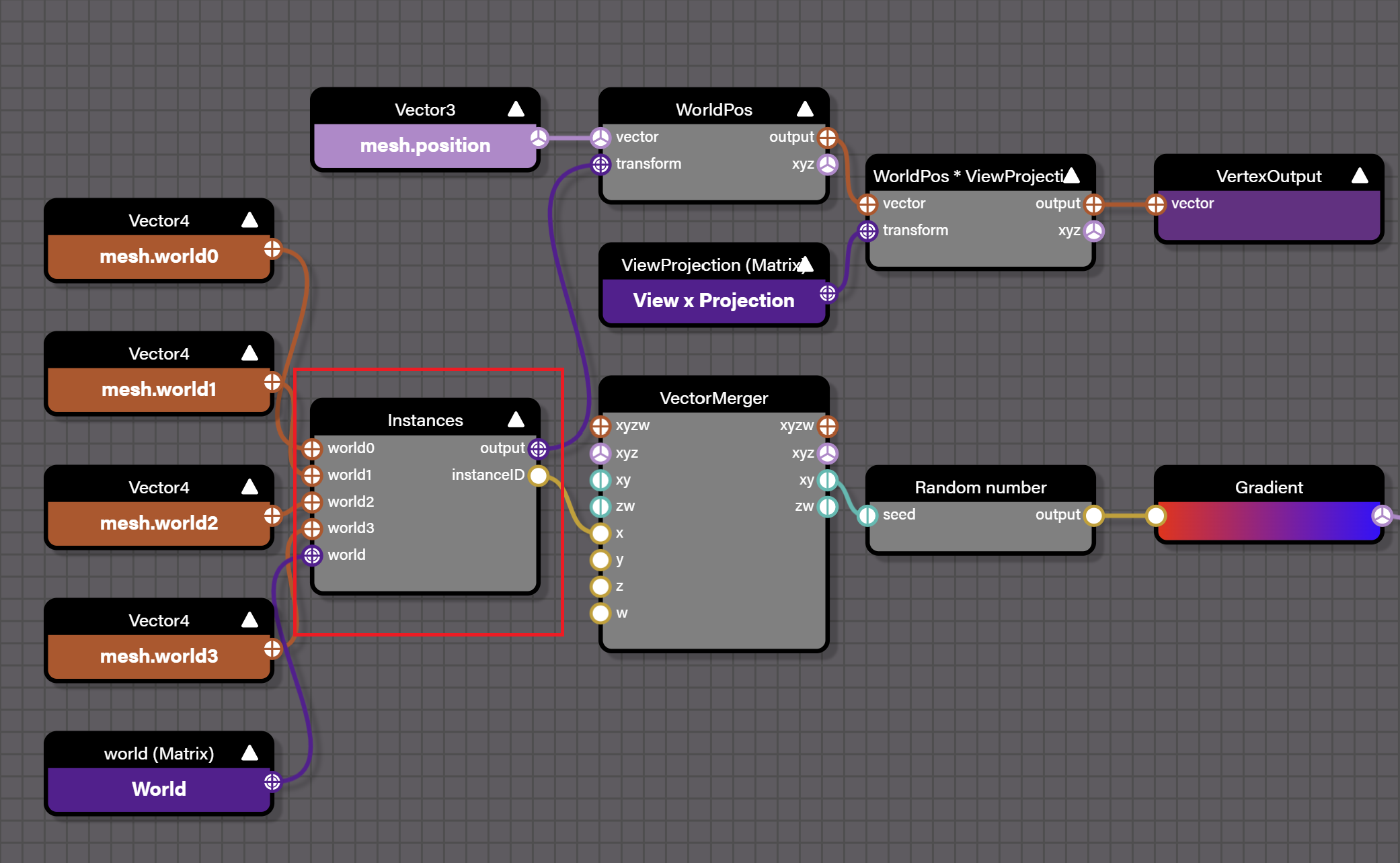
#ifdef INSTANCES
  attribute vec4 world0;
  attribute vec4 world1;
  attribute vec4 world2;
  attribute vec4 world3;

  finalWorld = mat4(world0, world1, world2, world3);
#endif
由於我們只考慮 2D 場景,變換矩陣只需要儲存 6 個分量:
#ifdef USE_INSTANCES
  layout(location = 14) in vec4 a_Abcd;
  layout(location = 15) in vec2 a_Txty;

  model = mat3(a_Abcd.x, a_Abcd.y, 0, a_Abcd.z, a_Abcd.w, 0, a_Txty.x, a_Txty.y, 1);
#endif
值得一提的是,各個實例的變換矩陣除了直接存在頂點資料中,也可以存在資料紋理裡,再由頂點陣列中的索引引用: 在單一次繪製呼叫中繪製許多不同模型
我們為 Drawcall 加上 instanced 旗標:
export abstract class Drawcall {
    constructor(protected device: Device, protected instanced: boolean) {}
}
根據這個旗標,在著色器開頭加入 define 預編譯指令:
export class SDF extends Drawcall {
  createMaterial(uniformBuffer: Buffer): void {
    let defines = '';
    if (this.instanced) {
      defines += '#define USE_INSTANCES\n';
    }
  }
}
這樣模型變換矩陣就可以從 attribute 或 uniform 計算得出:
void main() {
  mat3 model;
  #ifdef USE_INSTANCES
    model = mat3(a_Abcd.x, a_Abcd.y, 0, a_Abcd.z, a_Abcd.w, 0, a_Txty.x, a_Txty.y, 1);
  #else
    model = u_ModelMatrix;
  #endif
}
這時可以用 Spector.js 看到,即使視埠中有 1000 個圓,也可以用單一次繪製呼叫完成:

也可以限制一個 Drawcall 中的最大實例數:每次建立前先檢查,若超過就重新建立:
export abstract class Drawcall {
    protected maxInstances = Infinity;
    validate() {
        return this.count() <= this.maxInstances - 1;
    }
}
渲染順序
既然我們用單一次繪製呼叫畫出多個圖形,就必須注意繪製順序。實例陣列中每個元素的位置不一定等於最終的繪製順序,因此在真正繪製之前,要先為每個圖形指定一個值,再把該值正規化到 [0, 1],作為深度值傳入著色器:
export class Renderer implements Plugin {
  apply(context: PluginContext) {
    hooks.render.tap((shape) => {
      shape.globalRenderOrder = this.#zIndexCounter++;
    });

    hooks.beginFrame.tap(() => {
      this.#zIndexCounter = 0;
    });
  }
}
接著開啟 深度測試,並把測試方法改為:深度值大於目前深度緩衝區儲存值(範圍在 [0, 1])時才寫入(WebGL 預設為 gl.LESS)。在我們的情境中,ZIndex 較大的圖形會覆蓋較小的圖形。
export class SDF extends Drawcall {
    createMaterial(uniformBuffer: Buffer): void {
        this.#pipeline = this.device.createRenderPipeline({
            megaStateDescriptor: {
                depthWrite: true,
                depthCompare: CompareFunction.GREATER,
            },
        });
    }
}
最後,建立 RenderPass 時額外建立一個深度 RenderTarget:
this.#renderPass = this.#device.createRenderPass({
    colorAttachment: [this.#renderTarget],
    colorResolveTo: [onscreenTexture],
    colorClearColor: [TransparentWhite],
    depthStencilAttachment: this.#depthRenderTarget,
    depthClearValue: 1,
});
看一下同時開啟剔除與批次最佳化後,繪製 5000 個圓的效果:
$icCanvas3 = call(() => {
    return document.createElement('ic-canvas-lesson8');
});$total2 = call(() => {
return document.createElement('div');
});$culled2 = call(() => {
return document.createElement('div');
});call(() => {
const { Canvas, Circle } = Lesson8;
const stats = new Stats();
stats.showPanel(0);
const $stats = stats.dom;
$stats.style.position = 'absolute';
$stats.style.left = '0px';
$stats.style.top = '0px';
$icCanvas3.parentElement.style.position = 'relative';
$icCanvas3.parentElement.appendChild($stats);
const circles = [];
$icCanvas3.addEventListener('ic-ready', (e) => {
const canvas = e.detail;
for (let i = 0; i < 5000; i++) {
const circle = new Circle({
cx: Math.random() * 1000,
cy: Math.random() * 1000,
r: Math.random() * 20,
fill: `rgb(${Math.floor(Math.random() * 255)},${Math.floor(
Math.random() * 255,
)},${Math.floor(Math.random() * 255)})`,
batchable: true,
cullable: true,
});
canvas.appendChild(circle);
circles.push(circle);
}
});
$icCanvas3.addEventListener('ic-frame', (e) => {
stats.update();
const total = circles.length;
const culled = circles.filter((circle) => circle.culled).length;
$total2.innerHTML = `total: ${total}`;
$culled2.innerHTML = `culled: ${culled}`;
});
});停用剔除
在某些情境下,啟用剔除反而可能增加效能開銷。
最佳化拾取效能
接下來,我們為每個 Circle 加上 pointerenter/leave 事件監聽器,藉此測量拾取效能:
circle.addEventListener('pointerenter', () => {
    circle.fill = 'red';
});
circle.addEventListener('pointerleave', () => {
    circle.fill = fill;
});
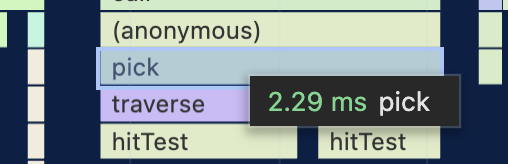
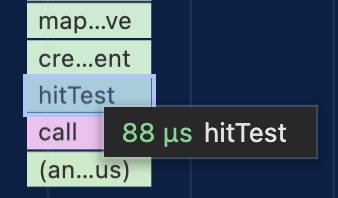
20000 個 Circle 的拾取花費了下列時間:
圖形的 AABB 可以用於基於視埠的剔除,與數學方法相比,能更快做出近似判斷。
使用空間索引
空間索引是用來高效處理空間資料與查詢操作的資料結構,尤其常見於地理資訊系統(GIS)、電腦圖學、3D 遊戲開發與資料庫技術。空間索引的主要目的,是減少在大量資料中搜尋特定空間物件所需的計算量與時間。空間索引有多種資料結構,例如四元樹、八元樹、R-tree、K-d tree 等。每種結構都有自己的適用情境與優點。
在 PIXI.js 生態系中,有 pixi-spatial-hash 這類函式庫會在每一幀建立新的空間索引。不過它目前似乎缺少維護。
我們使用 rbush,它支援批次插入,通常比逐幀插入快 2 到 3 倍,mapbox 也使用它。
import RBush from 'rbush';
const rBushRoot = new RBush<RBushNodeAABB>();

export interface RBushNodeAABB {
    shape: Shape;
    minX: number;
    minY: number;
    maxX: number;
    maxY: number;
}
RBush 搜尋
RBush 提供區域查詢函式 search,傳入一個查詢盒,就會回傳命中的圖形清單:
export class Canvas {
    elementsFromBBox(
        minX: number,
        minY: number,
        maxX: number,
        maxY: number,
    ): Shape[] {
        const { rBushRoot } = this.#pluginContext;
        const rBushNodes = rBushRoot.search({ minX, minY, maxX, maxY });

        const hitTestList: Shape[] = [];
        rBushNodes.forEach(({ shape }) => {
            // Omit the process of handling the visibility and pointerEvents properties of shape.
        });
        // Sort by global render order.
        hitTestList.sort((a, b) => a.globalRenderOrder - b.globalRenderOrder);

        return hitTestList;
    }
}
在 拾取外掛 中我們使用上述區域查找方法,當然傳入的是一個點,而不是 AABB:
export class Picker implements Plugin {
  apply(context: PluginContext) {
    hooks.pickSync.tap((result: PickingResult) => {
      const {
        position: { x, y },
      } = result;

      const picked: Shape[] = [root];
      elementsFromBBox(x, y, x, y).forEach((shape) => {
        if (this.hitTest(shape, x, y)) {
          picked.unshift(shape);
        }
      });
      result.picked = picked;
      return result;
    });
  }
}
再測量一次,20000 個 Circle 的拾取時間變成 0.088ms,大約提升了 20 倍!
以 GPU 為基礎的顏色拾取
在前一節 拾取 中,我們提過數學拾取之外的另一種做法:以 GPU 為基礎的顏色拾取。在 deck.gl 中這稱為 顏色拾取。