第 18 課 - 以 ECS 重構
我決定在這個時間點進行重構。從這一課開始,我們會實作下面兩個 npm 套件:
- @infinite-canvas-tutorial/ecs 使用 Becsy 實作 ECS,並包含內建的外掛、Component 與 System。
- @infinite-canvas-tutorial/webcomponents 基於 Spectrum 實作 UI,取代 第 7 課 使用的 Shoelace。不過別擔心,兩者都基於 Lit 實作。
目前我們使用 TypeScript Mixin 實作元件,但這種以繼承為基礎的做法有明顯問題,也就是層層相疊的元件類別很難維護:
// Current approach
export const Shape = Shapable(Renderable(Sortable(Transformable(EventTarget))));
const shape = new Shape();

// ECS approach
const shape = world.spawn(Renderable, Sortable, Transformable);
ECS 很擅長處理組合,可以依需要彈性增強實體的能力,正如 A-Frame 中的 Entity-Component-System 所強調的。
ECS 的好處包括:
- 透過混搭可重用的部分來定義物件時,彈性更大。
- 消除長繼承鏈裡,功能彼此糾結所帶來的問題。
值得一提的是,A-Frame 是知名的 Three.js 框架,它對宣告式 ECS 的用法令人印象深刻。 在遊戲引擎中,ECS 的使用更為廣泛,例如 Unity 的 ECS 與 Bevy ECS,我們的實作主要參考後者。
什麼是 ECS 架構
ecs-faq 整理了各種語言中常見的問題、資源與實作,值得一看。這裡引用 Bevy ECS 的介紹:
Bevy 中的所有應用程式邏輯都使用 Entity Component System 典範,通常簡稱為 ECS。ECS 是一種軟體模式,它把程式拆成 Entity、Component 與 System。Entity 是獨特的「東西」,會被指派一組 Component,再由 System 處理。
下面這張來自 ECSY 架構 的圖,直觀呈現了這些部分之間的關係:
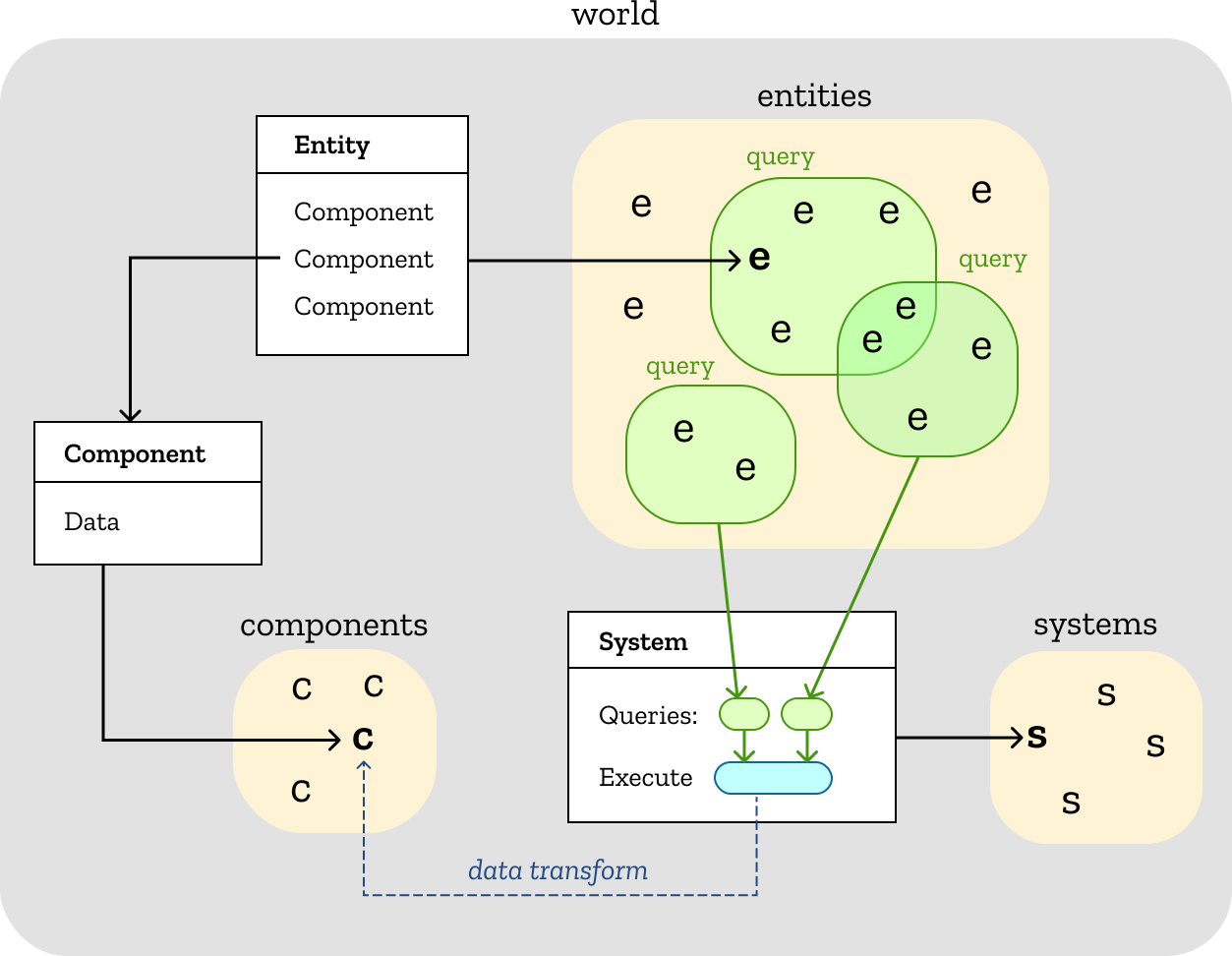
Entity 與 Component 的關係,可以從關聯式資料庫的資料表來理解:前者對應一列資料,後者對應欄位:

從呼叫端來看,比較容易理解 組合優於繼承 的原則。同時也可以看到,Entity 與 Component 不包含具體的處理邏輯,只有相關聯的資料。
commands.spawn(Position(10, 20), Color(255, 0, 0)); // Entity #1
commands.spawn(Position(30, 40), Color(0, 255, 0)); // Entity #2
每個 System 透過 Query 選出它關心的、帶有特定 Component 的 Entity 清單,好比用 SQL 查詢資料表:
// @see https://bevyengine.org/learn/quick-start/getting-started/ecs/#your-first-query
fn print_position_system(query: Query<&Position>) {
    for position in &query {
        println!("position: {} {}", position.x, position.y);
    }
}
從整體來看,整個應用程式被分成多個 System:
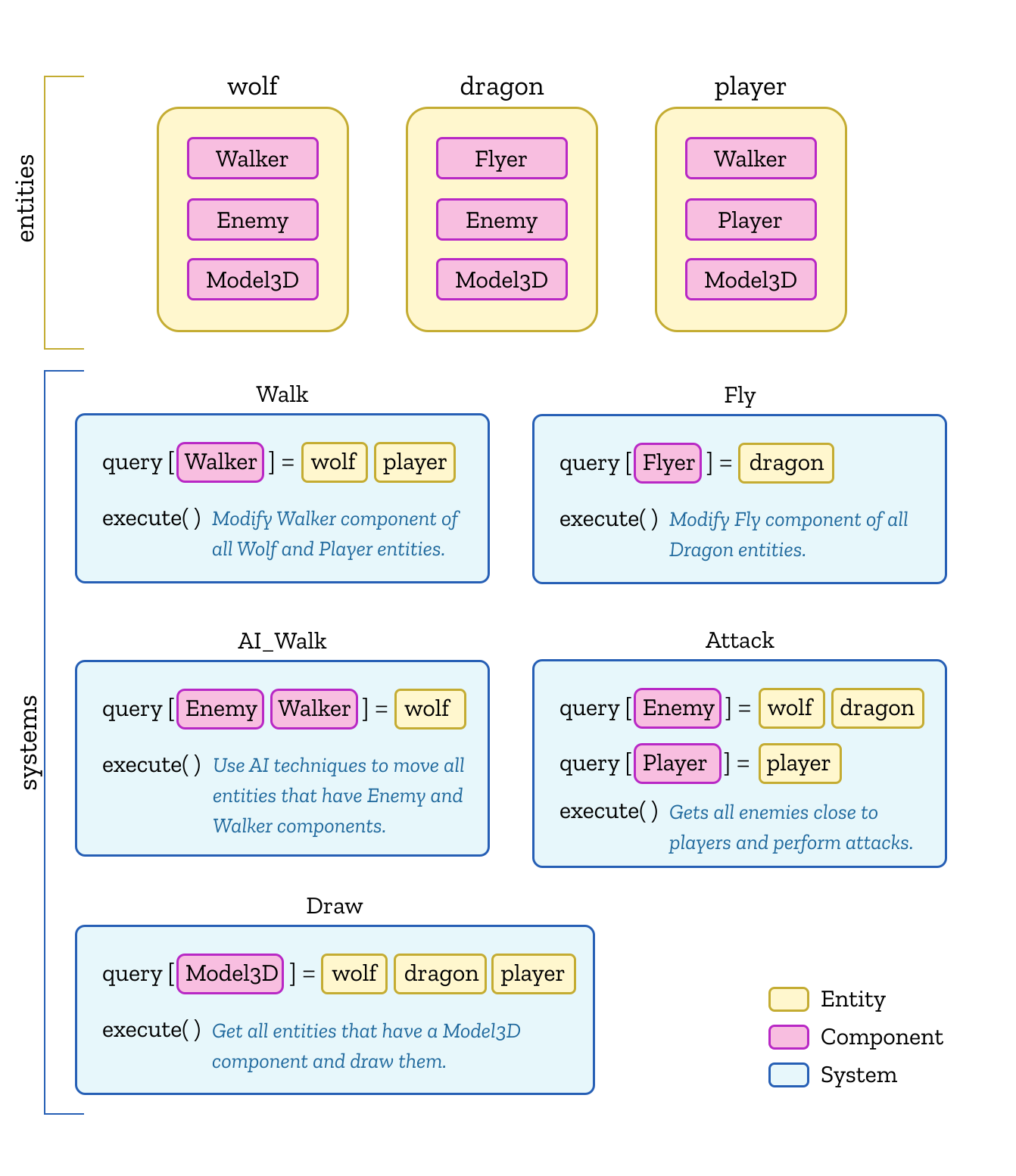
在真實應用程式而不是簡單示範中,會出現下列問題。我們稍後會展開說明,它們也是我們選擇 ECS 實作的依據:
- 如何用直覺、友善的語法建立複雜 Query?
- 如何控制多個 System 的執行順序?
- System 之間如何溝通?
先看看 ECS 的一些補充。
外掛
在第 2 章 以外掛為基礎的架構 中,我們用這種做法展示高內聚,並提高可擴充性。Bevy 外掛 也用類似的方式組織內建功能,每個外掛包含 Component 與 System。使用者也能用同樣的方式開發自己的外掛:
Bevy 的核心原則之一是模組化。所有 Bevy 引擎功能都實作成外掛——會修改 App 的程式碼集合。
實務上很容易擴充:
fn main() {
    App::new()
        .add_plugins(DefaultPlugins) // Default plugin set provided by the official team
        .add_systems(Startup, add_people)
        .add_systems(Update, (hello_world, (update_people, greet_people).chain()))
        .run();
}
在我們的專案中,內建外掛放在 /plugins 底下,並透過 DefaultPlugins 對外暴露成一組外掛,可以在初始化時使用。當然,你也可以自訂外掛來擴充:
import { App, DefaultPlugins } from '@infinite-canvas-tutorial/ecs';

new App().addPlugins(...DefaultPlugins, MyPlugin).run();
資源
我們介紹了 Entity 與 Component 的組合如何形成類似資料表的結構,但應用程式難免會用到一些全域唯一的物件,見:Bevy 資源。在後續實作中,我們會使用 singleton 這個概念。
前端的 ECS 實作
前端已有好幾個現成的 ECS 實作。雖然我很喜歡 ECSY 架構 文件裡的那些圖(上面已經引用過),但我發現它不適合目前這個專案。比較過 koota 與 Becsy 之後,我決定在專案中使用後者。下面介紹一些我在意的特性。
| 功能 | Becsy | koota | ECSY | bitECS |
|---|---|---|---|---|
| Query 修飾子 | ✅ | ✅ | ❌ | ❌ |
| 反應式 Query | ✅ | ✅ | ✅ | ✅ |
| System 執行順序 | ✅ | ❌ | ✅ | ✅ |
| System 間通訊 | ✅ | ❌ | ❌ | ❌ |
Query 修飾子
ECSY 與 bitECS 都支援簡單的 Query 建構:
// https://ecsyjs.github.io/ecsy/docs/#/manual/Architecture?id=queries
SystemName.queries = {
    boxes: { components: [Box] },
    spheres: { components: [Sphere] },
};

// https://github.com/NateTheGreatt/bitECS/blob/master/docs/API.md#defineQuery
const movementQuery = defineQuery([Position, Velocity]);
那麼什麼是複雜 Query?簡單說,它支援透過 Not、Or、And 這類修飾子組合多個查詢條件。例如在 koota 與 Becsy 中:
// https://github.com/pmndrs/koota?tab=readme-ov-file#query-modifiers
const staticEntities = world.query(Position, Not(Velocity));

// https://lastolivegames.github.io/becsy/guide/architecture/queries#basic-query-syntax
private activeEnemies = this.query(
    q => q.current.with(Enemy).and.withAny(stateEnum).but.without(Dead));
另一個重要特性是反應式 Query。當 Entity 的 Component 被新增、修改或刪除時,它會自動更新。
// koota
const Added = createAdded();
const newPositions = world.query(Added(Position));

// https://lastolivegames.github.io/becsy/guide/architecture/queries#reactive-queries
private boxes = this.query(q => q.added.and.removed.with(Box, Transform));
System 執行順序
在簡單情況下,Becsy 的排程器會根據每個 System 對 Component 的讀寫關係,算出最終的執行順序。不過,如果兩個 System 都需要寫入同一種類型的 Component,就必須明確指定它們的執行順序。除了 before/after 約束,也可以使用一些更直覺的約束。
例如,我們希望 System ComputeCamera 在所有會寫入 Camera 的 System 之後執行:
// CameraPlugin
system((s) => s.afterWritersOf(Camera))(ComputeCamera);最後,在開發模式中,Becsy 會在主控台印出目前的 System 執行順序,如果存在循環就會報錯。
System 間通訊
理想情況下,每個 System 只需要關心自己對 Component 的讀寫,但 附加 System 讓我們能更直接地參照其他 System:
export class ZoomLevel extends System {
    private readonly cameraControl = this.attach(CameraControl);
}
來看看 ECS 設計模式帶來便利的一個例子。
階層
在 第 3 課 中,我們介紹了場景圖這類樹狀結構。父子結構以參照的形式維護,它們是計算變換、級聯可見性等屬性的基礎:
export abstract class Shape {
    parent: Shape;
    readonly children: Shape[] = [];
}
而在 ECS 架構中,無論底層以 AoS 還是 SoA 儲存實體,資料都是線性的。要如何在扁平的資料結構中表示這樣的階層結構?

定義 Component
Entity Component System 中的階層關係 提供了幾種做法:
- 階層式 Entity,也就是「帶有 Component 的場景圖」。把階層關係存在 Entity 上,並照慣例由上往下走訪。
- 階層式 Component。把階層關係存在 Component 上。
我們選擇第二種做法,使用 Becsy 的 參照實體 能力來實作:
import { Entity, field } from '@lastolivegames/becsy';

export class Parent {
    @field.backrefs(Children, 'parent') declare children: Entity[];
}
export class Children {
    @field.ref declare parent: Entity;
}
新增子節點時,只需要在 Child 端關聯 Parent 實體,另一端的關聯就會生效:
// addChild(parent, child)
if (!parent.has(Parent)) {
    parent.add(Parent);
}
child.add(Children, {
    parent,
});

// getChildren()
parent.read(Parent).children; // [child]
值得一提的是,Bevy 從 0.16 版開始使用新的 ECS 關係:
commands.spawn(ChildOf(some_parent));
commands.entity(some_entity).insert(ChildOf(new_parent));
在我們的實作中,我們參考 Bevy 階層,在 Entity 之上封裝 EntityCommand,以更友善的方式建立上述父子關係。AddChild 包含了上面的實作:
export class EntityCommands {
    appendChild(child: EntityCommands) {
        this.commands.add(new AddChild(this.id(), child.id()));
        return this;
    }
}

parent.appendChild(child);
最後,我們在外掛中完成這兩個 Component 的註冊:
import { component } from '@lastolivegames/becsy';

export const HierarchyPlugin: Plugin = () => {
    component(Parent);
    component(Children);
};
計算世界變換
System 的 Query 語法非常不言自明。例如,這裡我們想選出所有同時包含 Transform 與 Parent 的實體,並在它們第一次被加入以及發生變更時,計算並更新(子節點的)GlobalTransform。
import { System } from '@lastolivegames/becsy';

export class PropagateTransforms extends System {
    queries = this.query(
        (q) =>
            q
                .with(Transform, Parent)
                .addedOrChanged.trackWrites.using(GlobalTransform).write,
    );
}
回應事件
如果 System 每一幀都會被呼叫,我們要如何回應非同步事件?
Bevy 事件
看看 Bevy 中回應視窗縮放事件的例子:window-resizing。它使用 EventReader 讀取 WindowResized 事件攜帶的資料:
fn on_resize_system(
    mut text: Single<&mut Text, With<ResolutionText>>,
    mut resize_reader: EventReader<WindowResized>,
) {
    for e in resize_reader.read() {
        // When resolution is being changed
    }
}
WindowResized 事件由 EventWriter 寫入:
// https://github.com/bevyengine/bevy/blob/main/crates/bevy_winit/src/state.rs#L945-L949
// window_resized: &mut EventWriter<WindowResized>,
window_resized.write(WindowResized {
    window: window_entity,
    width: window.width(),
    height: window.height(),
});
可以看到,事件機制為 System 之間的通訊提供了便利,詳見 Bevy 事件。
Becsy 協程
在 EventWriter System 中透過 DOM API 監聽事件:
$el.addEventListener('pointerup', onPointerUp, true);
const onPointerUp = (e: PointerEvent) => {
    this.setInputTrigger(input, 'pointerUpTrigger');
};
事件觸發時,對應的事件旗標會寫入 Input 元件。這個元件也記錄其他事件的觸發狀態、Ctrl、Shift 的按鍵狀態,以及事件座標。這些狀態會用於後續的互動行為,例如點擊選取圖形、拖曳選取圖形等:
export class Input {
    @field.boolean declare pointerUpTrigger: boolean;
}
那麼,如何確保這個狀態在一幀內只寫入一次?Becsy 提供 協程 來處理跨越多幀的邏輯,包括等待一定的幀數或秒數。這裡我們使用最基本的用法:
@co private *setInputTrigger(entity: Entity, triggerKey: string): Generator {
    const input = entity.write(Input);

    if (!(triggerKey in input)) return;
    Object.assign(input, { [triggerKey]: true });

    yield;

    {
      const input = entity.hold().write(Input);
      Object.assign(input, { [triggerKey]: false });
    }

    yield;
}
最後,在 CameraControl 這類需要處理事件的 System 中,我們可以透過旗標處理目前這一幀對應的事件:
execute() {
    const input = canvas.write(Input);
    if (input.pointerDownTrigger) {}
    if (input.pointerUpTrigger) {}
}