第 12 課 - 繪製折線
讓我們繼續加入基本圖形:折線。在本課中,你將學到以下內容:
- 為什麼不直接使用
gl.LINES? - 在 CPU 或著色器中建構網格
- 分析著色器細節,包括:
- 拉伸頂點與接合
- 反鋸齒
- 繪製虛線
- 如何計算折線的包圍盒?
$icCanvas = call(() => {
    return document.createElement('ic-canvas-lesson12');
});call(() => {
const { Canvas, Polyline, Rect } = Lesson12;
const stats = new Stats();
stats.showPanel(0);
const $stats = stats.dom;
$stats.style.position = 'absolute';
$stats.style.left = '0px';
$stats.style.top = '0px';
$icCanvas.parentElement.style.position = 'relative';
$icCanvas.parentElement.appendChild($stats);
$icCanvas.addEventListener('ic-ready', (e) => {
const canvas = e.detail;
const polyline1 = new Polyline({
points: [
[100, 100],
[100, 200],
[200, 100],
],
stroke: 'red',
strokeWidth: 20,
fill: 'none',
});
canvas.appendChild(polyline1);
const polyline2 = new Polyline({
points: [
[220, 100],
[220, 200],
[320, 100],
],
stroke: 'red',
strokeWidth: 20,
strokeLinejoin: 'bevel',
fill: 'none',
});
canvas.appendChild(polyline2);
const polyline3 = new Polyline({
points: [
[340, 100],
[340, 200],
[440, 100],
],
stroke: 'red',
strokeWidth: 20,
strokeLinejoin: 'round',
strokeLinecap: 'round',
fill: 'none',
});
canvas.appendChild(polyline3);
const polyline4 = new Polyline({
points: [
[100, 300],
[200, 300],
[300, 210],
[400, 300],
[500, 300],
],
stroke: 'red',
strokeWidth: 20,
strokeLinejoin: 'round',
strokeLinecap: 'round',
strokeDasharray: [10, 5],
fill: 'none',
});
canvas.appendChild(polyline4);
const rect2 = new Rect({
x: 500,
y: 100,
fill: 'black',
fillOpacity: 0.5,
stroke: 'red',
strokeWidth: 10,
dropShadowBlurRadius: 10,
dropShadowColor: 'black',
dropShadowOffsetX: 10,
dropShadowOffsetY: 10,
strokeDasharray: [5, 5],
});
rect2.width = 100;
rect2.height = 100;
canvas.appendChild(rect2);
});
$icCanvas.addEventListener('ic-frame', (e) => {
stats.update();
});
});gl.LINES 的限制
WebGL 提供的 gl.LINES 與 gl.LINE_STRIP 在實際情境中往往不太實用:
- 不支援寬度。如果試著使用 lineWidth,Chrome 這類常見瀏覽器會丟出警告:
WARNING
截至 2017 年 1 月,大多數 WebGL 實作只支援最小值 1 與最大值 1,因為它們所基於的技術有同樣的限制。
要注意的是,第 5 課 - 線段網格 中的做法並不適合繪製任意線段;它甚至無法任意定義一條線段的兩個端點。此外,線段與折線最大的差別在於接合處的處理,deck.gl 分別提供了 LineLayer 與 PathLayer。
現在釐清我們希望為折線實作的功能:
- 支援任意線寬
- 支援定義任意數量的端點。類似 SVG 的 points 屬性。
- 支援相鄰線段之間的連接形狀 stroke-linejoin,以及端點形狀 stroke-linecap
- 支援虛線。stroke-dashoffset 與 stroke-dasharray
- 良好的反鋸齒效果
- 支援實例化繪製,見先前介紹的 實例化繪製
我們設計的 API 如下:
const line = new Polyline({
  points: [
    [0, 0],
    [100, 100]
  ],
  strokeWidth: 100,
  strokeLinejoin: 'round'
  strokeLinecap: 'round',
  strokeMiterlimit: 4,
  strokeDasharray: [4, 1],
  strokeDashoffset: 10
});
先看第一個問題:如何實作任意的 strokeWidth。
建構網格
下面這張圖來自 Pixi.js 分享的 WebGL meetup:如何用 WebGL 畫線。本文會大量引用其中的截圖,並在圖說中標上 PPT 頁碼。既然沒有原生方法可用,我們只能回到建構網格這種傳統繪製方案。
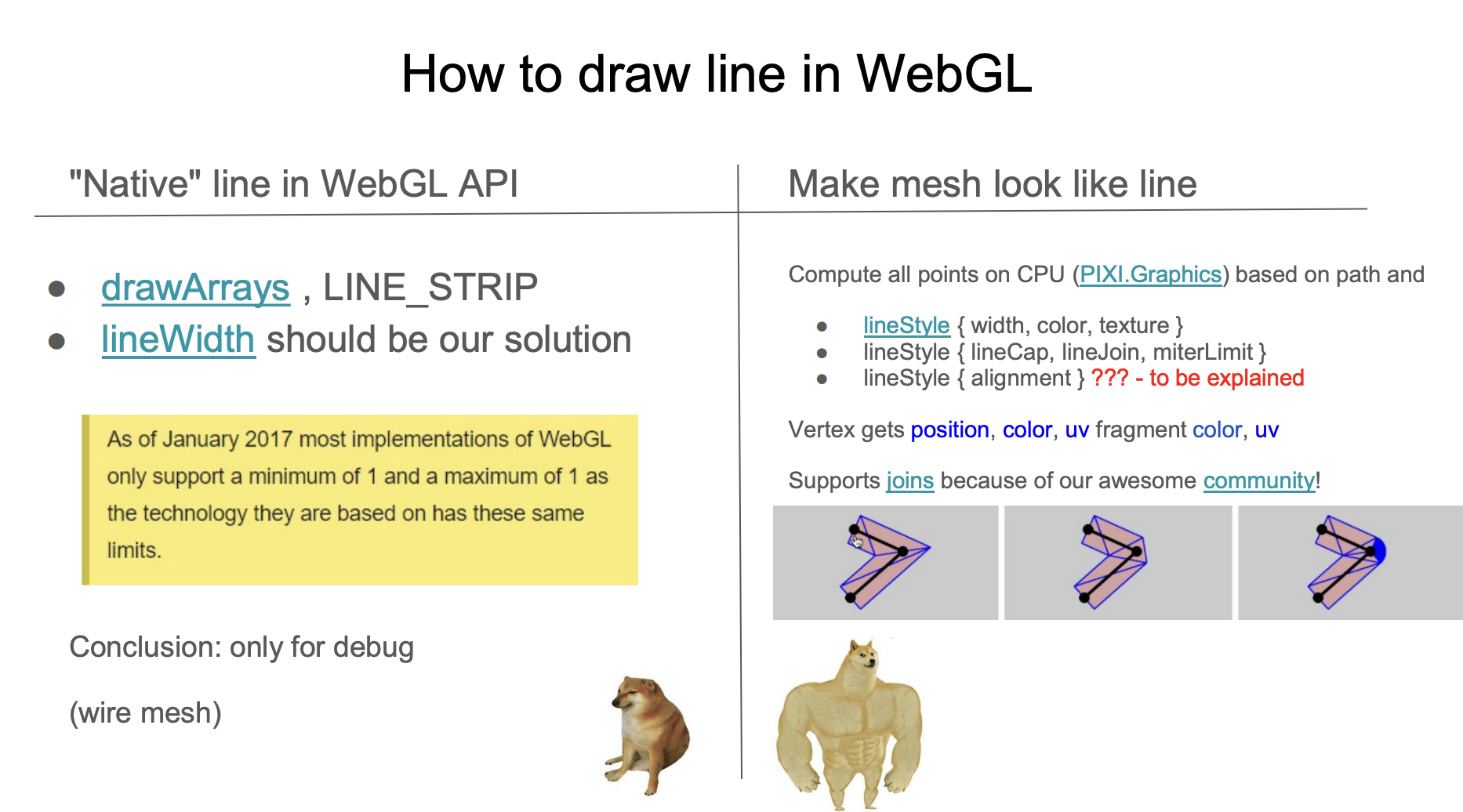
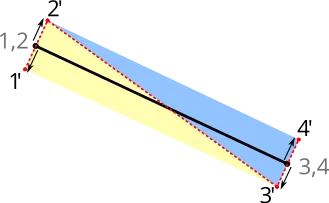
常見做法是沿著線段法線方向拉伸並三角化。下面這張圖來自 用 OpenGL 繪製反鋸齒線段。線段的兩個端點沿著紅色虛線法線向兩側拉伸,形成 4 個頂點,三角化成 2 個三角形,因此 strokeWidth 可以是任意值。
在 CPU 上建構
線段的拉伸,以及 strokeLinejoin 與 strokeLinecap 的網格建構,可以在 CPU 或著色器中完成。採用前者的實作包括:
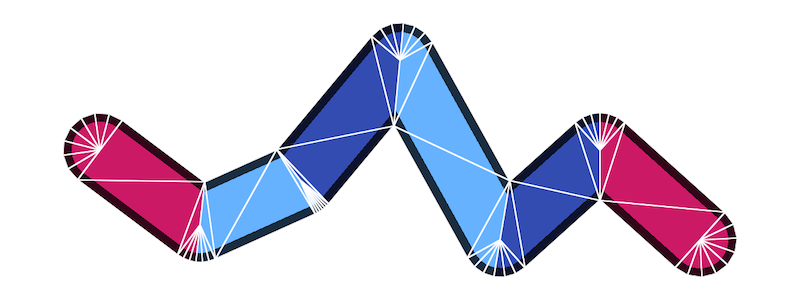
可以看出,當 strokeLinejoin 與 strokeLinecap 取值為 round 時,為了讓圓角看起來平滑,網格建構需要最多的頂點。在 regl-gpu-lines 中,每一段最多需要 32 * 4 + 6 = 134 個頂點:
// @see https://github.com/rreusser/regl-gpu-lines/blob/main/src/index.js#L81
cache.indexBuffer = regl.buffer(
    new Uint8Array([...Array(MAX_ROUND_JOIN_RESOLUTION * 4 + 6).keys()]), // MAX_ROUND_JOIN_RESOLUTION = 32
);
strokeLinecap 與線段需要在不同的繪製呼叫中繪製。仍以 regl-gpu-lines 的 實例化範例 為例,它需要編譯兩個程式,並用 3 次繪製呼叫來畫,其中:
- 兩個端點使用同一個程式,但 Uniform
orientation不同。頂點數是cap + join - 所有中間線段用一次繪製呼叫畫出,頂點數是
join + join,實例數是線段數
const computeCount = isEndpoints
    ? // Draw a cap
      (props) => [props.capRes2, props.joinRes2]
    : // Draw two joins
      (props) => [props.joinRes2, props.joinRes2];
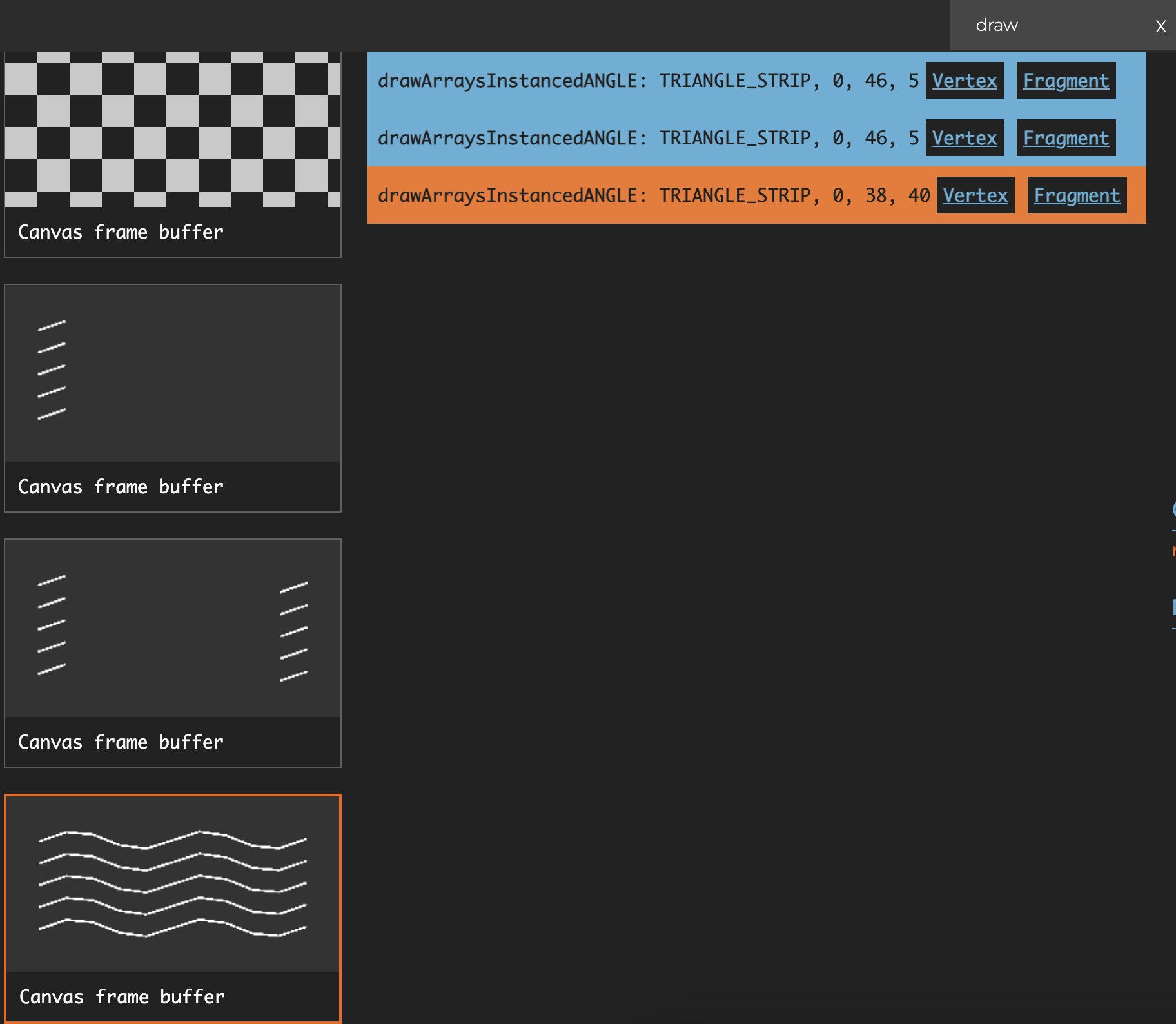
如果有多條折線,合併條件是 strokeLinecap、strokeLinejoin 以及線段數量都相同。下圖是繪製 5 條折線的情況,其中每條折線的中間線段部分包含 8 個 instance,所以 instance 總數是 40:
在著色器中建構
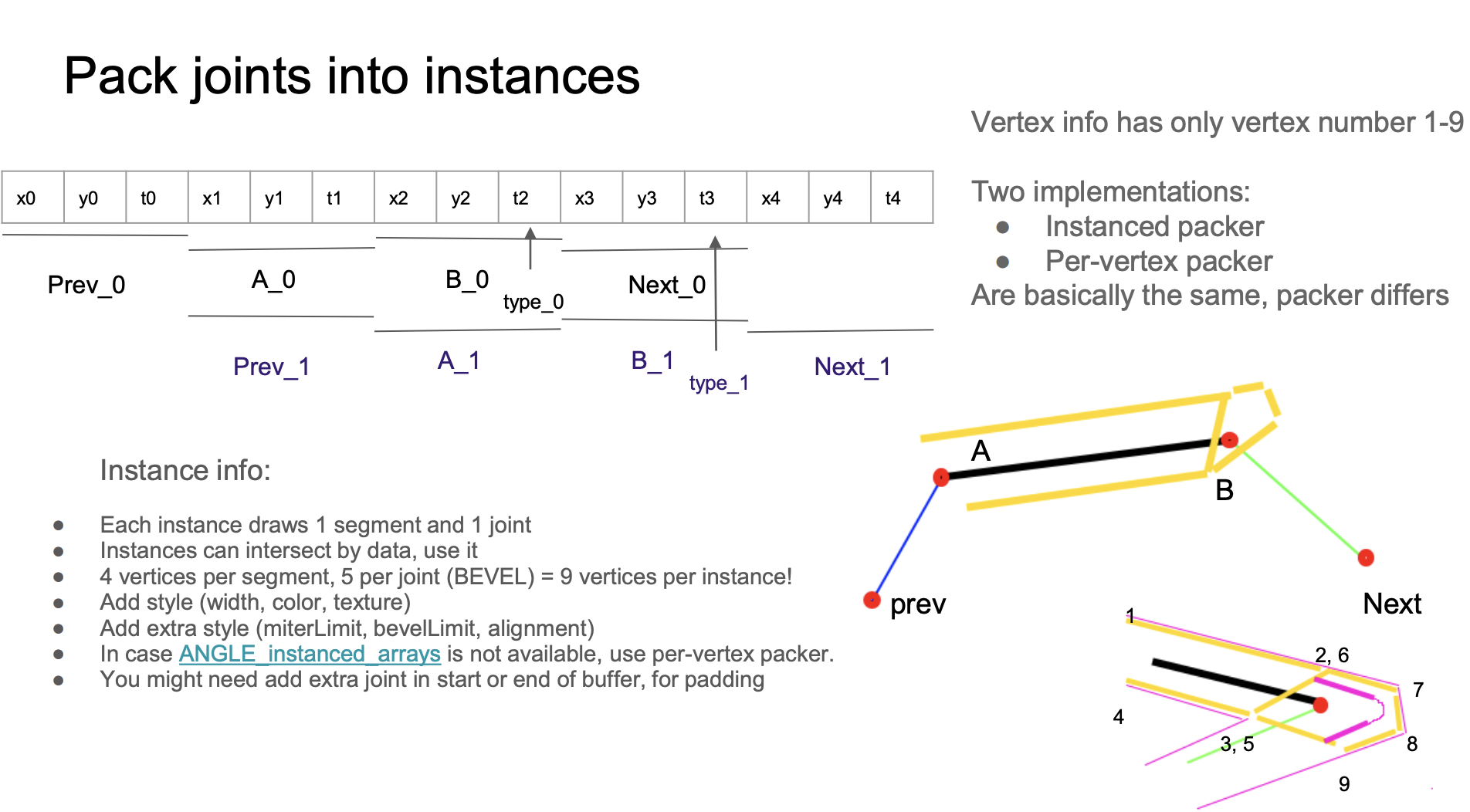
來自 Pixi.js 分享的 WebGL meetup,在著色器中建構網格:
與在 CPU 上建構相比,它的優點包括:
- 只需要一次繪製呼叫,就能畫出
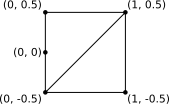
strokeLinecap、strokeLineJoin與中間線段 - 頂點固定為 9 個。頂點 1234 組成兩個三角形,用來繪製線段部分;頂點 56789 組成三個三角形,用來繪製接合部分
- 當
strokeLinecap、strokeLinejoin取值為round時更平滑,因為片段著色器中使用了類似 SDF 畫圓的方法 - 反鋸齒效果好
layout(location = ${Location.PREV}) in vec2 a_Prev;
layout(location = ${Location.POINTA}) in vec2 a_PointA;
layout(location = ${Location.POINTB}) in vec2 a_PointB;
layout(location = ${Location.NEXT}) in vec2 a_Next;
layout(location = ${Location.VERTEX_JOINT}) in float a_VertexJoint;
layout(location = ${Location.VERTEX_NUM}) in float a_VertexNum;
Buffer 的配置如下,每個 Stride 的大小是 4 * 3。在 Buffer 中,像 x1 y1 t1 這樣同一段連續資料,在第一個實例中被讀成 A_0,在第二個實例中被讀成 Prev_1。這種交錯配置可以盡量節省 Buffer 大小:
const vertexBufferDescriptors: InputLayoutBufferDescriptor[] = [
    {
        arrayStride: 4 * 3,
        stepMode: VertexStepMode.INSTANCE,
        attributes: [
            {
                format: Format.F32_RG,
                offset: 4 * 0,
                shaderLocation: Location.PREV,
            },
            {
                format: Format.F32_RG,
                offset: 4 * 3,
                shaderLocation: Location.POINTA,
            },
            {
                format: Format.F32_R,
                offset: 4 * 5,
                shaderLocation: Location.VERTEX_JOINT,
            },
            {
                format: Format.F32_RG,
                offset: 4 * 6,
                shaderLocation: Location.POINTB,
            },
            {
                format: Format.F32_RG,
                offset: 4 * 9,
                shaderLocation: Location.NEXT,
            },
        ],
    },
];
不幸的是,如果改用 WebGPU 渲染器,會得到下面的錯誤:
WARNING
屬性偏移(12)搭配格式 VertexFormat::Float32x2(大小:8)無法放入頂點緩衝區的 stride(12)。
原因是 WebGPU 對 VertexBufferLayout 有下面這條驗證規則,而我們的 arrayStride 是 4 * 3。WebGPU 實例化問題 與 規格:允許 GPUVertexBufferLayout.arrayStride 小於 offset + sizeof(attrib.format) 會很有用 也提到了這一點。
attrib.offset + byteSize(attrib.format) ≤ descriptor.arrayStride.
4 3 + 4 2 ≤ 4 * 3 // Oops!
因此我們必須改變 Buffer 的配置。首先在 Layout 中,把原本一個 Buffer 包含多個 Attribute 的配置,拆成多個 Buffer,每個只包含一個 Attribute:
const vertexBufferDescriptors: InputLayoutBufferDescriptor[] = [
    {
        arrayStride: 4 * 3,
        stepMode: VertexStepMode.INSTANCE,
        attributes: [
            {
                format: Format.F32_RG,
                offset: 4 * 0,
                shaderLocation: Location.PREV,
            },
        ],
    },
    {
        arrayStride: 4 * 3,
        stepMode: VertexStepMode.INSTANCE,
        attributes: [
            {
                format: Format.F32_RG,
                offset: 4 * 0,
                shaderLocation: Location.POINTA,
            },
        ],
    },
    // Omit VERTEX_JOINT
    // Omit POINTB
    // Omit NEXT
];
雖然拆成多個 BufferLayout 宣告,實際引用的仍是同一個 Buffer,只是透過 offset 讀取對應的 Attribute,詳見:頂點資料起始處在緩衝區中的位元組偏移。
const buffers = [
    {
        buffer: this.#segmentsBuffer, // PREV
    },
    {
        buffer: this.#segmentsBuffer, // POINTA
        offset: 4 * 3,
    },
    {
        buffer: this.#segmentsBuffer, // VERTEX_JOINT
        offset: 4 * 5,
    },
    {
        buffer: this.#segmentsBuffer, // POINTB
        offset: 4 * 6,
    },
    {
        buffer: this.#segmentsBuffer, // NEXT
        offset: 4 * 9,
    },
];
renderPass.setVertexInput(this.#inputLayout, buffers, {
    buffer: this.#indexBuffer,
});
之後的其他功能也會基於這個方案實作。
著色器實作分析
先看看如何在線段主體與接合處拉伸頂點。
擠出線段
讓我們聚焦頂點 1 到 4,也就是線段的主體。考量線段與相鄰線段所呈現的角度,有下列四種形態 /-\、\-/、/-/ 與 \-\:
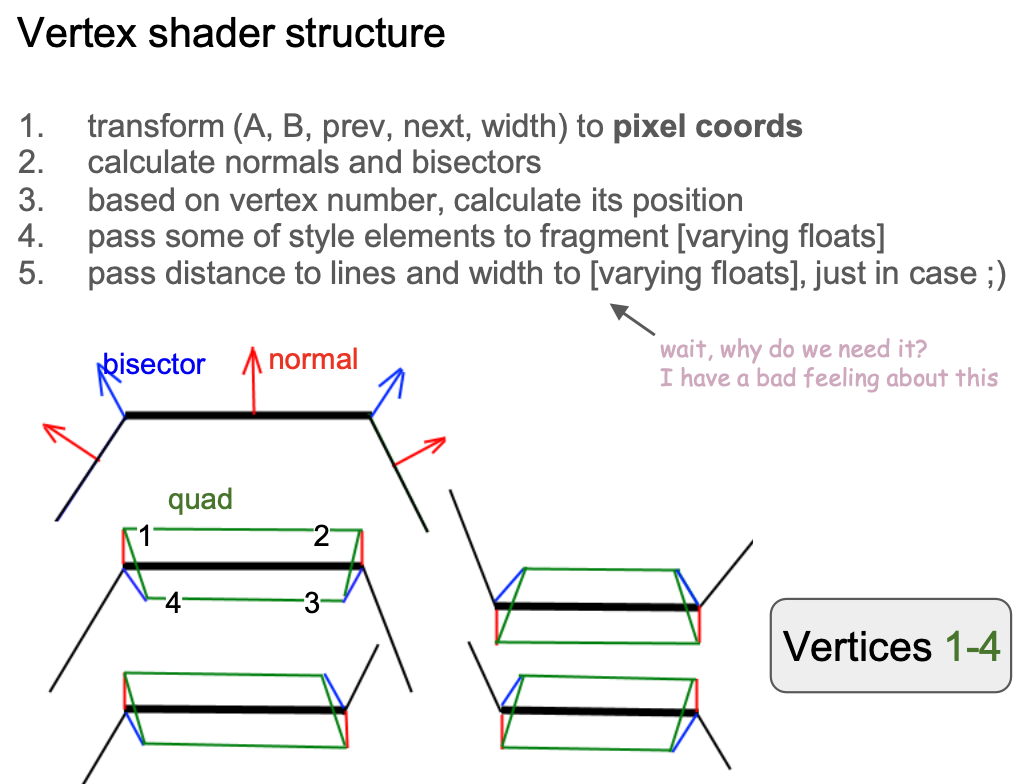
計算單位法線向量之前,先把每個頂點的位置轉換到模型座標系:
vec2 pointA = (model * vec3(a_PointA, 1.0)).xy;
vec2 pointB = (model * vec3(a_PointB, 1.0)).xy;

vec2 xBasis = pointB - pointA;
float len = length(xBasis);
vec2 forward = xBasis / len;
vec2 norm = vec2(forward.y, -forward.x);

xBasis2 = next - base;
float len2 = length(xBasis2);
vec2 norm2 = vec2(xBasis2.y, -xBasis2.x) / len2;
float D = norm.x * norm2.y - norm.y * norm2.x;
以第一種形態為例,頂點 1 與 2 沿著法線向外拉伸,頂點 3 與 4 沿著接合處的角平分線(doBisect())向內拉伸:
if (vertexNum < 3.5) { // Vertex #1 ~ 4
    if (abs(D) < 0.01) {
        pos = dy * norm;
    } else {
        if (flag < 0.5 && inner < 0.5) { // Vertex #1, 2
            pos = dy * norm;
        } else { // Vertex #3, 4
            pos = doBisect(norm, len, norm2, len2, dy, inner);
        }
    }
}
擠出接合
接下來聚焦接合處的頂點 5~9。拉伸方向與距離會隨接合形狀而變,原作者的實作非常複雜。其中 bevel 與 round 共用同一種拉伸方法,後者再在片段著色器中透過 SDF 完成圓角繪製。
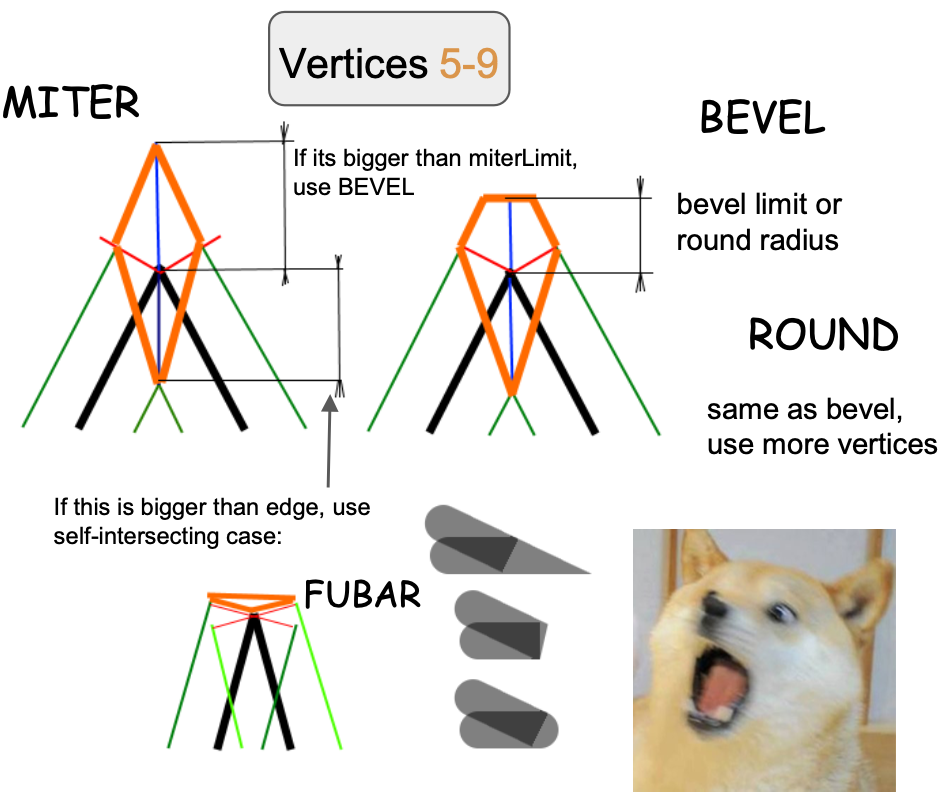
我們從最簡單的 miter 開始分析。依照定義,如果超過 strokeMiterlimit,它會轉成 bevel。
if (length(pos) > abs(dy) * strokeMiterlimit) {
    type = BEVEL;
} else {
    if (vertexNum < 4.5) {
        dy = -dy;
        pos = doBisect(norm, len, norm2, len2, dy, 1.0);
    } else if (vertexNum < 5.5) {
        pos = dy * norm;
    } else if (vertexNum > 6.5) {
        pos = dy * norm2;
    }
    v_Type = 1.0;
    dy = -sign * dot(pos, norm);
    dy2 = -sign * dot(pos, norm2);
    hit = 1.0;
}
值得一提的是,在 Cairo 中,要使用圓角還是斜角接合,需要根據 arc height 來決定。下圖來自:Cairo:修正圓角接合

反鋸齒
最後看看如何對線段邊緣做反鋸齒。我們先前介紹過 SDF 中的反鋸齒,這裡使用類似的做法:
- 在頂點著色器中計算頂點到線段的垂直單位向量,並透過
varying傳給片段著色器,以便自動內插 - 內插後的向量不再是單位向量。計算它的長度,也就是目前像素點到線段的垂直距離,範圍在
[0, 1] - 用這個值計算像素點最終的透明度,完成反鋸齒。
smoothstep發生在線段邊緣,也就是區間[linewidth - feather, linewidth + feather]內。下圖來自:用 OpenGL 繪製反鋸齒線段,具體計算邏輯稍後介紹。
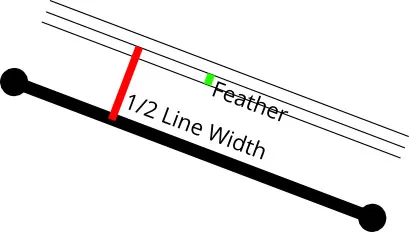
這個「羽化」(feather)應該是多少?在先前的 繪製矩形外陰影 中,我們把矩形原始尺寸向外擴了 3 * dropShadowBlurRadius。下圖仍來自 如何用 WebGL 畫線,向外擴一個像素(從 w 到 w+1)就夠了。另一側兩個頂點(#3 與 #4 頂點)的距離是負的:
const float expand = 1.0;
lineWidth *= 0.5;

float dy = lineWidth + expand; // w + 1
if (vertexNum >= 1.5) { // Vertex #3 & #4
  dy = -dy; // -w - 1
}
從右下圖也可以看出,當我們放大並在片段著色器中檢視每一個像素時,利用這個有向距離 d,可以計算線段與目前像素的覆蓋率(下圖中三角形的面積),從而達到反鋸齒效果。
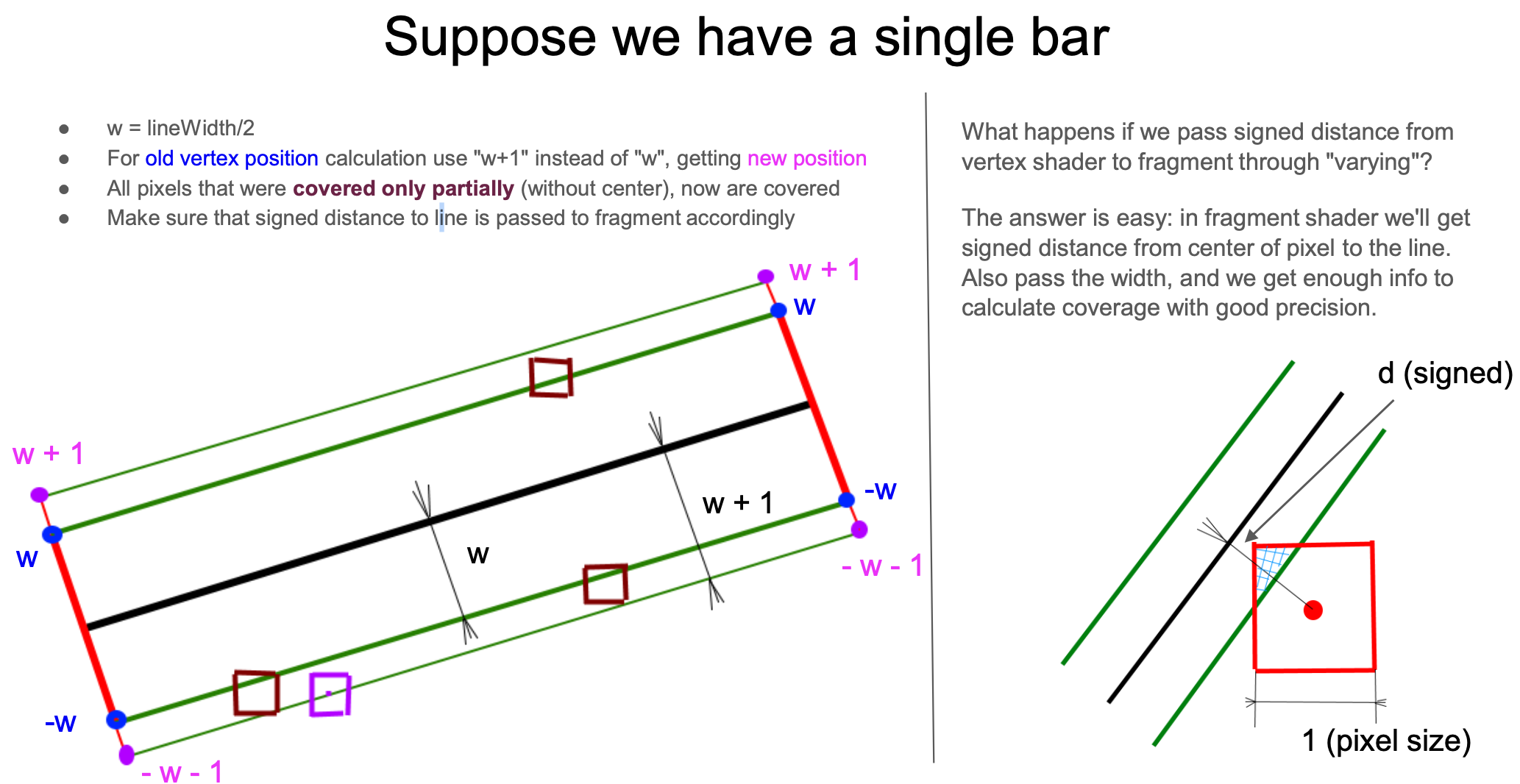
那麼要如何用這個距離計算覆蓋率?這需要分成線段主體與接合處兩種情況。
先看線段主體。它可以再簡化成垂直線段的情況。原作者也提供了考量旋轉的計算方法,與簡化估算版本差別不大。用 clamp 計算一側的覆蓋率,同時考量線寬非常細的情況,用右側減去左側得到最終覆蓋率,作為最終顏色的透明度係數。
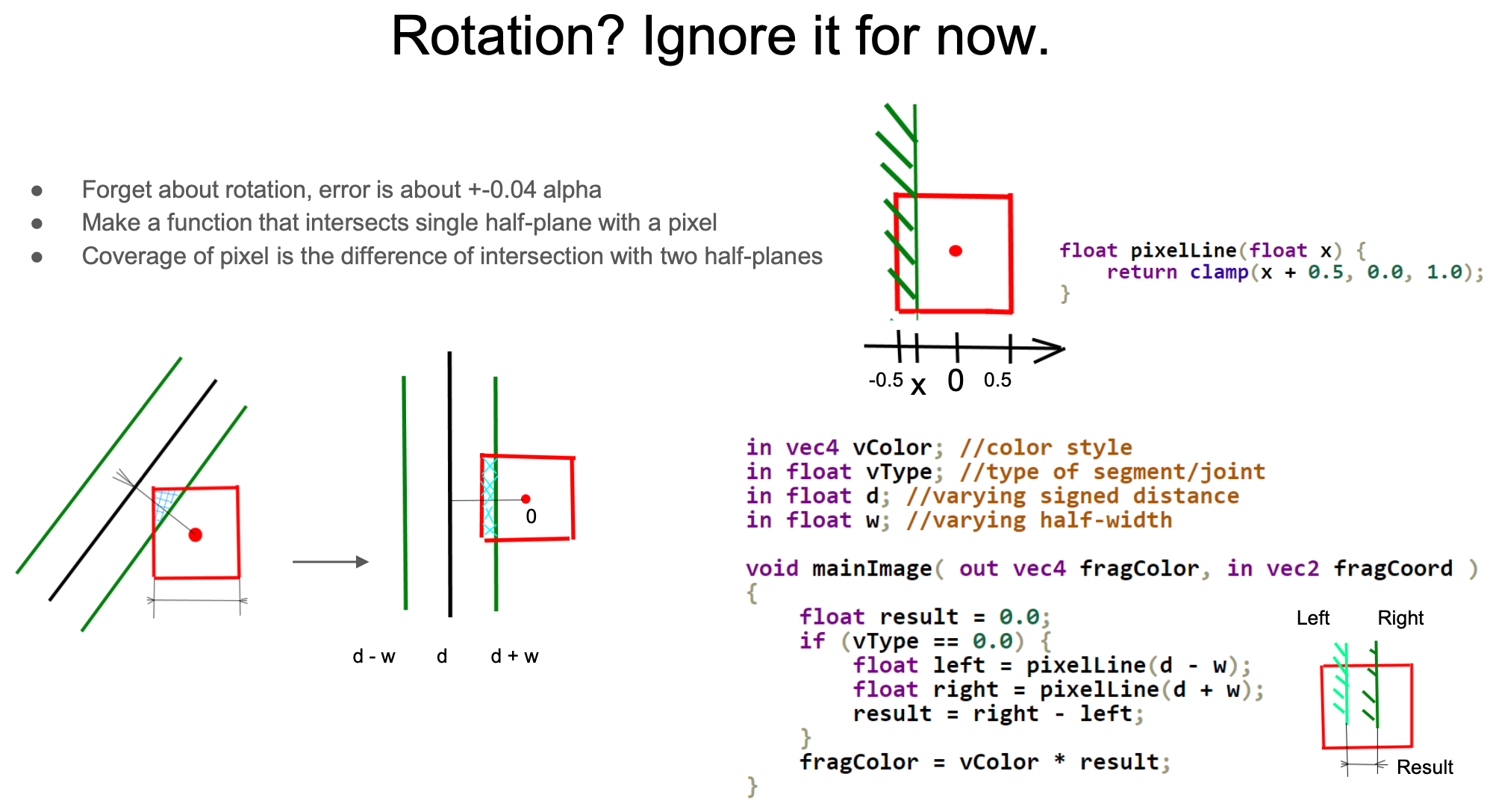
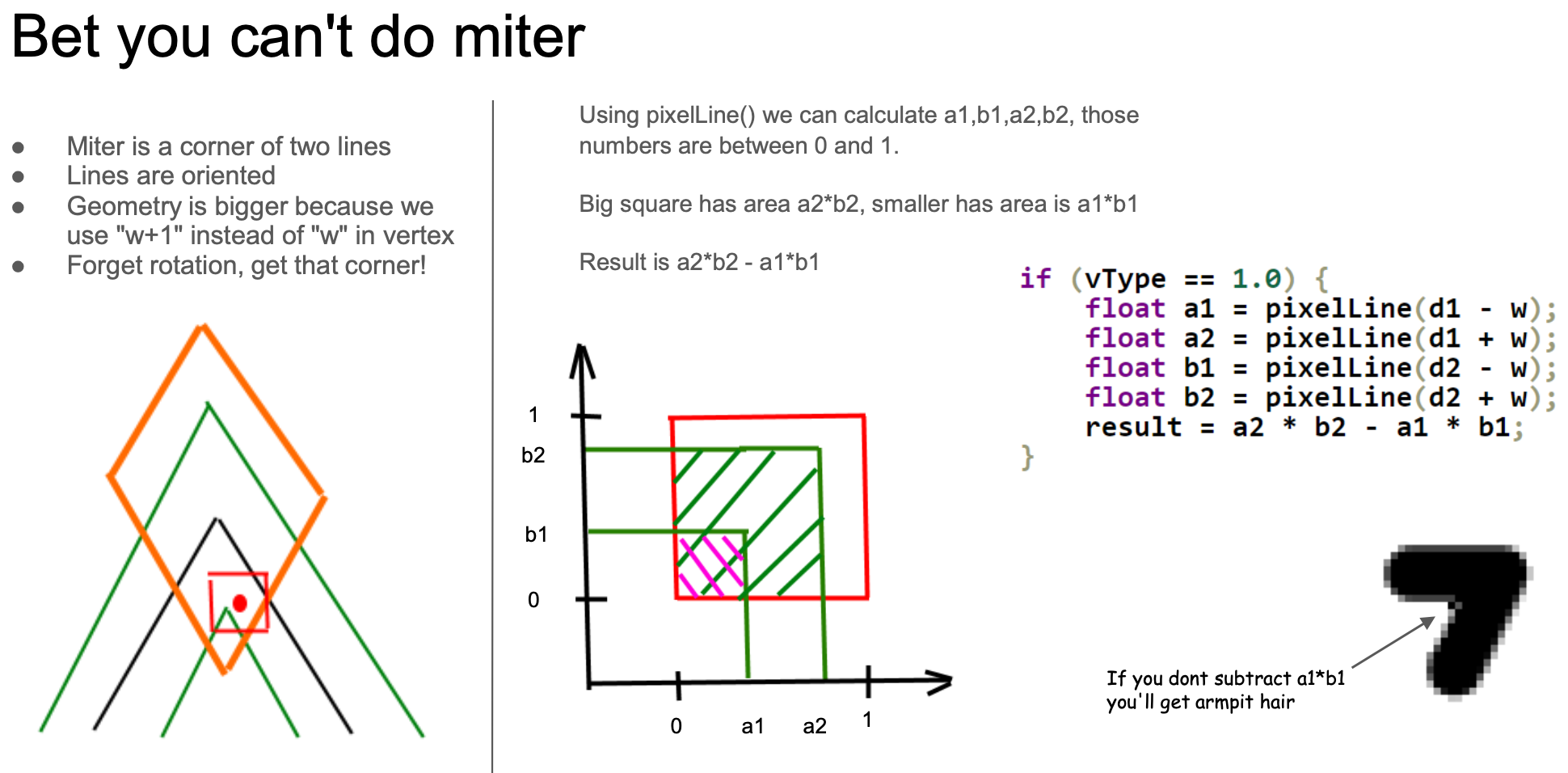
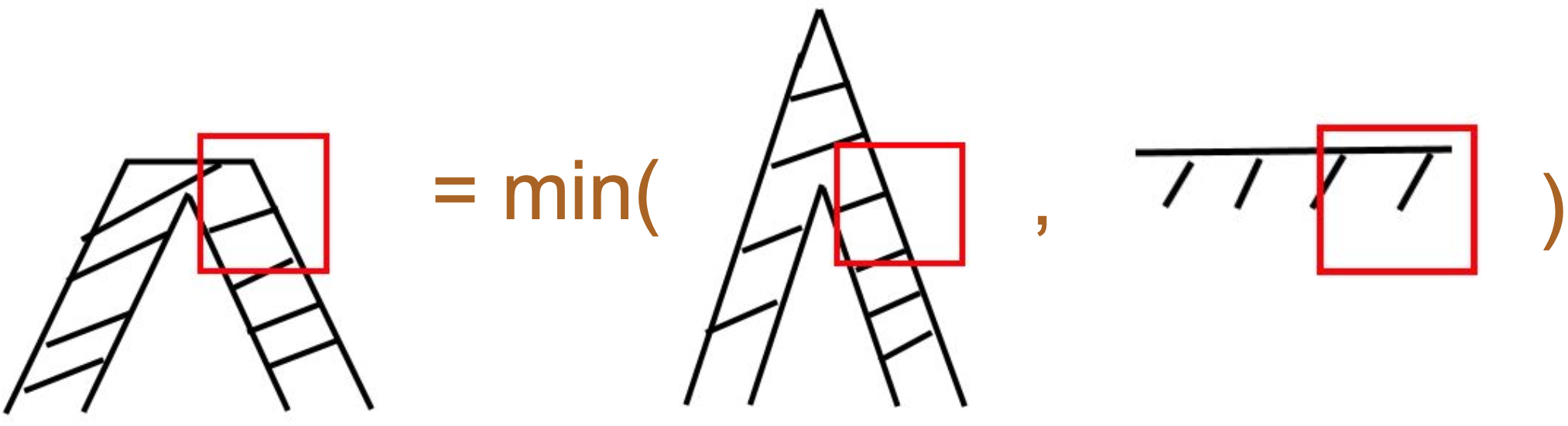
當然,計算線段部分與直線的相交面積是最簡單的情況。接合處與端點的處理會非常複雜。以斜接(Miter)接合為例,仍然忽略旋轉,只考慮相鄰線段互相垂直的情況(注意下圖右側的紅框區域)。與上面只有一個有向距離 d 的線段不同,這裡有兩個有向距離 d1 與 d2,分別代表接合處前後兩段線。同樣地,考量一個像素區域內非常細的線,覆蓋區域是兩個正方形的面積差(a2 * b2 - a1 * b1):
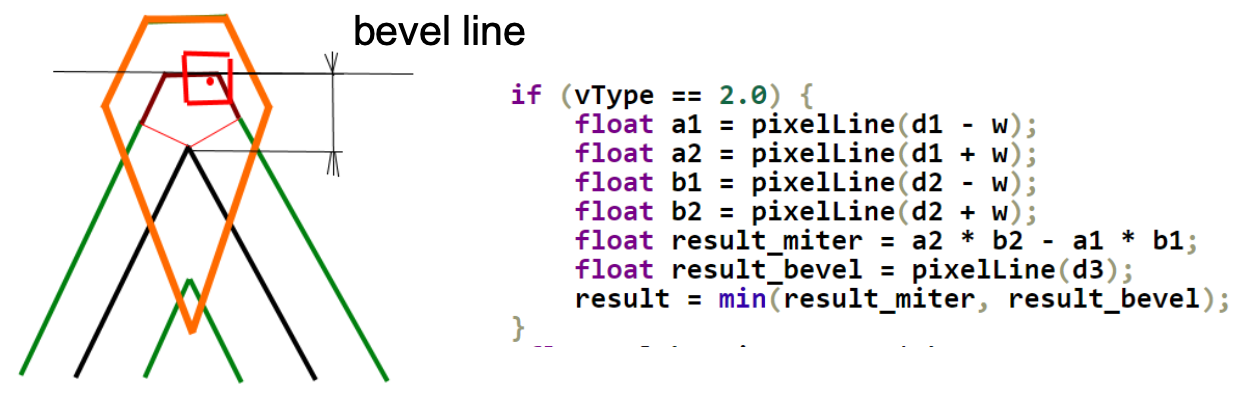
斜角(Bevel)接合的計算方法與斜接大致相同(下圖中間的情況)。d3 表示像素中心到「斜角線」的距離,可以用它計算下圖右側的覆蓋率。可以取這兩種情況的最小值,得到近似的計算結果。
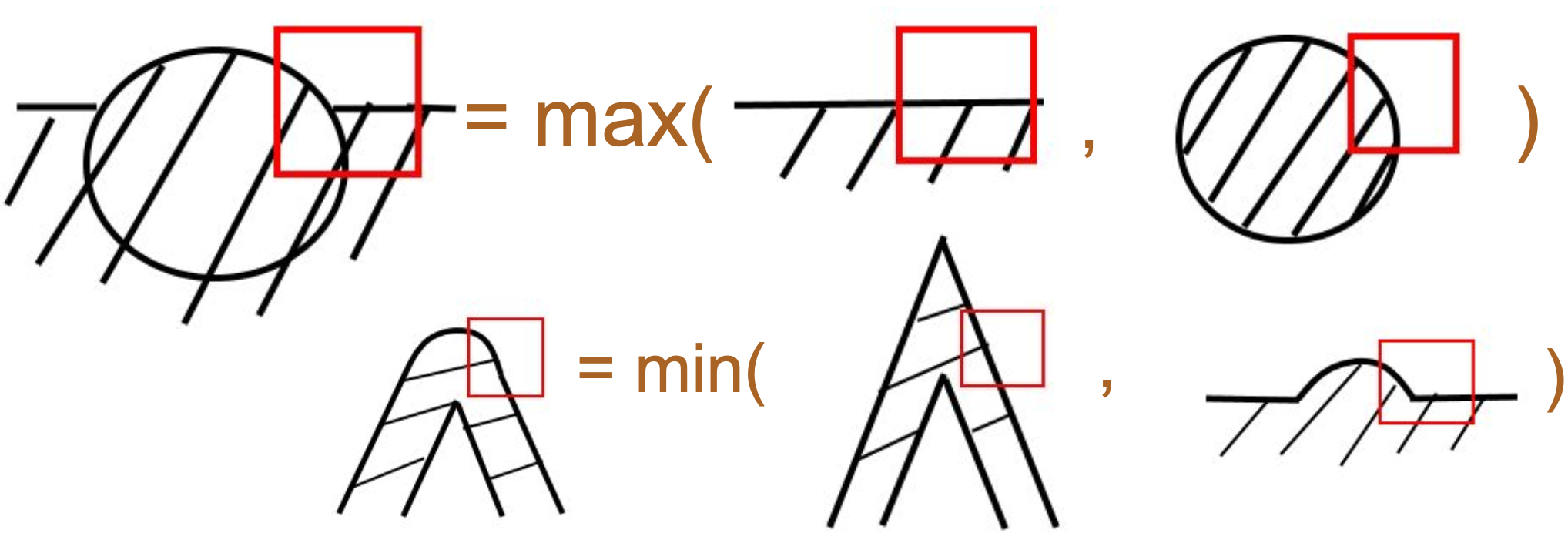
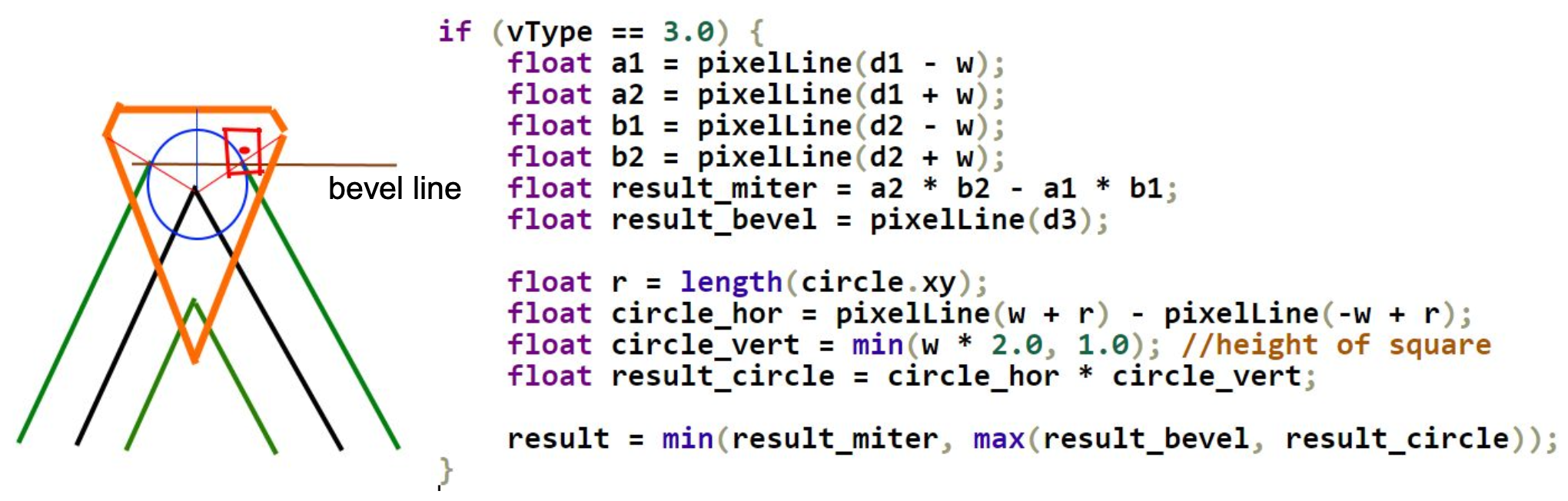
最後是圓角接合。它還需要一個從圓心到像素點的額外距離 d3(類似用 SDF 畫圓),由頂點著色器傳入。
原作者也提供了 pixelLine 的精確版本實作,限於篇幅不再展開。
支援 stroke-alignment
我們先前在用 SDF 繪製的 Circle、Ellipse 與 Rect 上實作了 增強 SVG:描邊對齊。現在把這個屬性加到折線上。下圖來自 Pixi.js 的 lineStyle.alignment 效果,紅線代表折線的幾何位置,它會依照不同的值上下浮動:
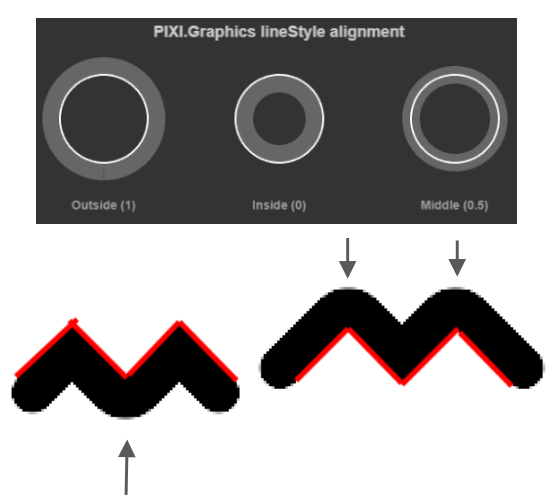
對 ECS 折線來說,描邊對齊也會影響計算出的幾何包圍範圍。變更 strokeWidth 或 strokeAlignment、移除描邊幾何,以及復原或重做這些編輯,都會重新整理偏移點與它們的包圍範圍。沒有描邊的折線會保留原本的點。連續的重複取樣共用同一個頂點的偏移;整條都由重合取樣組成的折線會保持有限。原本的點順序與數量會保留,供 SVG 匯出使用。
在著色器中,我們把這個屬性反映在沿法線拉伸的偏移上。如果 strokeAlignment 取值為 center,偏移是 0:
float shift = strokeWidth * strokeAlignment;
pointA += norm * shift;
pointB += norm * shift;
從左到右分別是 outer、center 與 inner 的效果:
$icCanvas2 = call(() => {
    return document.createElement('ic-canvas-lesson12');
});call(() => {
const { Canvas, Polyline } = Lesson12;
const stats = new Stats();
stats.showPanel(0);
const $stats = stats.dom;
$stats.style.position = 'absolute';
$stats.style.left = '0px';
$stats.style.top = '0px';
$icCanvas2.parentElement.style.position = 'relative';
$icCanvas2.parentElement.appendChild($stats);
$icCanvas2.addEventListener('ic-ready', (e) => {
const canvas = e.detail;
const polyline1 = new Polyline({
points: [
[100, 100],
[100, 200],
[200, 200],
[200, 100],
],
stroke: 'black',
strokeWidth: 20,
strokeAlignment: 'outer',
fill: 'none',
cursor: 'pointer',
});
canvas.appendChild(polyline1);
const polyline4 = new Polyline({
points: [
[100, 100],
[100, 200],
[200, 200],
[200, 100],
],
stroke: 'red',
strokeWidth: 2,
// strokeAlignment: 'outer',
fill: 'none',
});
canvas.appendChild(polyline4);
const polyline2 = new Polyline({
points: [
[220, 100],
[220, 200],
[320, 200],
[320, 100],
],
stroke: 'black',
strokeWidth: 20,
cursor: 'pointer',
fill: 'none',
});
canvas.appendChild(polyline2);
const polyline5 = new Polyline({
points: [
[220, 100],
[220, 200],
[320, 200],
[320, 100],
],
stroke: 'red',
strokeWidth: 2,
fill: 'none',
});
canvas.appendChild(polyline5);
const polyline3 = new Polyline({
points: [
[360, 100],
[360, 200],
[460, 200],
[460, 100],
],
stroke: 'black',
strokeWidth: 20,
strokeAlignment: 'inner',
fill: 'none',
cursor: 'pointer',
});
canvas.appendChild(polyline3);
const polyline6 = new Polyline({
points: [
[360, 100],
[360, 200],
[460, 200],
[460, 100],
],
stroke: 'red',
strokeWidth: 2,
fill: 'none',
});
canvas.appendChild(polyline6);
polyline1.addEventListener('pointerenter', () => {
polyline1.stroke = 'green';
});
polyline1.addEventListener('pointerleave', () => {
polyline1.stroke = 'black';
});
polyline2.addEventListener('pointerenter', () => {
polyline2.stroke = 'green';
});
polyline2.addEventListener('pointerleave', () => {
polyline2.stroke = 'black';
});
polyline3.addEventListener('pointerenter', () => {
polyline3.stroke = 'green';
});
polyline3.addEventListener('pointerleave', () => {
polyline3.stroke = 'black';
});
});
$icCanvas2.addEventListener('ic-frame', (e) => {
stats.update();
});
});最後有兩點需要注意:
- 因為
stroke-alignment不是標準的 SVG 屬性,匯出 SVG 時必須重新計算points。這與著色器中沿著法線與角平分線拉伸的邏輯一致,限於篇幅不再展開 - 拾取判定方法,也就是
containsPoint,也需要根據points偏移後的頂點來計算。你可以在上面的範例中把滑鼠移入、移出,試著改變折線的顏色
虛線
一段虛線有自己的兩個端點。對實心描邊套用週期性的 alpha 遮罩,可以在直線段上切出平整的切口,但無法做出圓形端點;若只把轉角投影到進入的那一段,會產生位置不對的楔形。
首先,把累積的中心線距離關聯到正確的線段實例。對於 [[0, 0], [100, 0], [200, 0]],實例是可選的起點端帽與兩個線段,起始距離為 [0, 0, 100]。每個實例也帶有前一段與後一段的起始距離;-1 表示該相鄰段不存在:
layout(location = ${Location.TRAVEL}) in vec3 a_Travel;
// x: current segment start; y: previous start; z: next start
在片段著色器中,用 period = dash + gap 找出最近的著色區間,再把這些區間裁切到各自的中心線線段。著色長度是 dash,不是 gap。本章仍支援兩個數字的樣式;任何正的週期都有效,包括小於一個像素的值。gap 為 0 時會畫出實心描邊。
對於 strokeLinecap: 'round',每個著色區間都是一個膠囊。這裡 p.x 是沿該區間的世界單位距離,p.y 是到其中心線的垂直距離,dashLength 是以相同單位表示的裁切後長度:
float radius = strokeWidth * 0.5;
float alongOutside = max(max(-p.x, p.x - dashLength), 0.0);
float distance = length(vec2(alongOutside, p.y)) - radius;
float coverage = clamp(
    0.5 - distance / max(fwidth(distance), 0.0001),
    0.0, 1.0
);半徑要使用完整的半線寬;如果把它和已經縮放過的垂直距離混在一起,端點和線身會變得太窄。butt 使用矩形;square 會在兩端把矩形各延伸半個線寬。圓形與方形端點會伸進名義上的間隔,所以當間隔比描邊寬度更窄時,相鄰的虛線段可能會相接。
轉角需要兩段線的方向:
- 計算目前、前一段與後一段可見的虛線區間,並取它們的聯集。也會檢查相鄰的週期格子,這樣端點處的部分虛線與負偏移才能正確。
- 如果一段虛線穿過頂點繼續下去,就抑制該線段邊界上人工加上的端點,並用
strokeLinejoin處理外側轉角。 - 如果虛線在那裡停止,或頂點落在間隔中,就不要加上實心的接合楔形。真正的虛線端點仍然可以與轉角重疊;不要用實心描邊的圓角或斜角接合去裁切它們。
- 封閉路徑用實際的累積距離連接第一段與最後一段。獨立的子路徑從 0 重新開始。
幾何在 strokeDashoffset 改變時保持固定;改變的只有它的 uniform。有號距離反鋸齒的分母會被限制在遠離 0 的範圍,包含覆蓋率恆定的片段。
我們也可以即時改變(遞增)stroke-dashoffset,做出螞蟻線效果。這類動畫通常透過同名的 SVG 屬性實作,見:如何在路徑本身也在動畫時,沿著 SVG 路徑進行動畫?
$icCanvas3 = call(() => {
    return document.createElement('ic-canvas-lesson12');
});call(() => {
const { Canvas, Polyline } = Lesson12;
const stats = new Stats();
stats.showPanel(0);
const $stats = stats.dom;
$stats.style.position = 'absolute';
$stats.style.left = '0px';
$stats.style.top = '0px';
$icCanvas3.parentElement.style.position = 'relative';
$icCanvas3.parentElement.appendChild($stats);
let polyline1;
$icCanvas3.addEventListener('ic-ready', (e) => {
const canvas = e.detail;
polyline1 = new Polyline({
points: [
[100, 100],
[100, 200],
[200, 200],
[200, 100],
],
stroke: 'black',
strokeWidth: 20,
strokeDasharray: [10, 10],
strokeDashoffset: 0,
fill: 'none',
cursor: 'pointer',
});
canvas.appendChild(polyline1);
const polyline2 = new Polyline({
points: [
[300, 100],
[300, 200],
[500, 200],
[500, 100],
],
stroke: 'black',
strokeWidth: 10,
strokeDasharray: [20, 20],
strokeDashoffset: 0,
strokeLinecap: 'round',
strokeLinejoin: 'round',
fill: 'none',
cursor: 'pointer',
});
canvas.appendChild(polyline2);
polyline1.addEventListener('pointerenter', () => {
polyline1.stroke = 'green';
});
polyline1.addEventListener('pointerleave', () => {
polyline1.stroke = 'black';
});
});
$icCanvas3.addEventListener('ic-frame', (e) => {
stats.update();
polyline1.strokeDashoffset += 0.1;
});
});另一種實作方法使用 fract(),見:純 WebGL 虛線。
依照 SVG 規範,stroke-dasharray 與 stroke-dashoffset 這兩個屬性也可以套用到 Circle / Ellipse / Rect 等其他圖形。因此當這兩個屬性有合理的值時,原本用 SDF 繪製的輪廓需要改成 Polyline 實作。以 Rect 為例,最多可能需要 3 次繪製呼叫,分別畫外陰影、矩形主體與虛線輪廓:
SHAPE_DRAWCALL_CTORS.set(Rect, [ShadowRect, SDF, SmoothPolyline]);對 Rect 而言,建構五個點:四個角,再加上重複的第一個點。準備 GPU 實例時,把第一段的前一個點接到最後一段,並把最後一段的下一個點接到第一段。這樣就能閉合接合,而不需要額外一段 epsilon 長度的線段或端點端帽。Circle 與 Ellipse 使用同樣的閉合方式,只是取樣更多(這裡是 64):
if (object instanceof Polyline) {
    points = object.points.reduce((prev, cur) => {
        prev.push(cur[0], cur[1]);
        return prev;
    }, [] as number[]);
} else if (object instanceof Rect) {
    const { x, y, width, height } = object;
    points = [x, y, x + width, y, x + width, y + height, x, y + height, x, y];
}$icCanvas5 = call(() => {
return document.createElement('ic-canvas-lesson12');
});call(() => {
const { Canvas, Rect, Circle, Ellipse } = Lesson12;
const stats = new Stats();
stats.showPanel(0);
const $stats = stats.dom;
$stats.style.position = 'absolute';
$stats.style.left = '0px';
$stats.style.top = '0px';
$icCanvas5.parentElement.style.position = 'relative';
$icCanvas5.parentElement.appendChild($stats);
$icCanvas5.addEventListener('ic-ready', (e) => {
const canvas = e.detail;
const rect = new Rect({
x: 50,
y: 50,
fill: 'black',
fillOpacity: 0.5,
dropShadowBlurRadius: 10,
dropShadowColor: 'black',
dropShadowOffsetX: 10,
dropShadowOffsetY: 10,
stroke: 'red',
strokeWidth: 10,
});
rect.width = 100;
rect.height = 100;
canvas.appendChild(rect);
const rect2 = new Rect({
x: 200,
y: 50,
fill: 'black',
fillOpacity: 0.5,
stroke: 'red',
strokeWidth: 10,
dropShadowBlurRadius: 10,
dropShadowColor: 'black',
dropShadowOffsetX: 10,
dropShadowOffsetY: 10,
strokeDasharray: [5, 5],
});
rect2.width = 100;
rect2.height = 100;
canvas.appendChild(rect2);
const circle = new Circle({
cx: 400,
cy: 100,
r: 50,
fill: 'black',
stroke: 'red',
strokeWidth: 20,
strokeDasharray: [5, 5],
});
canvas.appendChild(circle);
const circle2 = new Circle({
cx: 550,
cy: 100,
r: 50,
fill: 'black',
stroke: 'red',
strokeWidth: 20,
strokeDasharray: [5, 20],
strokeAlignment: 'inner',
});
canvas.appendChild(circle2);
const ellipse = new Ellipse({
cx: 150,
cy: 250,
rx: 100,
ry: 50,
fill: 'black',
stroke: 'red',
strokeWidth: 20,
strokeDasharray: [5, 5],
});
canvas.appendChild(ellipse);
});
$icCanvas5.addEventListener('ic-frame', (e) => {
stats.update();
});
});計算包圍盒
讓我們暫時離開渲染,做一些幾何計算。如同前面幾課所介紹的,拾取與剔除都需要計算包圍盒。
如果忽略線寬這類繪製屬性,幾何包圍盒的計算非常簡單。只要找出折線所有頂點的最小與最大座標:
const minX = Math.min(...points.map((point) => point[0]));
const maxX = Math.max(...points.map((point) => point[0]));
const minY = Math.min(...points.map((point) => point[1]));
const maxY = Math.max(...points.map((point) => point[1]));

return new AABB(minX, minY, maxX, maxY);一旦牽涉線寬、端點與接合,計算折線的包圍盒就變得更複雜。如果不需要精確結果,只要把前述包圍盒向外擴半個線寬即可。計算有粗細的線段包圍盒 使用 Cairo 提供的 cairo-stroke-extents 方法。如果線寬是 0,它會退化成 cairo-path-extents:
在使用者座標中計算一個包圍盒,涵蓋會被影響的區域(也就是「著墨」區域)
繼續深入 Cairo 原始碼可以發現,針對描邊包圍盒,它也提供了兩個方法(這裡省略大量參數)。前者使用估算,因此較快;後者會考量端點與接合的具體形狀,做精確計算:
cairo_private void
_cairo_path_fixed_approximate_stroke_extents ();

cairo_private cairo_status_t
_cairo_path_fixed_stroke_extents ();
快速估算
這個估算是指在幾何包圍盒的基礎上,沿水平與垂直方向向外擴一段距離:style_expansion * strokeWidth。
/*
 * For a stroke in the given style, compute the maximum distance
 * from the path that vertices could be generated.  In the case
 * of rotation in the ctm, the distance will not be exact.
 */
void
_cairo_stroke_style_max_distance_from_path (const cairo_stroke_style_t *style,
         const cairo_path_fixed_t *path,
                                            const cairo_matrix_t *ctm,
                                            double *dx, double *dy)
{
    double style_expansion = 0.5;

    if (style->line_cap == CAIRO_LINE_CAP_SQUARE)
 style_expansion = M_SQRT1_2;

    if (style->line_join == CAIRO_LINE_JOIN_MITER &&
 ! path->stroke_is_rectilinear &&
 style_expansion < M_SQRT2 * style->miter_limit)
    {
 style_expansion = M_SQRT2 * style->miter_limit;
    }

    style_expansion *= style->line_width;
}
考量 stroke-linecap="square" 的情況,下圖表示在最理想的狀況下,style_expansion 等於 0.5,也就是從紅色主體向外延伸 0.5 * strokeWidth,黑色區域則是 <polyline> 的包圍盒。
但如果折線以 45 度稍微傾斜,此時向外延伸的距離是 sqrt(2) / 2 * strokeWidth:
同樣也需要考量 stroke-linejoin="miter" 的情況。可以看出,這種估算方法不會精確考量每一個頂點與接合,而只做最樂觀的估計,以確保包圍盒能夠容納折線。
下面我們即時繪製折線的包圍盒,從左到右顯示 strokeLinecap 的不同取值:
$icCanvas6 = call(() => {
    return document.createElement('ic-canvas-lesson12');
});call(() => {
const { Canvas, Polyline, Rect } = Lesson12;
const stats = new Stats();
stats.showPanel(0);
const $stats = stats.dom;
$stats.style.position = 'absolute';
$stats.style.left = '0px';
$stats.style.top = '0px';
$icCanvas6.parentElement.style.position = 'relative';
$icCanvas6.parentElement.appendChild($stats);
function drawBounds(canvas, polyline) {
const { minX, minY, maxX, maxY } = polyline.getBounds();
const bounds = new Rect({
x: minX,
y: minY,
stroke: 'red',
fill: 'none',
});
bounds.width = maxX - minX;
bounds.height = maxY - minY;
canvas.appendChild(bounds);
}
$icCanvas6.addEventListener('ic-ready', (e) => {
const canvas = e.detail;
const polyline1 = new Polyline({
points: [
[100, 100],
[200, 200],
],
stroke: 'black',
strokeWidth: 20,
fill: 'none',
cursor: 'pointer',
});
canvas.appendChild(polyline1);
drawBounds(canvas, polyline1);
const polyline2 = new Polyline({
points: [
[300, 100],
[400, 200],
],
stroke: 'black',
strokeWidth: 20,
strokeLinecap: 'round',
fill: 'none',
cursor: 'pointer',
});
canvas.appendChild(polyline2);
drawBounds(canvas, polyline2);
const polyline3 = new Polyline({
points: [
[500, 100],
[600, 200],
],
stroke: 'black',
strokeWidth: 20,
strokeLinecap: 'square',
fill: 'none',
cursor: 'pointer',
});
canvas.appendChild(polyline3);
drawBounds(canvas, polyline3);
});
$icCanvas6.addEventListener('ic-frame', (e) => {
stats.update();
});
});精確計算
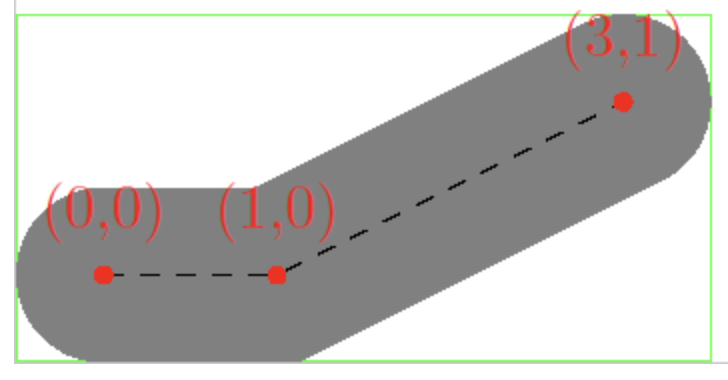
如果真的想精確計算呢?Cairo 的想法是先把它轉換成 Polygon,再計算包圍盒:
cairo_status_t
_cairo_path_fixed_stroke_extents (const cairo_path_fixed_t *path,
      const cairo_stroke_style_t *stroke_style,
      const cairo_matrix_t  *ctm,
      const cairo_matrix_t  *ctm_inverse,
      double    tolerance,
      cairo_rectangle_int_t  *extents)
{
    cairo_polygon_t polygon;
    cairo_status_t status;
    cairo_stroke_style_t style;

    _cairo_polygon_init (&polygon, NULL, 0);
    status = _cairo_path_fixed_stroke_to_polygon (path,
        stroke_style,
        ctm, ctm_inverse,
        tolerance,
        &polygon);
    _cairo_box_round_to_rectangle (&polygon.extents, extents);
    _cairo_polygon_fini (&polygon);

    return status;
}
效能測試
讓我們測試效能,顯示幾條各自包含 20,000 個點的折線:
$icCanvas4 = call(() => {
    return document.createElement('ic-canvas-lesson12');
});call(() => {
const { Canvas, Polyline } = Lesson12;
const stats = new Stats();
stats.showPanel(0);
const $stats = stats.dom;
$stats.style.position = 'absolute';
$stats.style.left = '0px';
$stats.style.top = '0px';
$icCanvas4.parentElement.style.position = 'relative';
$icCanvas4.parentElement.appendChild($stats);
let polyline1;
$icCanvas4.addEventListener('ic-ready', (e) => {
const canvas = e.detail;
const data = new Array(20000)
.fill(undefined)
.map((_, i) => [i, Math.random() * 50]);
polyline1 = new Polyline({
points: data,
stroke: 'black',
strokeWidth: 2,
fill: 'none',
cursor: 'pointer',
});
canvas.appendChild(polyline1);
const data2 = new Array(20000)
.fill(undefined)
.map((_, i) => [i, Math.random() * 50 + 100]);
polyline2 = new Polyline({
points: data2,
stroke: 'black',
strokeWidth: 2,
strokeLinejoin: 'round',
fill: 'none',
cursor: 'pointer',
});
canvas.appendChild(polyline2);
const data3 = new Array(20000)
.fill(undefined)
.map((_, i) => [i, Math.random() * 50 + 200]);
polyline3 = new Polyline({
points: data3,
stroke: 'black',
strokeWidth: 2,
strokeDasharray: [4, 4],
fill: 'none',
cursor: 'pointer',
});
canvas.appendChild(polyline3);
});
$icCanvas4.addEventListener('ic-frame', (e) => {
stats.update();
});
});看起來還不錯,但仔細想想,仍有下列問題,可以當作未來的改進方向:
- 由於每個 Instance 使用 15 個頂點,而且 Buffer 有大小限制,單條折線實際能包含的頂點數是有限的
- 目前一條折線對應一次繪製呼叫。如果有大量相似、重複的折線呢?regl-gpu-lines 提供了兩個想法:
- 依照目前的相機縮放層級簡化頂點
下面我們沿著上述方向繼續最佳化。
含多段的折線
沿著前面減少繪製呼叫次數的最佳化方向,我們可以把多條折線接在一起,當然需要某種分隔符。參照 regl-gpu-lines,我們使用 [NaN, NaN]。稍後繪製路徑時也會用到它:一條路徑可能包含數個子路徑!
Polyline1: [[0, 0], [100, 100]]
Polyline2: [[100, 0], [200, 100]]
MultiPolyline: [[0, 0], [100, 100], [NaN, NaN], [100, 0], [200, 100]]
依分隔符拆開之後,仍然用與上面相同的方式為每一段建構頂點陣列:
const subPaths = [];
let lastNaNIndex = 0;
for (let i = 0; i < points.length; i += stridePoints) {
    if (isNaN(points[i]) || isNaN(points[i + 1])) {
        subPaths.push(points.slice(lastNaNIndex, i));
        lastNaNIndex = i + 2;
    }
}
subPaths.push(points.slice(lastNaNIndex));
subPaths.forEach((points) => {
    // Omit constructing each segments
});
效果如下,並有以下說明:
- 因為多條折線被合併成一條,拾取也會以整體為單位。試著把滑鼠移到下面三組線上。
- 匯出 SVG 時,無法再直接匯出成對應的
<polyline>元素。
$icCanvas7 = call(() => {
    return document.createElement('ic-canvas-lesson12');
});call(() => {
const { Canvas, Polyline } = Lesson12;
const stats = new Stats();
stats.showPanel(0);
const $stats = stats.dom;
$stats.style.position = 'absolute';
$stats.style.left = '0px';
$stats.style.top = '0px';
$icCanvas7.parentElement.style.position = 'relative';
$icCanvas7.parentElement.appendChild($stats);
$icCanvas7.addEventListener('ic-ready', (e) => {
const canvas = e.detail;
const data = new Array(200).fill(undefined).map((_, i) => [
[Math.random() * 200, Math.random() * 200],
[Math.random() * 200, Math.random() * 200],
[NaN, NaN],
]);
const polyline = new Polyline({
points: data.flat(1),
stroke: 'black',
strokeWidth: 2,
strokeLinecap: 'round',
cursor: 'pointer',
});
canvas.appendChild(polyline);
polyline.addEventListener(
'pointerenter',
() => (polyline.stroke = 'red'),
);
polyline.addEventListener(
'pointerleave',
() => (polyline.stroke = 'black'),
);
const data2 = new Array(200).fill(undefined).map((_, i) => [
[Math.random() * 200 + 200, Math.random() * 200],
[Math.random() * 200 + 200, Math.random() * 200],
[NaN, NaN],
]);
const polyline2 = new Polyline({
points: data2.flat(1),
stroke: 'black',
strokeWidth: 2,
strokeLinecap: 'round',
cursor: 'pointer',
});
canvas.appendChild(polyline2);
polyline2.addEventListener(
'pointerenter',
() => (polyline2.stroke = 'green'),
);
polyline2.addEventListener(
'pointerleave',
() => (polyline2.stroke = 'black'),
);
const data3 = new Array(200).fill(undefined).map((_, i) => [
[Math.random() * 200 + 400, Math.random() * 200],
[Math.random() * 200 + 400, Math.random() * 200],
[NaN, NaN],
]);
const polyline3 = new Polyline({
points: data3.flat(1),
stroke: 'black',
strokeWidth: 2,
strokeLinecap: 'round',
cursor: 'pointer',
});
canvas.appendChild(polyline3);
polyline3.addEventListener(
'pointerenter',
() => (polyline3.stroke = 'blue'),
);
polyline3.addEventListener(
'pointerleave',
() => (polyline3.stroke = 'black'),
);
});
$icCanvas7.addEventListener('ic-frame', (e) => {
stats.update();
});
});[WIP] 合併相似的折線
簡化折線
對於包含大量頂點的折線(以及之後的 Path 與 Polygon),一項重要的最佳化是依照目前的縮放層級簡化它們,盡量減少渲染的資料量。簡化的依據有兩點:
- 太短的線段與太小的多邊形可以濾掉。
- 折線中對整體形狀影響很小的頂點可以濾掉。
線段頂點簡化的基本演算法是 Ramer–Douglas–Peucker 演算法,它的做法如下:
- 先保留折線的第一個與最後一個頂點,並把它們連起來。
- 在其餘頂點中找出離這條線段最遠的頂點,並保留該距離。
- 如果距離小於閾值,就捨棄它。
- 如果距離大於閾值,就保留它。如果距離小於閾值,就捨棄它。如果距離大於閾值,就保留它。
- 用分割的方式處理兩個子線段,回到步驟 1。
下圖(來自 wiki)示範這個過程:紅點被捨棄,綠點被保留。

顯然,閾值(ε)選得越大,最終簡化後留下的頂點數(n)就越少,Polyline 也越不平滑:

基於這個演算法的 JS 實作很多:simplify-js、turf-simplify、geojson-vt 等。我們以 geojson-vt 的實作為例:
export default function simplify(coords, first, last, sqTolerance) {
    let maxSqDist = sqTolerance;
    const mid = (last - first) >> 1;
    let minPosToMid = last - first;
    let index; // index of maximum distance

    const ax = coords[first];
    const ay = coords[first + 1];
    const bx = coords[last];
    const by = coords[last + 1];

    // Find the point with the greatest distance from the line segment
    for (let i = first + 3; i < last; i += 3) {
        const d = getSqSegDist(coords[i], coords[i + 1], ax, ay, bx, by);
        if (d > maxSqDist) {
            index = i;
            maxSqDist = d;
        }
    }

    if (maxSqDist > sqTolerance) {
        // Recursively process the first half of the line segment
        if (index - first > 3) simplify(coords, first, index, sqTolerance);
        // Preserving the maximum distance indicates that this vertex needs to be preserved
        coords[index + 2] = maxSqDist;
        // Half of the line segments after recursive processing
        if (last - index > 3) simplify(coords, index, last, sqTolerance);
    }
}
稍後會在 第 25 課 - 在筆刷模式中使用折線 中使用這個方法。
其他問題
到目前為止,我們已經完成折線的基本繪製。最後看一些相關的其他問題。限於篇幅,部分問題會在之後的課程中詳細說明。
SizeAttenuation
在某些情境中,我們不希望圖形的大小隨著相機縮放而改變,例如在 Figma 中選取圖形時,包圍盒線框以及它下方的尺寸標籤:
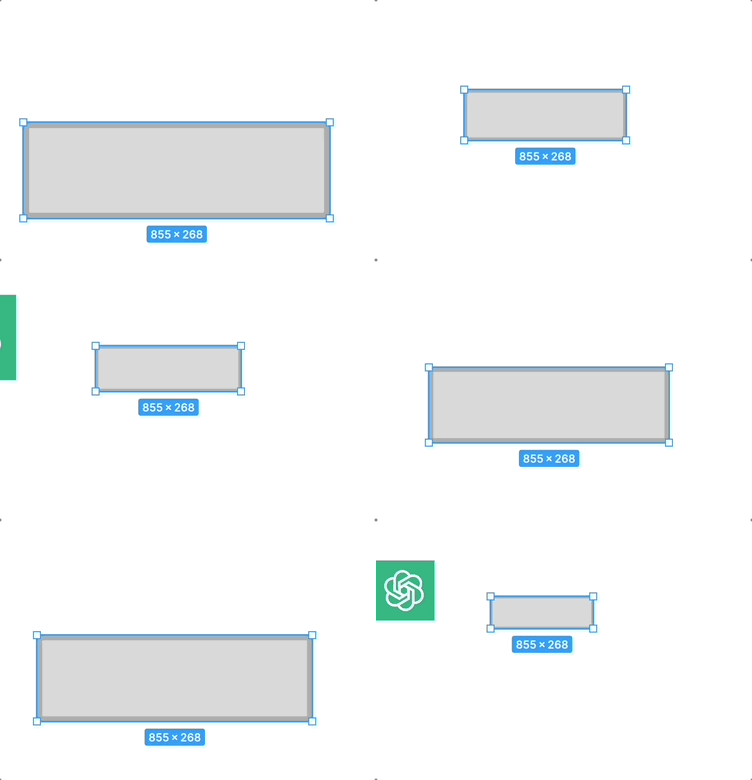
Three.js 把這稱為 sizeAttenuation。在透視投影模式下,Sprite 會隨著相機深度增加而變小。我們會在實作選取 UI 時再實作它。
線段、路徑與多邊形
在 SVG 中,還有 <line>、<path> 與 <polygon> 三個元素,其中:
<line>不需要考量strokeLinejoin,因此使用的頂點數可以簡化<polygon>的填色部分可以在用 earcut 等演算法三角化之後繪製,輪廓部分則與折線完全相同<path>也可以用類似<rect>、<circle>的方式在路徑上取樣,最後用折線繪製,但會有這樣的問題:繪製弧線時弧線不平滑 ISSUE
下一課會詳細介紹如何繪製它們。