33강 - 레이아웃 엔진
브라우저는 Flexbox, Grid, Block 같은 여러 레이아웃 시스템을 구현하므로, 노드 위치를 직접 계산하지 않고도 “가운데 정렬” 같은 효과를 쉽게 만들 수 있습니다.
DOM 밖에서 동작하는 무한 캔버스 같은 애플리케이션은 레이아웃 엔진 논리를 직접 구현해야 합니다. Figma는 Auto Layout을 구현했습니다. 그중 Grid는 현재 베타이고, Vertical과 Horizontal은 CSS의 flex-direction 속성에 대응합니다. 자세한 내용은 Figma - Guide to auto layout을 참고하세요.
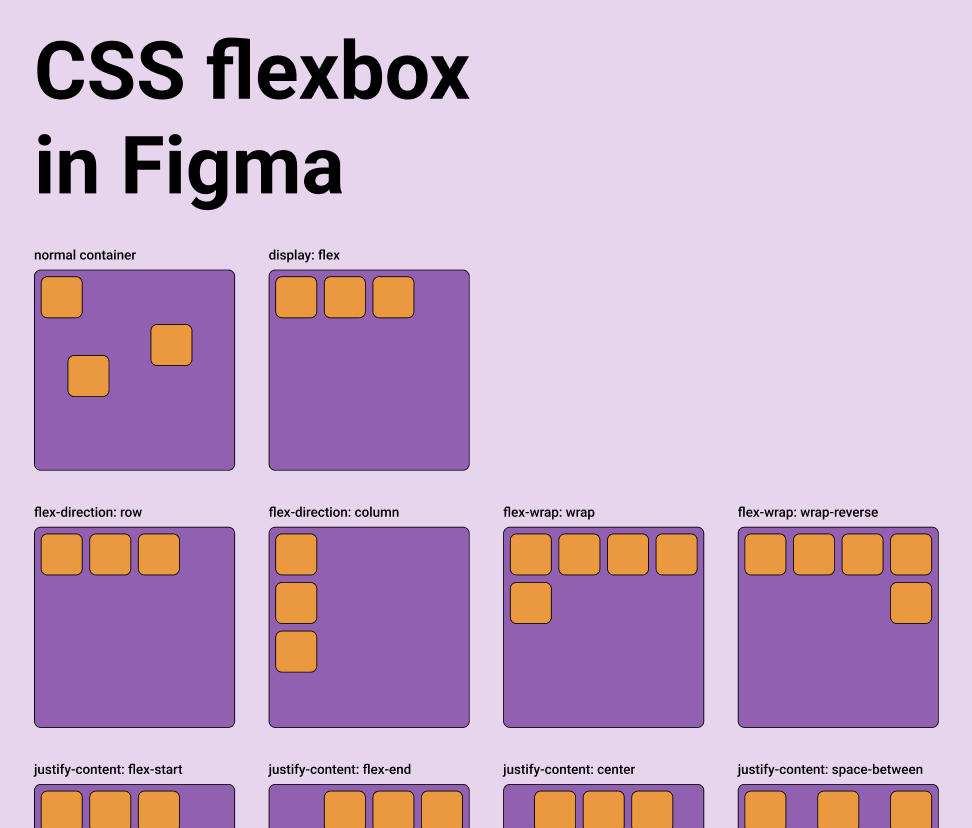
디자인에서 코드로 이어지는 도구는 보통 이 기능을 제공합니다. 자세한 내용은 다음을 참고하세요. Layout in pencil.dev
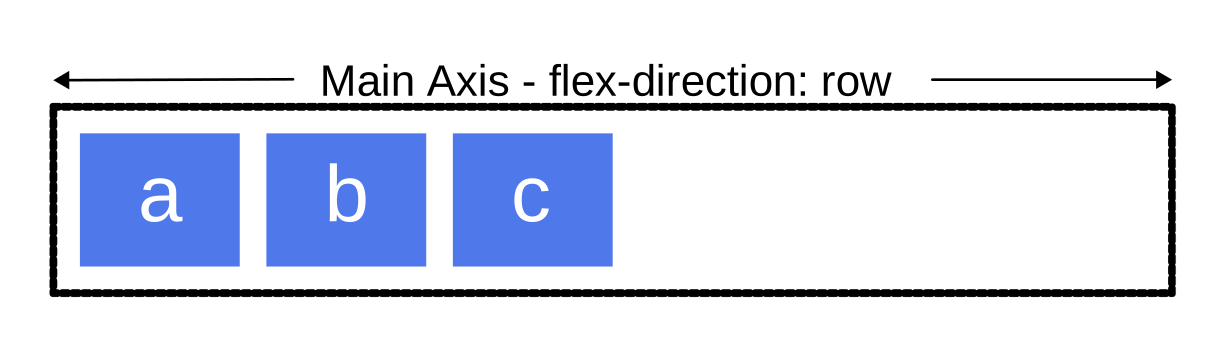
부모 객체는 layout, justifyContent, alignItems 같은 속성을 통해 Flexbox 스타일 레이아웃 시스템으로 자식의 크기와 위치를 대신 정할 수 있습니다.
export interface Layout {
    /** Enable flex layout. None means all children are absolutely positioned and will not be affected by layout properties. Frames default to horizontal, groups default to none. */
    layout?: 'none' | 'vertical' | 'horizontal';
    /** The gap between children in the main axis direction. Defaults to 0. */
    gap?: NumberOrVariable;
    layoutIncludeStroke?: boolean;
    /** The Inside padding along the edge of the container */
    padding?:
        | /** The inside padding to all sides */ NumberOrVariable
        | /** The inside horizontal and vertical padding */ [
              NumberOrVariable,
              NumberOrVariable,
          ]
        | /** Top, Right, Bottom, Left padding */ [
              NumberOrVariable,
              NumberOrVariable,
              NumberOrVariable,
              NumberOrVariable,
          ];
    /** Control the justify alignment of the children along the main axis. Defaults to 'start'. */
    justifyContent?:
        | 'start'
        | 'center'
        | 'end'
        | 'space_between'
        | 'space_around';
    /** Control the alignment of children along the cross axis. Defaults to 'start'. */
    alignItems?: 'start' | 'center' | 'end';
}
이번 강의에서는 Flexbox 레이아웃을 구현하고, 노드에서 CSS와 같은 이름의 속성을 지원합니다.
const parent = {
    id: 'parent',
    type: 'rect',
    x: 100,
    y: 100,
    width: 200,
    height: 200,
    display: 'flex',
    alignItems: 'center',
    justifyContent: 'center',
};
const child = {
    id: 'child',
    parentId: 'parent',
    type: 'rect',
    width: 50,
    height: 50,
};
Yoga
프론트엔드에서 Yoga 레이아웃 엔진을 쓰려면 WASM을 통해야 합니다. 현재 쓸 수 있는 구현은 여러 가지입니다.
- yoga-layout-prebuilt 마지막 업데이트 이후 오랜 시간이 지났습니다.
- yoga-wasm-web 초기의 satori가 HTML을 SVG로 바꾸고 레이아웃을 계산하는 데 사용했습니다. taffy에도 관련 예제가 있습니다.
- yoga-layout 이 구현을 권장하며, 우리의 구현도 이것을 기반으로 합니다. react-pdf/yoga도 이것을 사용합니다.
Yoga는 평면을 지정하면 3D 공간에도 적용됩니다. 자세한 내용은 react-three-flex를 참고하세요.
DOM Flexbox와 또 하나의 중요한 차이는, 3D에서 컨테이너의 평면을 지정해야 한다는 점입니다. 요소는 두 축이 이루는 2D 평면 위에 놓이며, 두 축을 따라 계산한 width와 height를 사용합니다.

pixijs/layout
pixijs/layout도 Yoga로 구현되어 있습니다. 비슷한 구현으로는 pixi-flex-layout이 있습니다.
const container = new Container({
    layout: {
        width: '80%',
        height: '80%',
        gap: 4,
        flexWrap: 'wrap',
        justifyContent: 'center',
        alignContent: 'center',
    },
});
troika-flex-layout
troika-flex-layout은 yoga-layout-prebuilt를 사용해 웹 워커에서 계산합니다.
import { requestFlexLayout } from 'troika-flex-layout';

// Describe your layout style tree, with a unique id for each node:
const styleTree = {
    id: 'root',
    width: 100,
    height: 100,
    alignItems: 'center',
    justifyContent: 'center',
    children: [
        {
            id: 'child',
            width: '50%',
            height: '50%',
        },
    ],
};

// Initiate a layout request with a callback function:
requestFlexLayout(styleTree, (results) => {
    // The results are a mapping of node ids to layout boxes:
    // {
    //   root: { left: 0, top: 0, width: 100, height: 100 },
    //   child: { left: 25, top: 25, width: 50, height: 50 }
    // }
});
Yoga의 대안
순수 JS 구현:
- Motion Canvas Layouts 브라우저 고유의 Flexbox 구현을 써서, 복잡한 레이아웃 알고리즘을 다시 구현할 필요가 없습니다.
- Simplifying WebGL: Building an Effective Layout Engine
Rust 구현:
- stretch는 Flexbox를 구현하고
stretch-layoutWASM 바인딩을 제공하지만, 오랫동안 유지보수되지 않았습니다. - taffy Rust로 작성한 고성능 UI 레이아웃 라이브러리입니다. 현재 Flexbox, Grid, Block을 포함한 여러 CSS 레이아웃 알고리즘을 구현합니다. 다만 WASM 바인딩은 아직 없습니다. 자세한 내용은 taffy wasm bindings를 참고하세요.
우리의 구현
공식 yoga-layout을 선택했습니다. 익숙한 Flexbox 외에도 Margin, Padding 같은 기본 레이아웃 속성을 제공합니다.
import { loadYoga } from 'yoga-layout/load';

class YogaSystem extends System {
    async prepare() {
        Yoga = await loadYoga();
    }
}
씬 그래프와 나란한 레이아웃 트리를 구성해야 합니다.
먼저 씬 그래프와 나란한 레이아웃 트리를 만듭니다. 노드 구조는 다음과 같습니다.
interface StyleTreeNode {
    id: string;
    top?: number | string;
    left?: number | string;
    width?: number | string;
    height?: number | string;
    children: StyleTreeNode[];
    padding?: number | number[];
    margin?: number | number[];
    gap?: number;
    rowGap?: number;
    columnGap?: number;
}
그런 다음 적절한 시점에 레이아웃 트리를 Yoga 트리로 바꾸고, 레이아웃을 계산한 뒤, 결과를 씬 그래프 노드에 적용합니다.
const root = Yoga.Node.createWithConfig(yogaConfig);
populateNode(root, styleTree);

root.calculateLayout();
const results = Object.create(null);
walkStyleTree(styleTree, (styleNode) => {
    const { id, yogaNode } = styleNode;
    results[id] = {
        x: yogaNode.getComputedLeft(),
        y: yogaNode.getComputedTop(),
        width: yogaNode.getComputedWidth(),
        height: yogaNode.getComputedHeight(),
    };
});
root.freeRecursive();
레이아웃을 수행할 시점
Flexbox 컨테이너 자체의 크기가 바뀌면 레이아웃을 다시 계산하고, 그 결과를 자식의 위치와 크기에 적용해야 합니다. 컨테이너에 새 자식이 추가될 때도 같습니다.
class YogaSystem extends System {
    private readonly bounds = this.query((q) =>
        q.addedOrChanged.and.removed
            .with(ComputedBounds)
            .trackWrites.and.with(Flex),
    );

    execute() {
        this.bounds.addedOrChanged.forEach((entity) => {
            // relayout
        });
    }
}
AlignItems와 JustifyContent
가장 흔한 용도는 이 두 속성으로 내용을 가운데 맞추는 것입니다.
텍스트를 가운데에 둔 버튼을 구현합니다.
레이블은 고유 너비(wordWrap: false)를 쓰고, Yoga가 측정한 텍스트 상자를 버튼 안에서 가운데에 둡니다. wordWrapWidth를 고정하고 maxLines: 1과 textOverflow: 'ellipsis'를 쓰면, 버튼에 여유가 있어도 레이블이 잘릴 수 있습니다. 이 옵션은 의도적으로 잘라야 하는 레이블에만 둡니다.
간격
다음 예제는 padding과 gap의 효과를 보여 줍니다.
const parent = {
    id: 'yoga-gap-parent',
    type: 'rect',
    x: 100,
    y: 100,
    width: 200,
    height: 250,
    fill: 'grey',
    display: 'flex',
    padding: 10,
    flexWrap: 'wrap',
    gap: 10,
    zIndex: 0,
};
Flex Basis, Grow, Shrink
Flex grow는 0 이상의 모든 부동소수점 값을 받으며, 기본값은 0입니다. 컨테이너는 남은 공간을 자식의 flex grow 값을 가중치로 하여 자식들에게 나눕니다.
최소/최대 너비와 높이
SVG로 내보내기
CSS Flexbox는 컨테이너로 HTML 요소만 지원하고 SVG 요소는 지원하지 않으므로, SVG로 내보낼 때는 레이아웃 이후의 절대 위치를 그대로 써야 합니다.
const layoutNodes = api.readLayoutFromECS(nodes);

(await serializeNodesToSVGElements(layoutNodes)).forEach((element) => {
    $namespace.appendChild(element);
});