Lesson 36 - Animation
In this lesson you will learn:
- How to design an animation API
- How to implement declarative keyframes and controllers aligned with the Web Animations API
- How to implement path, stroke, and morphing effects
- How formats like Lottie fit in
How to design the animation API
Motion is fully compatible with declarative WAAPI-style animation; see Improvements to Web Animations API. It calls the browser’s native element.animate() for GPU acceleration, an independent compositor thread, and work off the main thread. JavaScript fills in what WAAPI does not provide:
- Spring physics (WAAPI only supports Bézier easing)
- Independent
transformproperties (animatex,y,scaleseparately instead of one combined transform string) transformOriginfor scale and rotation centers- Timeline helpers such as
sequence()andstagger()
import { animate, stagger } from 'motion';

// Returns a controller you can pause, play, and reverse
const controls = animate(
    '.box',
    { x: [0, 100], opacity: [0, 1] }, // keyframes
    { duration: 0.5, delay: stagger(0.1), easing: 'spring(1, 100, 10, 0)' },
);

// Serializable control calls
controls.pause();
controls.play();
controls.reverse();
Keyframes and options are plain objects and can be JSON-serialized. Runtime state from animate()—bindings to the DOM, current time, velocity, etc.—is not serializable.
Following WAAPI
We can follow the WAAPI polyfill web-animations-js and integrate with our ECS.
Data layer: WAAPI-like keyframes (serializable)
interface Keyframe {
    offset?: number; // 0–1, same role as WAAPI offset
    [property: string]: any; // x, y, scale, fill, strokeWidth...
    easing?: string; // "ease-out", "spring(1, 100)"
}

interface AnimationOptions {
    duration: number; // ms
    delay?: number;
    iterations?: number | 'infinite';
    direction?: 'normal' | 'reverse' | 'alternate';
    fill?: 'forwards' | 'backwards' | 'both'; // How the animation appears when not running (before start, after end).
    easing?: string; // Global easing if a keyframe omits its own
}
Control layer: a WAAPI-like Animation controller. Differences from a full WAAPI polyfill:
- No CSS string parsing. WAAPI allows
{ transform: 'translate(100px)' }, which is expensive to parse. Prefer{ x: 100 }(Motion-style independent transform props). - Built-in
ease,ease-in,ease-out,linear, plus Motion-stylespring(mass, stiffness, damping). - Composite modes. Like WAAPI’s
composite: 'add' | 'replace', stack animations on top of base values (e.g. entity position plus an animated offset). - Timeline support. Like Motion’s
timeline()or WAAPI’sGroupEffect, including stagger across entities.
Controller
const animation = api.animate(
    node1,
    [
        { x: 100, fill: 'green' },
        { x: 200, fill: 'red' },
    ],
    {
        duration: 1000,
        direction: 'alternate',
        iterations: 'infinite',
        easing: 'ease-in-out',
    },
);
animation.pause();
animation.play();
animation.finish(); 矩形在 x: 100 ↔ 200 之间往复,填充在 green 与 red 之间插值;可用按钮控制同一 AnimationController。
Interpolation
Scalars like x / y / opacity interpolate trivially. For fill / stroke, parse colors with something like d3-color, then interpolate each rgba channel.
For linear gradients, matching stop counts interpolate each stop's position and color. Different stop counts use the combined stop positions from both gradients, retaining repeated positions that represent hard color transitions. This preserves nonuniform spacing when both keyframes contain the same gradient.
In ECS, fill / fillOpacity and stroke / strokeOpacity update the first enabled paint layer together. Other layers and their enabled state are preserved. If no layer is enabled, animating a paint adds one; animating only opacity does not create a new layer.
function interpolateValue(from: unknown, to: unknown, t: number) {
    if (isFiniteNumber(from) && isFiniteNumber(to)) {
        return interpolateNumber(from, to, t);
    }
    const fromColor = parseColor(from);
    const toColor = parseColor(to);
    if (fromColor && toColor) {
        return colorToRgbaString({
            r: interpolateNumber(fromColor.r, toColor.r, t),
            g: interpolateNumber(fromColor.g, toColor.g, t),
            b: interpolateNumber(fromColor.b, toColor.b, t),
            a: interpolateNumber(fromColor.a, toColor.a, t),
        });
    }
    return t < 1 ? from : to;
}
Easing
Beyond standard curves, we can support spring:
function evaluateEasing(easing: string, t: number) {
    const p = clamp01(t);
    const bezier = EASING_FUNCTION[easing as keyof typeof EASING_FUNCTION];
    if (bezier) {
        return clamp01(bezier(p));
    }
    if (easing.startsWith('spring(')) {
        return evaluateSpringEasing(p, easing);
    }
    return p;
} 切换缓动会重新创建动画(新 easing 在构造时生效)。矩形仍在 x: 100 ↔ 200 往复,便于对比不同曲线的加减速感。
Transform origin
transformOrigin: { x: 50, y: 50 }scale: 0.5 ↔ 1.2rotation: Math.PI / 4 ↔ -Math.PI / 4
Special animation effects
Path animation
Moving graphics along a path is common; CSS does this with Motion Path.
#motion-demo {
    animation: move 3000ms infinite alternate ease-in-out;
    offset-path: path('M20,20 C20,100 200,0 200,100');
}
@keyframes move {
    0% {
        offset-distance: 0%;
    }
    100% {
        offset-distance: 100%;
    }
}
Stroke animation
We need the path length:
const length = api.getTotalLength(path);
api.animate(
    path,
    [{ strokeDasharray: [0, length] }, { strokeDasharray: [length, 0] }],
    {
        duration: 3500,
    },
);Dash offset
draw.io uses animation to show connector direction:

Export your diagram to a SVG file to include the connector animation when you publish it in a web page or on a content platform that supports SVG images.
api.animate(node, [{ strokeDashoffset: -20 }, { strokeDashoffset: 0 }], {
    duration: 500,
    iterations: Infinity,
});Morphing
Many SVG libraries demonstrate morphing:
- Paper.js
- Kute.js offers Morph and CubicMorph
- GreenSock’s MorphSVGPlugin can even render in Canvas
- vectalign
Some libraries require matching segment structure before and after the morph, or interpolation fails.
Following Kute.js’s CubicMorph: convert path segments to cubic Béziers, use easy subdivision to normalize both paths to the same segment count, then interpolate control points per segment.
Winding and start-point alignment apply only when both paths contain a single closed contour. Open paths retain their endpoint order, so translating a curve does not swap its endpoints or collapse the curve halfway through the animation.
function mergePaths(
    left: { absolutePath: AbsoluteArray; curve: CurveArray | null },
    right: { absolutePath: AbsoluteArray; curve: CurveArray | null },
): [CurveArray, CurveArray, (b: CurveArray) => CurveArray] {
    let curve1 = left.curve;
    let curve2 = right.curve;
    if (!curve1 || curve1.length === 0) {
        // convert to curves to do morphing & picking later
        // @see http://thednp.github.io/kute.js/svgCubicMorph.html
        curve1 = path2Curve(left.absolutePath, false) as CurveArray;
        left.curve = curve1;
    }
    if (!curve2 || curve2.length === 0) {
        curve2 = path2Curve(right.absolutePath, false) as CurveArray;
        right.curve = curve2;
    }

    let curves = [curve1, curve2];
    if (curve1.length !== curve2.length) {
        curves = equalizeSegments(curve1, curve2);
    }

    const closed = [left.absolutePath, right.absolutePath].every(
        (path) =>
            path[path.length - 1]?.[0] === 'Z' &&
            path.filter(([command]) => command === 'M').length === 1,
    );
    const curve0 =
        closed && getDrawDirection(curves[0]) !== getDrawDirection(curves[1])
            ? reverseCurve(curves[0])
            : (clonePath(curves[0]) as CurveArray);

    return [
        curve0,
        closed ? (getRotatedCurve(curves[1], curve0) as CurveArray) : curves[1],
        (pathArray: CurveArray) => pathArray,
    ];
}Lottie
- lottie json schema
- Tips for rendering
- lottie-parser — we mainly follow its parsing logic
- velato — a renderer built on Vello
Usage
We implemented a plugin that converts Lottie JSON into graphics and keyframes. Highlights:
- Supports the following elements from Shape layers:
- In Lottie,
anchorX/anchorYdefine the scale and rotation center relative to the top-left of the shape’s bounding box—take care when mapping totransformOrigin - Merge multiple animation tracks into one keyframe set and fill in missing properties
import { loadAnimation } from '@infinite-canvas-tutorial/lottie';

const response = await fetch('/bouncy_ball.json');
const animation = loadAnimation(await response.json(), {
    loop: true,
    autoplay: true,
    onDiagnostic: ({ code, path, message }) =>
        console.info(code, path, message),
});

await api.edit(() => animation.render(api), { capture: 'NEVER' });

// On component unmount (also automatically cleaned up on canvas destruction):
// await animation.destroy();
Below is the official sample running in our setup: Bouncy Ball
Compatibility
This importer converts Lottie into ECS nodes and keyframes; it is not a complete Lottie renderer. Parsing a field does not necessarily implement its visual effect.
| Feature | Current behavior |
|---|---|
| Rectangles, ellipses, paths, groups; basic fill/stroke | Basic static geometry, path morphing and 2D position/rotation/scale; primitive size/corner animation remains limited |
| PolyStar | Stars/polygons, both windings, point count, position, rotation, inner/outer radius and roundness; numeric keyframes with temporal easing and holds |
| Repeater | Copies of preceding shapes/groups; count, offset, anchor, translation, scale, rotation, start/end opacity and composite order, including numeric keyframes |
| Solid, Null, parenting, Precomp | Basic support; layer in/out visibility, time stretch and remapping are incomplete |
| Gradients and multiple paints | Basic gradients; animated gradient geometry, radial highlights and multiple paint/operator ordering remain limited |
| Trim Paths | Stroke-dash approximation with corrected full/empty coverage, endpoint sorting and offsets; filled geometry, multi-path modes, existing dash patterns, animated zero-length round caps, direction and modifier ordering remain limited |
| Spatial Bézier motion, Skew | Incomplete; reported during inspection |
| Merge Paths, Round Corners and other modifiers | Not rendered |
| Image | Partial; asset directories and preloading are not implemented |
| Text, Masks, Track Mattes, Effects, Blend Modes, 3D | Not implemented or not reliably rendered; ECS capabilities do not imply Lottie import support |
| Expressions | Baked at import; defaults to the bundled lottie-web ExpressionManager with a limited shape-layer environment, not full AE semantics |
inspectLottie(data) checks known gaps without mutating JSON or evaluating expressions. animation.getDiagnostics() and onDiagnostic provide a stable code, severity (partial / unsupported), JSON Pointer path, and message. Import continues with diagnostics; an empty list does not certify AE compatibility. Expand Compatibility notes in the examples to inspect their gaps.
Playback uses one composition clock. goTo(value, true) seeks composition-relative frames; the default unit is seconds, preserving play/pause state. stop() pauses at frame zero. setSpeed() takes a positive multiplier; setDirection(-1) reverses from the current position while preserving speed. playSegments([start, end]) honors both endpoints; descending endpoints play backward. Numeric loop counts extra repeats. ECS controllers returned by getAnimations() are sampled by the player; control time through the player API.
Repeated render(api) on the same instance is idempotent; another canvas needs a separate instance. destroy() is idempotent, cancels playback, and removes the imported node tree in a safe edit. Components should also cancel pending fetches and queued edits when unmounting. Browser regressions compare fixed frames against a pinned lottie-web version for position, single-path stroked Trim Paths, PolyStar geometry and Repeater groups at integer/fractional frames; they do not establish whole-format parity.
Stars and polygons
PolyStar (ty: "sr") generates a closed Bézier path: sy: 1 selects a star and sy: 2 a polygon. Point count (pt), position (p), rotation (r), radius (or / ir) and roundness (os / is) can animate independently. Inner properties apply only to stars. d: 3 reverses winding. Fractional point counts are floored, matching lottie-web 5.13; this is not a continuous morph between point counts.
The example animates both shapes. Pause, reverse, or drag Seek frame to inspect intermediate geometry. Parameters are interpolated before constructing the path, so rotation preserves the radius and point-count changes take effect at the correct instant.
Star (blue) · Polygon (red)
Animated PolyStar geometry is sampled by a plugin controller on the composition clock. Keep the original Lottie JSON to reload it: plain ECS keyframe serialization and the animation editor do not preserve or edit these procedural parameter tracks yet. Spatial position tangents, modifier combinations (including Trim Paths on changing geometry), expressions and other limitations in the matrix still apply. Curved strokes also inherit the ECS renderer’s existing transparency seams at some tessellated joins; their reference tests verify the silhouette and color, not alpha parity.
Bézier curves in Lottie
vis an array of vertices.iis an array of “in” tangent points, relative tov.ois an array of “out” tangent points, relative tov.cis a boolean determining whether the poly-Bézier is closed. If it is, there is an extra Bézier segment between the last point invand the first.
Repeater
Repeater (ty: "rp") duplicates the operators before it in the current shape group. Keep the fill/stroke inside the repeated group to paint each copy independently. Nested shape groups and animated PolyStar geometry can be repeated. Nested or stacked Repeaters currently use recursive duplication and emit shape.repeater.nested; compound ordering and retained source copies can differ from lottie-web.
Copies (c) round up; zero hides every copy. Offset (o) accepts fractional and negative values. The transform (tr) includes anchor (a), translation (p), nonuniform scale (s), rotation (r) and start/end opacity (so / eo). Composite mode (m) changes copy stacking. Numeric tracks support temporal easing and holds. Transforms follow lottie-web 5.13, including its identity-crossing behavior at negative integer offsets.
Animated copies · Offset · Scale · Rotation · Opacity
The importer allocates a copy pool from the count track’s upper bound, including easing overshoot. Playback and seeking reuse this pool. Large counts and nested repeaters multiply the imported node count. As with PolyStar, keep the original Lottie JSON: plain ECS keyframe serialization and the animation editor do not preserve these procedural tracks.
Paint operators after the Repeater have partial support and emit shape.repeater.paint-scope: per-copy paint inheritance does not reproduce the shared compound fill coverage/opacity of lottie-web. Modifier ordering, skew, spatial motion and layer timing remain subject to the compatibility matrix. Singular inverse scales (e.g. zero scale with a negative offset) hide the affected copies instead of submitting invalid transforms.
Expressions
{
    "ty": "sh",
    "ks": {
        "a": 0,
        "k": {
            "i": [],
            "o": [],
            "v": []
        },
        "x": "var group = thisLayer.content(\"Quadratic Points\");\nvar num_points = 3;\nvar points = [];\nvar ip = [];\nvar op = [];\nfor ( var i = 0; i < num_points; i++ )\n{\n    var pos = group.content(\"p\" + i).position;\n    points.push(pos);\n    ip.push(pos);\n    op.push(pos);\n}\nvar $bm_rt = {\n    v: points,\n    i: ip,\n    o: op\n};\n"
    }
}
Text layer
Text layers and text animators are not imported yet.
Clipping mask
Mask modes, inversion, animation and track mattes are not reliably rendered.
Layer effects
Lottie effects are not mapped to ECS yet.
Rive

Manim
Animation editor
Inspired by products such as lottielab and Jitter, we built a lightweight animation editor in the Web Components layer: the Animation panel on the right edits keyframes for the selected element, and the Timeline panel at the bottom shows the scene-wide timeline and drives that canvas's playhead. Both share the same serializable keyframe data and the scene clock in AppState.
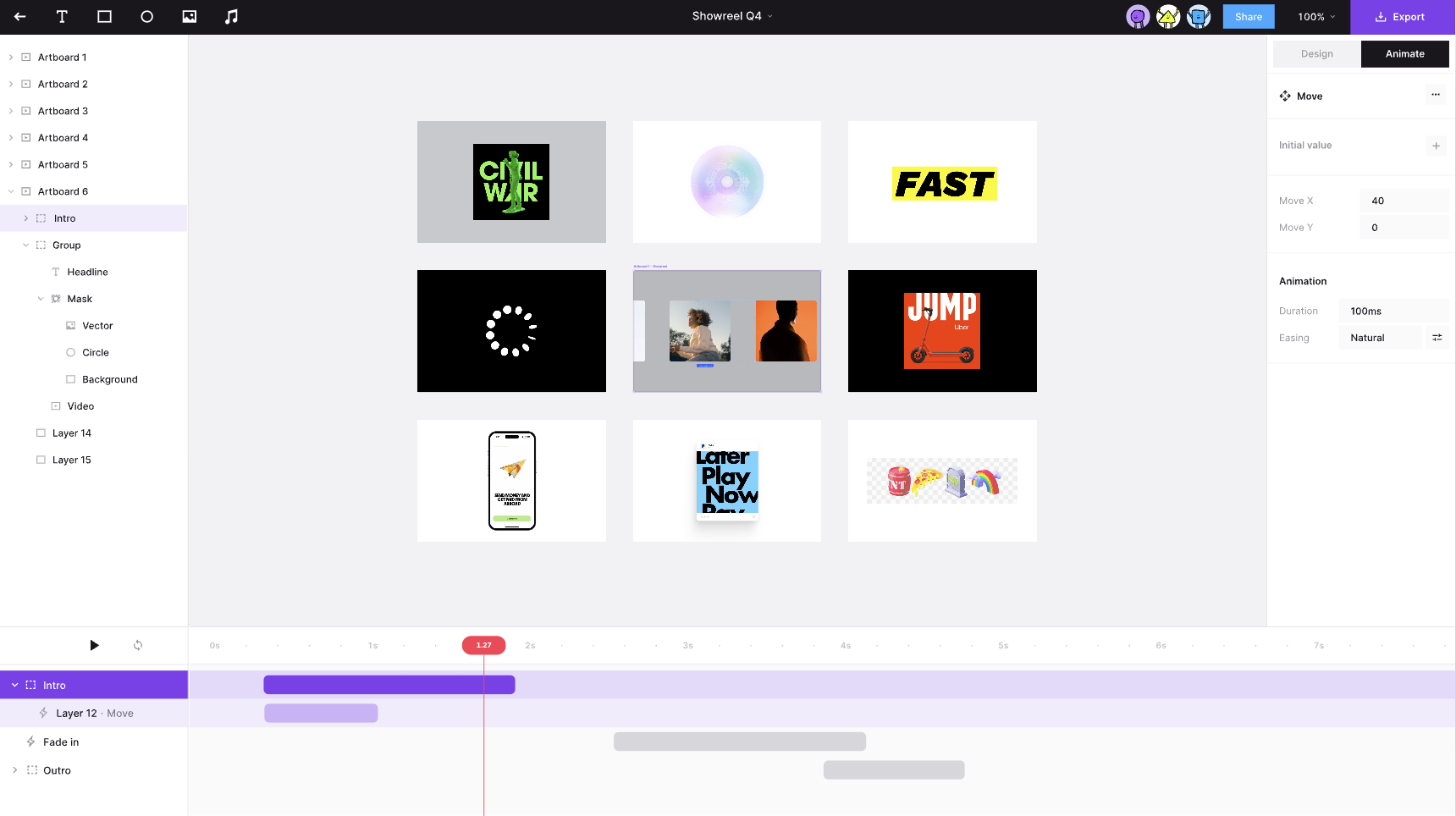
Layout
The taskbar exposes two independent toggles:
SHOW_ANIMATION_PANEL→ic-spectrum-animation-panel(right side, alongside the Properties panel)SHOW_TIMELINE_PANEL→ic-spectrum-timeline-panel(bottom dock, full canvas width)
Typical workflow:
- Select a single element and add an animation or edit property tracks in the Animation panel.
- Open the Timeline to see every animated layer in the scene and its time range.
- Scrub the playhead or press Play to preview the whole scene at one moment in time.
- Selecting a track in the Timeline also selects its element; the Animation panel on the right shows that element’s keyframes.
Scene clock and editing mode
The Timeline drives the canvas's playhead in AppState, decoupled from each AnimationController. Canvases sharing an ECS world keep independent playheads, playback state, and scene durations:
| Field | Meaning |
|---|---|
animationEditing | When true, enters deterministic scrub mode: every controller in this canvas is sampled at the same animationCurrentTime instead of free-running on its own |
animationCurrentTime | This canvas's playhead position (milliseconds) |
animationPlaying | Whether the playhead advances automatically |
animationLoop | Whether playback wraps back to 0 at the end of the scene |
When animationEditing === true, AnimationSystem samples only entities belonging to that canvas. While paused, controllers are fixed at animationCurrentTime; while playing, the playhead advances via performance.now() deltas. Paused wall-clock time is excluded when playback resumes, and scene duration is determined by that canvas's tracks.
After leaving editing mode, controllers paused by the editor resume autoplay from the current position. Controllers already paused by the caller remain paused, and cancelled controllers are not restarted.
Opening the Timeline automatically calls setAnimationEditing(true) so scrubbing and preview stay consistent.
Timeline panel design
底部为 ic-spectrum-timeline-panel:拖动播放头 scrub、点击 ▶ 预览整场景; 点击轨道可选中元素并在右侧 Animation 面板编辑 keyframes。Hero 淡入 2s,Orbit 延迟 0.5s 后位移 1.5s。
Track data
The Timeline does not read node JSON directly; it aggregates via api.getAnimatedTracks():
interface Track {
    id: string; // node id
    name: string; // layer name; falls back to id
    properties: string[]; // e.g. ['opacity', 'x']
    delay: number; // ms
    duration: number; // active animation length (total − delay)
    totalDuration: number;
}
Scene duration = the maximum totalDuration across all tracks. Bar left / width are computed as delay * PX_PER_MS and duration * PX_PER_MS.
Interactions
| Action | Behavior |
|---|---|
| Click track label | layersSelected = [track.id], highlight the track, drive the Animation panel |
| Drag lane / ruler | Scrub the playhead; canvas previews that frame live |
| Play / Pause | toggleAnimationPlaying() advances the global clock in editing mode |
| Loop | setAnimationLoop() controls whether the scene wraps at the end |
Animation panel (works with Timeline)
Component: packages/webcomponents/src/spectrum/animation-panel.ts.
- Editable only with a single selection; multi-select or no selection shows a placeholder.
- Global options:
duration,delay, defaulteasing,iterations(Loop switch). - Keyframes grouped by property track; each row has
offset(0–1), value,easing, and a delete button. - Add keyframe at playhead: reads
animationCurrentTime, converts to a normalized offset, and samples the current property values viacontroller.getCurrentValues()—open the Timeline and scrub to the target time before inserting a keyframe. fill/strokeuse a popover +ic-spectrum-color-picker; other numeric properties usesp-number-field.- Panel width and height are resizable; sizes persist in
localStorage(same handle interaction as the Properties panel).
All edits go through setNodeAnimation / updateNodeAnimationKeyframe and participate in undo history and document serialization.
Differences from Lottie-style editors
The current implementation stays deliberately simple compared with full DCC tools like lottielab:
- The Timeline uses one track per node, not Lottie’s layer + property multi-track layout; property names appear as a label suffix (
Rect · opacity, x). - Keyframes and bar timing cannot be dragged on the Timeline yet; timing is edited via
offsetin the Animation panel. - Expressions use limited import-time baking. Text layers and clipping masks are not reliably supported or authored by this editor.
Possible extensions: property sub-tracks, keyframe diamond markers, dragging bar edges to change delay/duration, and more.