Bidirectional edges
Two-way links: o--o, <-->, x--x.
flowchart LR
  A o--o B
  B <--> C
C x--x DIn Lesson 35 - Tile-based Rendering, we used the WebGPU Compute Shader-based renderer vello. In this lesson, we will try a global illumination approach that is also compute-shader-based, and integrate it with the existing rendering pipeline.
Paste while the canvas is focused to use the same styling as the demo above (dark theme, Gaegu font, etc.).
Two-way links: o--o, <-->, x--x.
flowchart LR
A o--o B
B <--> C
C x--x DMindmap
mindmap
  root((mindmap))
    Origins
      Long history
      ::icon(fa fa-book)
      Popularisation
        British popular psychology<br/> author Tony Buzan
    Research
      On effectiveness<br/>and features
      On Automatic creation
        Uses
            Creative techniques
            Strategic planning
            Argument mapping
    Tools
      Pen and paper
MermaidNested composite states with inner states.
stateDiagram-v2
    [*] --> Idle
    Idle --> Active: Start
Active --> [*]Actors and messages; paste to render on the canvas.
sequenceDiagram
  Alice->>John: Hello John, how are you?
  John-->>Alice: Great!
  Alice-)John: See you later!
For a complete explanation of the theory, see: Fundamentals of Radiance Cascades
What we've observed is that the further we are from the closest object in the scene:
- The less spatial resolution we need. (e.g. the larger spacing can be between probes)
- The more angular resolution we need. (e.g. the more rays we need per probe)
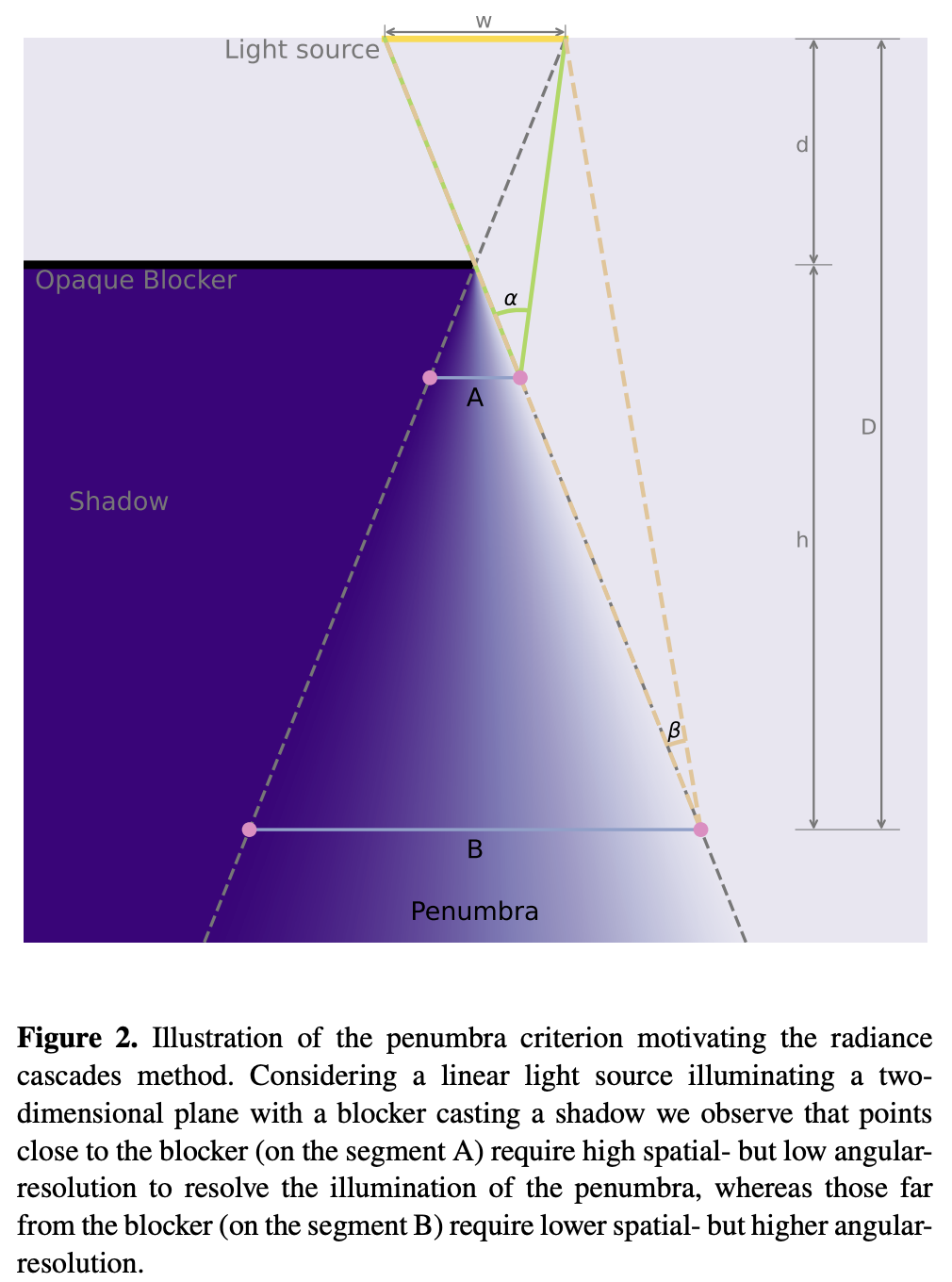
The overall pipeline is:
let mut rc_enc = device_handle
    .device
    .create_command_encoder(&wgpu::CommandEncoderDescriptor {
        label: Some("rc_gi"),
    });
rp.encode_distance_pass();
rp.encode_rc_cascade_passes();
rp.encode_rc_mipmap();
rp.encode_rc_apply();
device_handle.queue.submit([rc_enc.finish()]);We start with analytic geometry. In Lesson 2 - Draw a Circle and Lesson 9 - Draw Ellipses and Rectangles, we already introduced SDFs for circles, ellipses, and rectangles. The distance is 0 on shape boundaries and inside shapes. The figure below visualizes it in grayscale, mapping raw distance into [0,1] with saturate(d * DIST_FIELD_VIZ_SCALE):
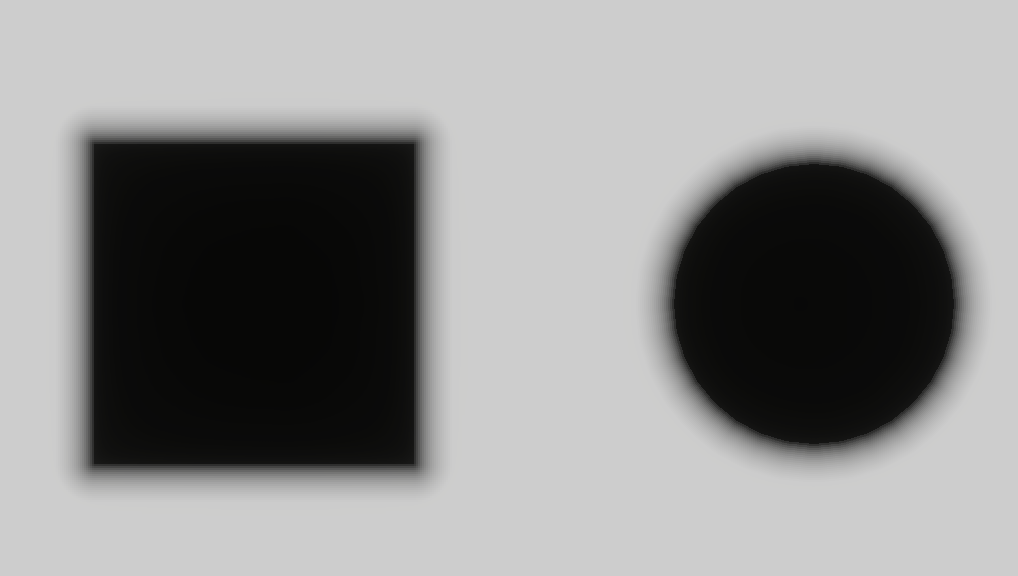
To generate the distance field texture, the vertex shader still uses a full-screen triangle (similar to our previous post-processing passes). prims stores basic scene primitive geometry, so sdf_prim can evaluate analytic distance fields. The final result is written into rc_dist, a full-canvas texture in R16F format storing unsigned distance.
@group(0) @binding(0) var<uniform> header: DistHeader;
@group(0) @binding(1) var<storage, read> prims: array<GpuRcPrim>;

@fragment
fn dist_fs(i: VsOut) -> @location(0) vec4<f32> {
  var d = 1e6;
  let n = header.count;
  for (var i = 0u; i < 64u; i = i + 1u) {
    if i >= n { break; }
    d = min(d, sdf_prim(p_canvas, prims[i]));
  }
  // d is union SDF: inside <0, outside >0, boundary ~=0. R stores max(d,0): 0 inside and on edges, positive outside as distance to boundary.
  return vec4(max(d, 0.0), 0.0, 0.0, 1.0);
}
Right now we only support Rect, Ellipse, Line, and Polyline. For other SDFs, refer to distfunctions2d.
The bevy_radiance_cascades implementation uses Jump Flood Algorithm (JFA), a parallel method for generating distance fields. The core idea is to propagate information through the entire grid in log₂(N) rounds with exponentially decreasing "jump steps".
texture_2d<u32> (stores seed coordinates).This allows ray marching to take large, safe steps to the next surface instead of using fixed tiny steps.
Fundamentals of Radiance Cascades
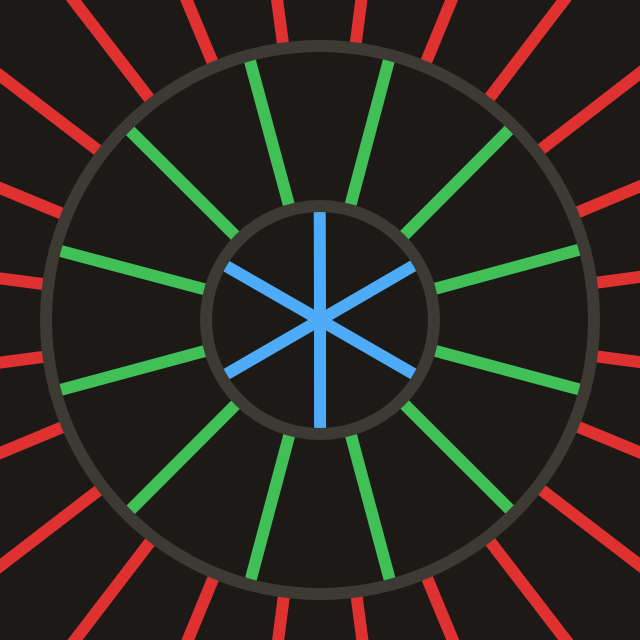
A cascade is basically a grid of probes, in which all probes have equal properties. (e.g. interval count, interval length, probe spacing)
Each Probe is structured like this. When uploading to GPU with std140 alignment, padding must be considered:
pub struct Probe {
    pub width: u32, // texel footprint per probe and ray count (angular discretization)
    pub start: f32, // where this ray segment starts from the probe center
    pub range: f32, // how far this cascade traces along the ray from start
}

pub fn probe_for_cascade(c: u32, resolution_factor: u32, interval0: f32) -> Probe {
    let width = 1u32 << (c + resolution_factor);
    let start = interval0 * (1.0 - 4.0_f32.powi(c as i32)) / -3.0;
    let range = interval0 * 4.0_f32.powi(c as i32);
    Probe {
        width,
        start,
        range,
    }
}
Compute required cascade count from canvas diagonal length:
pub fn cascade_count_for_gi_size(gi_w: u32, gi_h: u32) -> usize {
    let diag = ((gi_w * gi_w + gi_h * gi_h) as f32).sqrt();
    cascade_count_for_diagonal(diag, RC_INTERVAL0, RC_MAX_CASCADES).max(1)
}

pub const RC_INTERVAL0: f32 = 2.0;
pub const RC_MAX_CASCADES: usize = 16;
Allocate Probe uniforms when initializing the canvas:
for c in 0..cascade_count {
    let p = probe_for_cascade(c as u32, RC_RESOLUTION_FACTOR, RC_INTERVAL0);
    let slot = ProbeUniformSlotPadded::from_probe(&p);
    queue.write_buffer(
        &self.rc_probe_dynamic_buf,
        (c * PROBE_UNIFORM_STRIDE) as u64,
        bytemuck::bytes_of(&slot),
    );
}CPU-side scheduling is split into two pipelines, and requires two textures: rc_ping_a and rc_ping_b.
let rc_usage =
    TextureUsages::STORAGE_BINDING | TextureUsages::TEXTURE_BINDING | TextureUsages::COPY_SRC;
let (rc_a, rc_a_view) = mk_sz(
    device,
    "rc_ping_a",
    TextureFormat::Rgba16Float,
    rc_usage,
    gi_width,
    gi_height,
);
// rc_ping_b is the same
The first pipeline reads rc_ping_a and writes rc_ping_b, starting from the farthest segment first.
let mut pass = encoder.begin_compute_pass(&ComputePassDescriptor {
    label: Some("radiance_cascades_first_pass"),
    timestamp_writes: None,
});
pass.set_pipeline(&self.rc_cascade_first_pipeline);
pass.set_bind_group(0, &radiance_cascades_10, &[first_offset]);
pass.dispatch_workgroups(gw, gh, 1);
The second pipeline alternates between radiance_cascades_01 / 10 bind groups for ping-pong (rc_ping_a / rc_ping_b writes in turn). It then merges level by level toward smaller c, using the matching Probe offset each step.
let mut merge_pass = encoder.begin_compute_pass(&ComputePassDescriptor {
    label: Some("radiance_cascades_merge_passes"),
    timestamp_writes: None,
});
merge_pass.set_pipeline(&self.rc_cascade_merge_pipeline);
for pass_i in 1..cascade_count {
    let cascade_idx = cascade_count - 1 - pass_i;
    let dyn_off = (cascade_idx * PROBE_UNIFORM_STRIDE) as u32;
    let merge_idx = pass_i - 1;
    let bg = if merge_idx % 2 == 0 {
        &radiance_cascades_01
    } else {
        &radiance_cascades_10
    };
    merge_pass.set_bind_group(0, bg, &[dyn_off]);
    merge_pass.dispatch_workgroups(gw, gh, 1);
}
Both the first pass and subsequent ping-pong compute passes use the same ray dispatch logic.
@compute @workgroup_size(8, 8, 1)
fn rc_cascade_first(@builtin(global_invocation_id) gid: vec3<u32>) {
  radiance_dispatch(0u, gid);
}

@compute @workgroup_size(8, 8, 1)
fn rc_cascade_merge(@builtin(global_invocation_id) gid: vec3<u32>) {
  radiance_dispatch(1u, gid);
}Each Compute Shader thread handles one texel in the GI cascade texture:
width² block.start along the ray to get the ray-march start point.Inside one probe block, different texels represent different directions; the block packs width² directional samples. The explanation video below is from Fundamentals of Radiance Cascades:
let probe_texel = vec2<u32>(base_coord.x % probe_w, base_coord.y % probe_w);

// Flatten 2D local coords into ray IDs in 0 … probe_w²-1.
let ray_index = probe_texel.x + probe_texel.y * probe_w;
let ray_count = probe_w * probe_w;

// Uniformly split [0, 2π) into ray_count directions.
// +0.5 samples the center of each angular sector.
let ray_angle = (f32(ray_index) + 0.5) / f32(ray_count) * PI2;
let ray_dir = normalize(vec2(cos(ray_angle), sin(ray_angle)));

// Probe row/column index this texel belongs to.
let probe_cell = vec2<u32>(base_coord.x / probe_w, base_coord.y / probe_w);
// Top-left coordinate of this probe in GI texture.
let probe_coord = vec2<u32>(probe_cell.x * probe_w, probe_cell.y * probe_w);
// Probe center in GI texture.
let probe_coord_center = probe_coord + vec2<u32>(probe_w / 2u, probe_w / 2u);
// Probe center in full resolution.
let center_full = vec2<f32>(probe_coord_center) * rs.gi_scale;
If no hit is found and merge is enabled, add interpolated radiance from the upper cascade via merge().
@group(0) @binding(5) var tex_radiance_cascades_destination: texture_storage_2d<rgba16float, write>;

fn radiance_dispatch(merge_flag: u32, gid: vec3<u32>) {
  // ...

  // Start from center + ray_dir * probe.start, not exactly at center.
  // Inner cascades already cover near field; this cascade handles farther range only.
  let origin = center_full + ray_dir * ru.probe_start;
  var color = raymarch(origin, ray_dir, ru.probe_range);
  if merge_flag != 0u && color.a != 1.0 {
    color = color + merge(probe_cell, ray_index);
  }
  textureStore(tex_radiance_cascades_destination, ...);
}For each ray starting from a pixel and marching along a direction, we take at most MAX_RAYMARCH steps. In each step, we sample the previously generated distance field tex_dist_field and move forward by dist. If distance is < EPSILON, we treat it as hitting a surface (or being inside geometry), then directly sample tex_main for color.
fn raymarch(origin: vec2<f32>, ray_dir: vec2<f32>, range: f32) -> vec4<f32> {
    // ...
    var color = vec4(0.0);
    var covered_range = 0.0;
    for (var r = 0u; r < MAX_RAYMARCH; r = r + 1u) {
        if ( // termination
            covered_range >= range ||
            any(position >= dimensions)
        ) {
            break;
        }

        var dist = textureLoad(tex_dist_field, coord, 0).r;
        if (dist < EPSILON) {
            color = textureLoad(tex_main, coord, 0);
            break;
        }
        position = position + ray_dir * dist;
        covered_range = covered_range + dist;
    }
    return color;
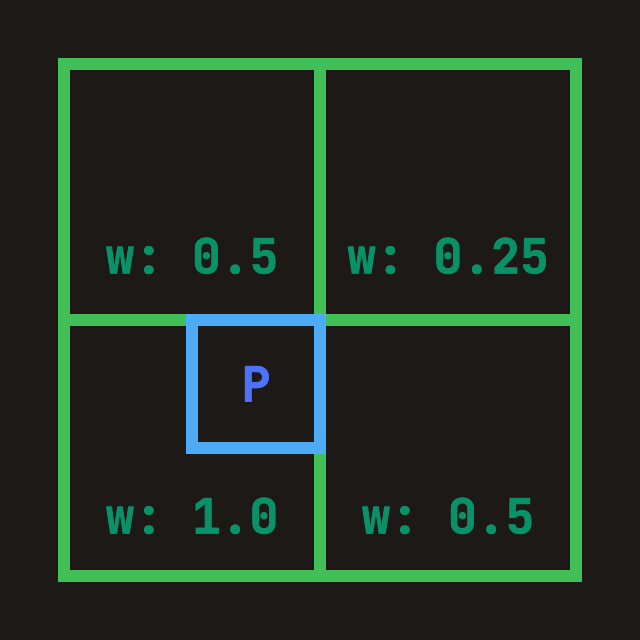
}"Merge from inner (finer) cascade into current layer": if current probe width is W, then previous cascade (already written in tex_radiance_cascades_source) has prev_width = 2W, i.e. 2x probe edge length and 4x directional samples. During merge:
ray_index*4 … +3) onto the current coarse direction.fn merge(probe_cell: vec2<u32>, ray_index: u32) -> vec4<f32> {
let dimensions = textureDimensions(tex_radiance_cascades_source);
// Probe edge length in previous cascade texture.
// Current is W, previous is 2W, so previous has 4x rays.
let prev_width = probe.width * 2u;
let prev_ray_index_start = ray_index * 4u;
for (var p = 0u; p < 4u; p = p + 1u) {
let prev_ray_index = prev_ray_index_start + p;
let offset_coord = vec2<u32>(
prev_ray_index % prev_width,
prev_ray_index / prev_width,
);
// Sample all four spatial corners
TL = TL + fetch_cascade(
probe_cell_i,
probe_correction_offset + vec2<i32>(-1, -1),
offset_coord,
dimensions,
prev_width,
);
// TR / BL / BR omitted
}
let weight = vec2<f32>(0.75, 0.75)
- vec2<f32>(f32(probe_correction_offset.x), f32(probe_correction_offset.y)) * 0.5;
// Bilinear interpolation over accumulated corner radiance.
return mix(mix(TL, TR, weight.x), mix(BL, BR, weight.x), weight.y)
// Average the 4 fine rays into one coarse-direction result.
* 0.25;
}
With WebGPU Inspector, you can inspect the final merged result in rc_ping_b. You can clearly see that non-hit areas get filled in, producing smoother penumbra.
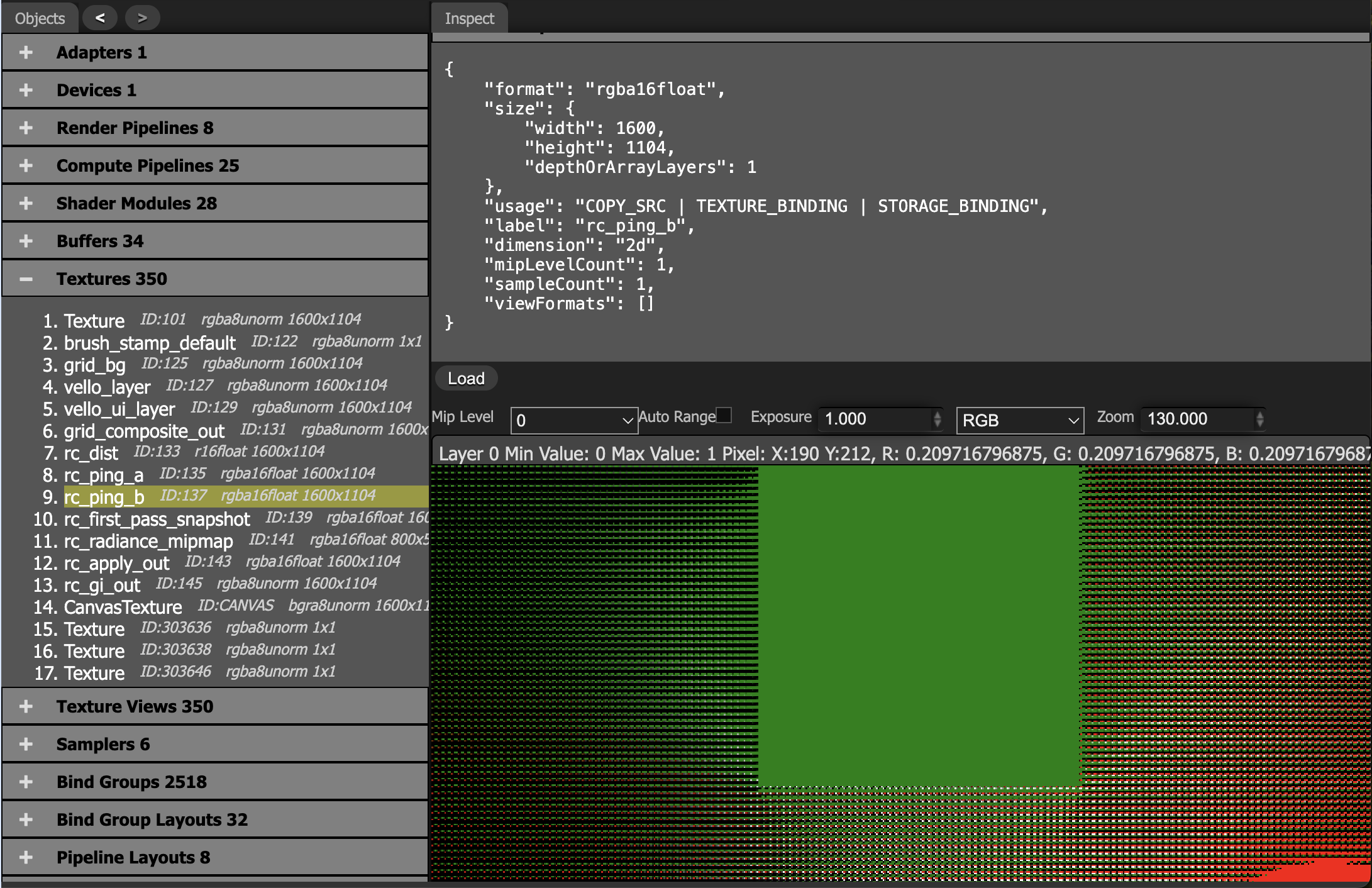
When probe spacing becomes larger than the shadow detail scale, interpolation blurs light-dark boundaries.
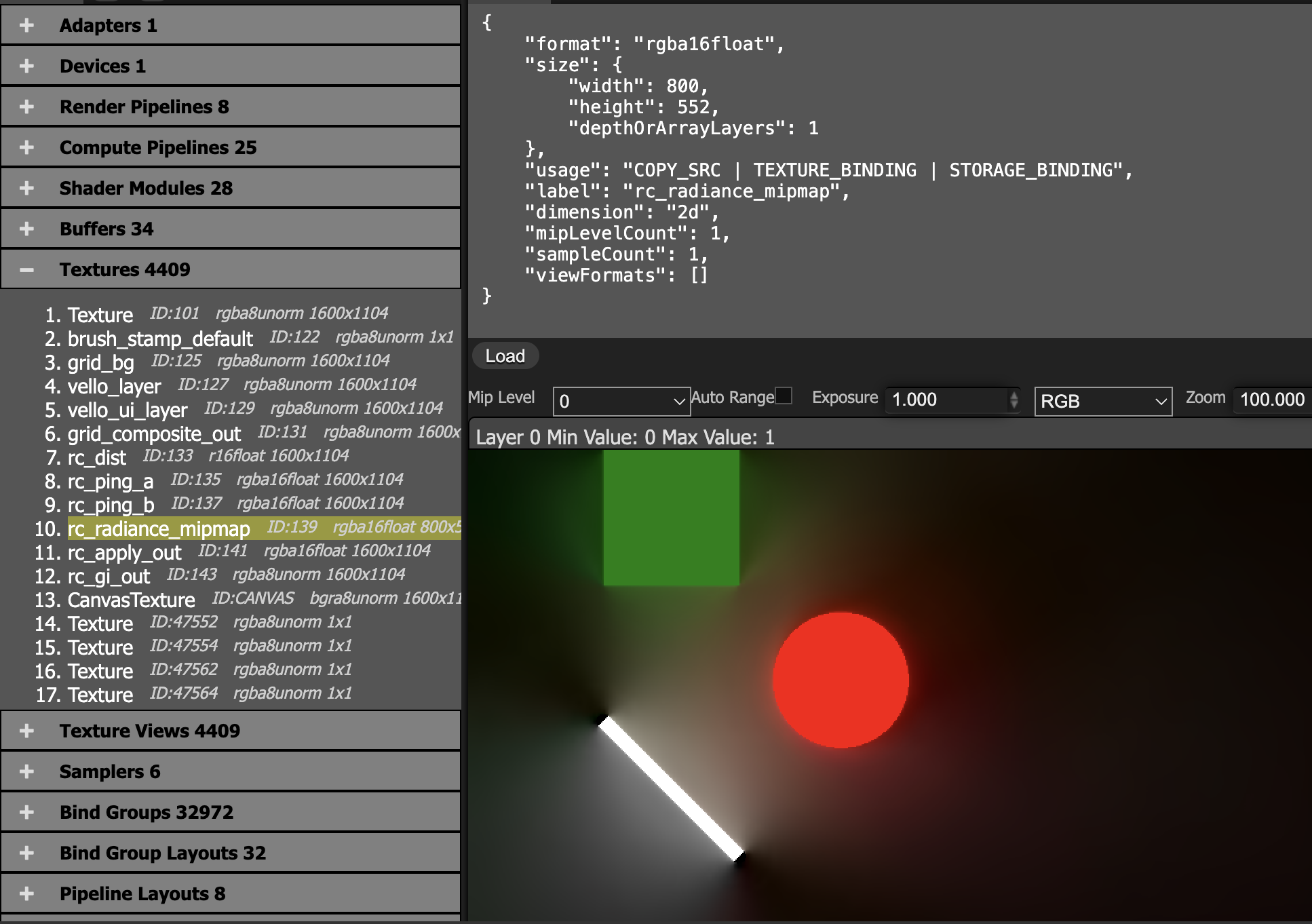
Average the final cascade result over the probe grid and write it to a downsampled radiance_mipmap.
@group(0) @binding(0) var<uniform> probe: MipmapProbe;
@group(0) @binding(1) var tex_radiance_cascades: texture_2d<f32>;
@group(0) @binding(2) var tex_radiance_mipmap: texture_storage_2d<rgba16float, write>;

@compute @workgroup_size(8, 8, 1)
fn rc_radiance_mipmap(@builtin(global_invocation_id) global_id: vec3<u32>) {
  let base_coord = global_id.xy;
  let dimensions = textureDimensions(tex_radiance_mipmap);
  if any(base_coord >= dimensions) {
    return;
  }
  let pw = probe.width;
  let ray_count = pw * 2u;
  let probe_cell = base_coord * vec2<u32>(pw, pw);
  var accumulation = vec4(0.0);
  for (var y = 0u; y < pw; y = y + 1u) {
    for (var x = 0u; x < pw; x = x + 1u) {
      let coord = vec2<i32>(i32(probe_cell.x + x), i32(probe_cell.y + y));
      accumulation = accumulation + textureLoad(tex_radiance_cascades, coord, 0);
    }
  }
  accumulation = accumulation / f32(ray_count);
  textureStore(tex_radiance_mipmap, vec2<i32>(base_coord), accumulation);
}
main + radiance_mipmap: add indirect lighting back into the main color.
@group(0) @binding(0) var tex_main: texture_2d<f32>;
@group(0) @binding(1) var sampler_main: sampler;
@group(0) @binding(2) var tex_radiance_mipmap: texture_2d<f32>;
@group(0) @binding(3) var sampler_radiance_mipmap: sampler;

@fragment
fn rc_apply_fs(i: VsOut) -> @location(0) vec4<f32> {
  let uv = vec2(i.ndc.x * 0.5 + 0.5, 0.5 - i.ndc.y * 0.5);
  let main = textureSample(tex_main, sampler_main, uv);
  let radiance = textureSample(tex_radiance_mipmap, sampler_radiance_mipmap, uv);
  return main + radiance;
}
Use a linear sampler for the mipmap:
let sampler_rc_mipmap = device.create_sampler(&SamplerDescriptor {
    label: Some("rc_mipmap_sampler"),
    mag_filter: FilterMode::Linear,
    min_filter: FilterMode::Linear,
    mipmap_filter: MipmapFilterMode::Nearest,
    ..Default::default()
});| Classic RC (2024 and earlier) | Holographic RC (HRC) |
|---|---|
| Discrete Probes: ray averages stored on grid points | Holographic Boundaries: directional lighting stored on boundaries |
| Bilinear Interpolation: softens hard shadow edges | Boundary Integral Reconstruction: preserves discontinuities |
| Soft Shadows Only: good for indirect/ambient light | Hard + Soft Shadows: preserves crisp point-light shadow edges |