The Brush Tool offers a range of drawing-related functions. Its state can be controlled via AppState:
api.setAppState({
    penbarSelected: Pen.SELECT,
    penbarText: {
        ...api.getAppState().penbarText,
        fontFamily: 'system-ui',
        fontFamilies: ['system-ui', 'serif', 'monospace', 'Gaegu'],
    },
});
penbarVisible
Is the brush tool visible? Default value: true
penbarAll
List all currently supported brush tools. Default value is true:
[
    Pen.HAND,
    Pen.SELECT,
    Pen.DRAW_RECT,
    Pen.DRAW_ELLIPSE,
    Pen.DRAW_LINE,
    Pen.DRAW_ARROW,
    Pen.DRAW_ROUGH_RECT,
    Pen.DRAW_ROUGH_ELLIPSE,
    Pen.IMAGE,
    Pen.TEXT,
    Pen.PENCIL,
    Pen.ERASER,
    Pen.COMMENT,
];
penbarSelected
The currently selected brush tool, default value is Pen.HAND
penbarText
Text Brush Tool, supporting the following functions:
- Select text, double-click to enter editing mode
- Double-click the canvas area to display the input cursor, then enter text
The default font, font size, and other Text-supported properties selected in the configuration panel can all be declared using this method:
api.setAppState({
    penbarText: {
        ...api.getAppState().penbarText,
        fontFamily: 'system-ui',
        fontSize: 32,
    },
});
The default style is as follows:
fontFamily: 'system-ui',
fontFamilies: ['system-ui', 'serif', 'monospace'],
fontSize: 16,
fontStyle: 'normal',
fill: '#000',
fontFamilies
List of fonts supported in the declaration configuration panel. Custom fonts can also be added, which can be loaded using webfontloader. For details, see Loading Web Fonts:
fontFamilies: ['system-ui', 'serif', 'monospace', 'Gaegu'],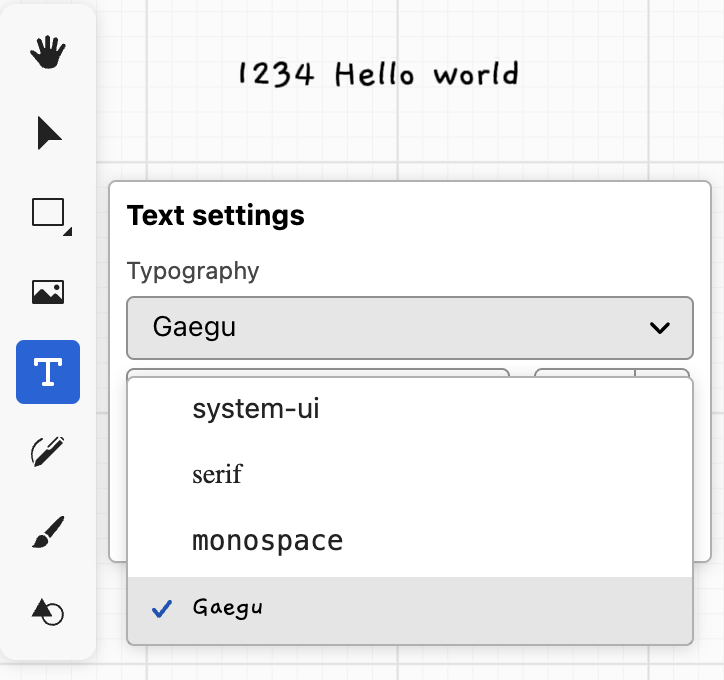
penbarDrawRect
Draw a rectangle by dragging.
The default style is as follows:
fill: TRANSFORMER_MASK_FILL_COLOR,
fillOpacity: 0.5,
stroke: TRANSFORMER_ANCHOR_STROKE_COLOR,
strokeWidth: 1,
strokeOpacity: 1,
penbarDrawEllipse
Draw an ellipse by dragging.
The default style is as follows:
fill: TRANSFORMER_MASK_FILL_COLOR,
fillOpacity: 0.5,
stroke: TRANSFORMER_ANCHOR_STROKE_COLOR,
strokeWidth: 1,
strokeOpacity: 1,
penbarDrawLine
The default style is as follows:
fill: 'none',
stroke: TRANSFORMER_ANCHOR_STROKE_COLOR,
strokeWidth: 1,
strokeOpacity: 1,
penbarDrawArrow
The default style is as follows:
fill: 'none',
stroke: TRANSFORMER_ANCHOR_STROKE_COLOR,
strokeWidth: 1,
strokeOpacity: 1,
markerStart: 'none',
markerEnd: 'line',
markerFactor: 3,
penbarDrawRoughRect
The default style is as follows:
fill: '#000',
fillOpacity: 1,
stroke: '#000',
strokeWidth: 10,
strokeOpacity: 1,
roughBowing: 1,
roughRoughness: 1,
roughFillStyle: 'hachure',
penbarDrawRoughEllipse
The default style is as follows:
fill: '#000',
fillOpacity: 1,
stroke: '#000',
strokeWidth: 10,
strokeOpacity: 1,
roughBowing: 1,
roughRoughness: 1,
roughFillStyle: 'hachure',
penbarPencil
Draw polyline with pencil.
The default style is as follows:
fill: 'none',
stroke: TRANSFORMER_ANCHOR_STROKE_COLOR,
strokeWidth: 1,
strokeOpacity: 1,
freehand
see: Perfect freehand
penbarBrush
Apply opacity with stamp. The default style is as follows:
brushType: BrushType.STAMP, // BrushType.VANILLA
brushStamp: '/stamp1.png',
stampMode: StampMode.RATIO_DISTANCE, // 贴图模式,按比例
stampInterval: 0.4,
stampNoiseFactor: 0.4,
stampRotationFactor: 0.75,
stroke: TRANSFORMER_ANCHOR_STROKE_COLOR,
strokeWidth: 20,
strokeOpacity: 1,