画笔工具提供一系列绘制相关的功能,可以通过 AppState 控制画笔工具的状态:
ts
api.setAppState({
    penbarSelected: Pen.SELECT,
    penbarText: {
        ...api.getAppState().penbarText,
        fontFamily: 'system-ui',
        fontFamilies: ['system-ui', 'serif', 'monospace', 'Gaegu'],
    },
});
penbarVisible
画笔工具是否可见,默认值为 true
penbarAll
声明当前支持的所有画笔工具,默认值为:
ts
[
    Pen.HAND,
    Pen.SELECT,
    Pen.DRAW_RECT,
    Pen.DRAW_ELLIPSE,
    Pen.DRAW_LINE,
    Pen.DRAW_ARROW,
    Pen.DRAW_ROUGH_RECT,
    Pen.DRAW_ROUGH_ELLIPSE,
    Pen.IMAGE,
    Pen.TEXT,
    Pen.PENCIL,
    Pen.ERASER,
    Pen.COMMENT,
];
penbarSelected
当前选中的画笔工具,默认值为 Pen.HAND
penbarText
文本画笔工具,支持以下功能:
- 选中文本,双击进入编辑状态
- 双击画布区域出现输入光标,输入文本
配置面板中默认选中的字体、字号等 Text 支持的属性,都可以通过这种方式声明:
ts
api.setAppState({
    penbarText: {
        ...api.getAppState().penbarText,
        fontFamily: 'system-ui',
        fontSize: 32,
    },
});
系统默认值如下:
ts
fontFamily: 'system-ui',
fontFamilies: ['system-ui', 'serif', 'monospace'],
fontSize: 16,
fontStyle: 'normal',
fill: '#000',
fontFamilies
声明配置面板中支持的字体列表。也可以添加自定义字体,此时可以使用 webfontloader 加载,详见 加载 Web 字体:
ts
fontFamilies: ['system-ui', 'serif', 'monospace', 'Gaegu'],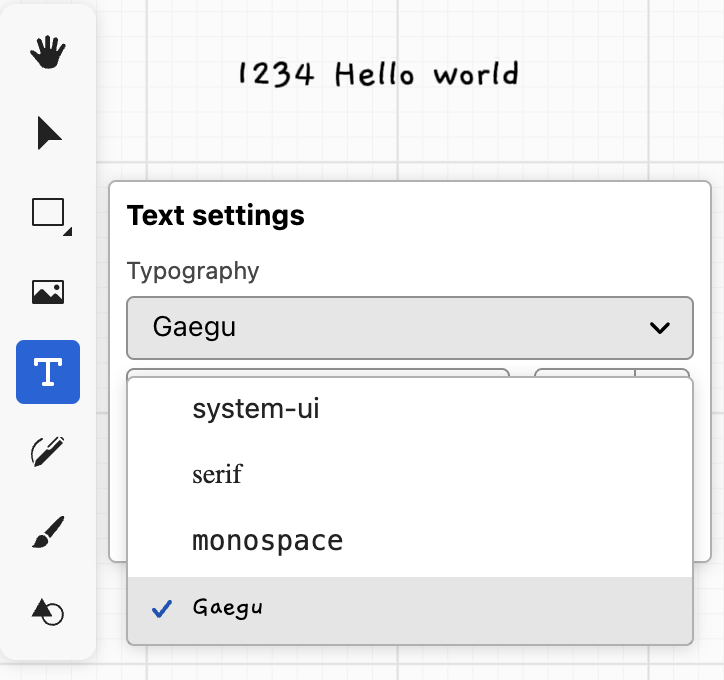
penbarDrawRect
通过拖拽绘制矩形。
样式的默认值为:
ts
fill: TRANSFORMER_MASK_FILL_COLOR,
fillOpacity: 0.5,
stroke: TRANSFORMER_ANCHOR_STROKE_COLOR,
strokeWidth: 1,
strokeOpacity: 1,
penbarDrawEllipse
通过拖拽绘制椭圆。
样式默认值为:
ts
fill: TRANSFORMER_MASK_FILL_COLOR,
fillOpacity: 0.5,
stroke: TRANSFORMER_ANCHOR_STROKE_COLOR,
strokeWidth: 1,
strokeOpacity: 1,
penbarDrawLine
样式默认值为:
ts
fill: 'none',
stroke: TRANSFORMER_ANCHOR_STROKE_COLOR,
strokeWidth: 1,
strokeOpacity: 1,
penbarDrawArrow
样式默认值为:
ts
fill: 'none',
stroke: TRANSFORMER_ANCHOR_STROKE_COLOR,
strokeWidth: 1,
strokeOpacity: 1,
markerStart: 'none',
markerEnd: 'line',
markerFactor: 3,
penbarDrawRoughRect
样式默认值为:
ts
fill: '#000',
fillOpacity: 1,
stroke: '#000',
strokeWidth: 10,
strokeOpacity: 1,
roughBowing: 1,
roughRoughness: 1,
roughFillStyle: 'hachure',
penbarDrawRoughEllipse
样式默认值为:
ts
fill: '#000',
fillOpacity: 1,
stroke: '#000',
strokeWidth: 10,
strokeOpacity: 1,
roughBowing: 1,
roughRoughness: 1,
roughFillStyle: 'hachure',
penbarPencil
使用铅笔工具绘制折线
默认样式为:
ts
fill: 'none',
stroke: TRANSFORMER_ANCHOR_STROKE_COLOR,
strokeWidth: 1,
strokeOpacity: 1,
freehand
penbarBrush
Stamp 贴图提供透明度,默认值为:
ts
brushType: BrushType.STAMP, // BrushType.VANILLA 纯色模式
brushStamp: '/stamp1.png',
stampMode: StampMode.RATIO_DISTANCE, // 贴图模式,按比例
stampInterval: 0.4, // 控制间隔比例
stampNoiseFactor: 0.4, // 每个 stamp 的随机影响因子
stampRotationFactor: 0.75, // 每个 stamp 的旋转影响因子
stroke: TRANSFORMER_ANCHOR_STROKE_COLOR,
strokeWidth: 20,
strokeOpacity: 1,